APRationCard

  • Help
    • Ration Shops List 1
    • Ration Shops List 2
    • Ration Shops List 3
  • News
    • Media
    • Bharatgas
    • Indane Gas
    • HP Gas
    • Home
    • Elections
    • Rules
    • Passport
    • Birth Certificate
    • ATM Card
    • APSRTC
  • Aadhar Card
    • Revenue
    • epos
    • PAN Card
  • Ration Card
    • Ration Shop
    • Spandana
    • Mandal
    • District
    • Helpline
  • Contact us
You are here: Home / Archives for Aadhar Card

Aadhaar Status online www.uidai.gov.in

October 31, 2019 by admin Leave a Comment

Aadhaar Card is proof of Identity and address anywhere in India. If a person has enrolled for and AADHAAR CARD, he can always check the status of his aadhaar card. It will enable him to know if the aadhaar has been generated or not.

Aadhaar Status online

When you enroll for an Aadhaar card, you are always given an enrollment slip. It is very important to keep the slip safe. If you lose your slip then it is very difficult to know your Aadhaar Status.

Things you need to check aadhaar status online:

  • Your 14 digit Enrollment no : 1234/12345/12345
  • Date and time of Enrollment : dd/m/yyyy hh:mm:ss

Aadhaaacr-Status-online-Checking

See the video to check aadhaar status by mobile

Download aadhar card

If your AADHAR number has been generated, you may download the E-aadhar card. It has the same validity as of Aadhar card. For more information on Eaadhar card, visit here

Track Aadhar Card

Aadhar card is been delivered by India Post. Residents can also track their Aadhar card from here

For any queries on above topic, please tell us through below comment session.

Filed Under: Aadhar Card

Aadhar Card Name DOB Correction Online – ssup.uidai.gov.in/update

October 31, 2019 by admin Leave a Comment

Aadhar card DOB correction online mode- uidai.gov.in : UIDAI Aadhaar card is among the greatest proof of Identity and Residence in India. Residents can now online change the address in their Aadhar card if they are shifting to a new house or there is a mistake in the printed address. They can also change Date of birth in Aadhaar card via offline mode but online mode is fast and reliable.

Steps for aadhar card name change via online mode:

  • Visit this portal https://ssup.uidai.gov.in/web/guest/update
  • Now enter your AADHAAR Number and Text verification number
  • Now click on send OTP.
  • You’ll receive an One Time Password on your mobile number.
  • Enter the Password and proceed.
  • Now select the DOB field.
  • Fill the fields in English as well as local language.
  • Now upload the any of the PROOF OF IDENTITY document
  • At the end, you will be given URN number. Keep this number to track down your progress.

Click here to check Aadhar card DOB change correction online status

For any queries on above topic, please tell us through below comment session.

Filed Under: Aadhar Card

Check Aadhaar Status online www.uidai.gov.in

October 31, 2019 by admin Leave a Comment

Aadhaar Card is proof of Identity and address anywhere in India. If a person has enrolled for and AADHAAR CARD, he can always check the status of his aadhaar card. It will enable him to know if the aadhaar has been generated or not.

Aadhaar Status online

When you enroll for an Aadhaar card, you are always given an enrollment slip. It is very important to keep the slip safe. If you lose your slip then it is very difficult to know your Aadhaar Status.

Things you need to check aadhaar status online:

  • Your 14 digit Enrollment no : 1234/12345/12345
  • Date and time of Enrollment : dd/m/yyyy hh:mm:ss

Download aadhar card

If your AADHAR number has been generated, you may download the E-aadhar card. It has the same validity as of Aadhar card. For more information on Eaadhar card, visit here

Track Aadhar Card

Aadhar card is been delivered by India Post. Residents can also track their Aadhar card from here

Filed Under: Aadhar Card

Aadhaar Card linking Status – Check Bank Account linking Status Online

October 31, 2019 by admin Leave a Comment

If your Aadhaar card is generated, you may check its linking status with your BANK account. Nowadays, every bank asks you to link your account number with your Aadhaar number. It is not mandatory as for now. Residents must link their Aadhaar number with their account number to maintain transparency with the Government of India.

If you have filled the form to link your Aadhaar number with your Bank account number, you may check its status from UIDAI’s site. Follow the method provided below:

Check more at : https://resident.uidai.gov.in/bank-mapper

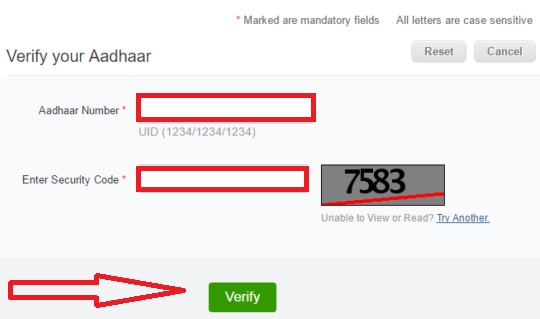
How to check Aadhaar card linking status

  • Enter your 12 digit UID number.
  • Enter your Security code.
  • Now click on Verify.
  • If your Aadhaar number is successfully link to bank account(s). It will show up the following details.
    1. Aadhaar number: 123456789101
    2. Bank linking status: Active
    3. Bank linking date: 11/12/13
    4. Bank name: (your bank name)

Check-Aadhaar-Bank-Linking-Status

For any more information on above topic, please tell us through below comment session.

Filed Under: Aadhar Card

How To Check URN Status Online – Update Request

October 31, 2019 by admin Leave a Comment

URN Status, where URN represents as Update Request Number. With the help of the update request number, you can track your application form URN status. Here we would like to share the complete guide on how to check your URN status below – also check how to check uidai status online. Most of the people will do the mistakes while applying for aadhaar card online. Keeping this in mind, the UIDAI website portal launched a new website called SSUP – with the help of the ssup portal you can actually update all your details online or even via offline and also track the update request status online.

Once you done with necessary changes you will receive an URN number – Update Request Number, with the help of the update request number you track the URN status. Not only update request number you also need to download the acknowledgment number for future reference. Below we do share the reference guide for you on how to track the URN status online.

Guide Step By Step Wise To Check URN Status

There you go with the help of the online UIDAI portal. You can able to track your URN status online. In order to track the status. You need to have the following details with you.

  • URN number – update request number
  • Aadhaar card number

Then after you need to check out this link: Link here.

Once you visited the web page, it will look alike as follows.

uidai-update

That’s it. However, we do share some of the useful information so that you will get an idea about it.

I applied through offline. Is there any way to get the URN number?

If you were applied through offline. Then you won’t get that URN number. But, as per our estimation people who are applied through offline will receive the messages from uidai about the status of updates.

  • And, it also clearly represents on the SSUP – Aadhar self service update portal, website – you can’t able to make any changes either via online or offline if your mobile number is not linked up with the aadhaar card.

Don’t worry if you are applied through the post – Most of the people will do the same. You will receive notifications through SMS.

What do I suppose To Do If I lost The URN number?

Lost the URN number? or forgotten to note down the number? In this case, you need not worry much about this – because as your mobile number is linked up with the UIDAI card, you will receive the updates to your mobile number, thereby you will let you know the URN status.

If you won’t receive any messages within a one week we are requested you to contact the official permanent aadhaar account center. In most of the case, you will receive the message.

In most of the case, you will receive the message.

Want to know more information about aadhaar card or URN?

Here are the complete details of information about aadhaar card that you need to know now or URN status details.

Update Your Mobile Number

If your mobile number is lost or not filled up while applying for the new aadhaar card then in that case you need to contact the nearest enrollment center and update your new mobile number.

If you have no idea where to find the enrollment center nearby your location. Then do check out our tutorial below so that you will get an idea about the process.

  • Here is the official link: Link to find out the enrollment center.

Once you visited the link the web page will look alike as follows:

urn-number


Make sure to fill out all the required details which were shown on the screen like as follows:

  • State
  • District
  • Locality Area

Then click on search. You will find out the aadhaar card enrollment centers nearby your location along with the customer contact numbers, Email Id, opening and closing timings. Once you get those details you can contact the office and update your mob;ile number.

Download aadhaar card

With the help of the UIDAI portal, you can download your aadhaar card. Below we cover the information related to this.

Just visit the official link here: Link here

Enter the following details:

  • Aadhar card number / EID number
  • Full Name
  • Pin code
  • Mobile Number

Once you entered the mobile number you will receive an OTP – one-time password for the process of verification. After that, you can download the aadhaar card without any problem.

  • But make sure that this E aadhar card can only be useful as an Identity purpose. You can’t use this card as a matter of Proof of address in order to open a bank account or any other purpose.

Verify Aadhaar card

If you would like to change whether all the personal details are entered right or wrong in the eyes of UIDAI government then you can check out the details by verifying it.

URN-Number-Online


  • Here is the link – Link here

Once you visited the link – you need to enter the UIDAI card number.

Then after the page will redirect to a verification page where you can access all the personal details of your uid card.

Verify your Mobile Number / Email Id

While enrolling a new aadhar card we do also fill out our mobile number and email Id. If you would like to know whether your entered mobile number is correct or wrong, with the help of the following link you will get to know.

  • Here is the official link to visit: Once you visited the official link make sure to fill out all information.

And, click on get OTP – If you successfully receive OTP number, then it’s confirmed your mobile number is right one.

Upon confirmation, the web page will redirect to the Email confirmation page. Where you are allowed to verify your Email Id. If the Email Id which is present over there is wrong. Then you can make necessary update changes via UIDAI portal.

That’s it. Below we do share a list of most frequent asked questions about the URN status online.

Most Frequent Asked Questions About URN

Q. Is there any way to get updated our aadhaar card apart from online?

A: Yes! You can with the offline procedure, via offline there are again two ways further divided:

1) You need to download the application form here first.

2) Then after fill, that application form along and attach the necessary documents to it.

3) And send the post to any one of the following address.

Second Method:

Visit the official enrollment center: Here is the link to visit the official enrolment center.

With the help of the search portal, you will get to know the details of nearest aadhaar card center.

  1. Visit the PAC – with all necessary documents.
  2. Fill the application form and submit there by itself.
  3. Collect the URN number in order to track the URN status online.

That’s it.

Q. My URN status is showing nothing why?

A. It will take around three to four weeks in order to get updated on the portal website. Please do check it after some time.

Q. It’s been 3 weeks, but the URN status is showing same?

A. Have you checked your mobile phone for messages? Maybe due to invalid documents that you are submitted. Please do contact the nearest service center. Usually, it will take no more than 3 weeks.

Q. Is URN – Update request number is mandatory to check the URN status online?

A. Without URN number you can’t able to track the status of the application. However, you will receive the notifications to your cell number.

Q. As I came to know there is only one chance to change the DOB is that true?

A: Yes that’s true! Here what they said on their official website:

  • You can update Date of Birth from Declared to Verified only once. In case your Verified Date of Birth is incorrect in the Aadhaar letter, you can get it corrected only once.

That’s the complete procedure to check URN status online. If you require any further details do leave a comment here at the end of the post. We do help you out.

Filed Under: Aadhar Card

  • « Previous Page
  • 1
  • …
  • 3
  • 4
  • 5
  • 6
  • 7
  • …
  • 13
  • Next Page »

Search List 1

Search List 2

Search List 3

How to Search Ration Card Number by Name

District Wise Ration Card Search

 Anantapur

Chittoor

East Godavari

Guntur

Kadapa

Krishna

Kurnool

Nellore

Prakasam

Srikakulam

Visakhapatnam

Vizianagaram

West Godavari

Recent Posts

  • APRationCard Smart Card Download
  • AP Smart Ration Card Now Available
  • What is the Process for member addition in Ration Card in Andhra Pradesh state ?
  • How to check AP Employee’s / Pensioner’s Salary / Pension Bill Status Online
  • How to Check Ration Card Status Online

Recent Comments

  • BUTCHI BABU on Guntur (District’s) Ration Shop Dealer Address | Phone Number | Status Check Online | FPS
  • A Lakshmi kanth on Circle Ii Urban (Mandal), Visakhapatnam (District) – Ration Card Search | Print Online Download
  • Sreerama Mary Aruna kumari on STO, Kamalapuram
  • Nagamalli on Visakhapatnam District’s Ration Card Download Online | YAP | TAP | WAP | RAP | JAP | White Card
  • M ESWARI on Makavarapalem (Mandal), Visakhapatnam (District) – Ration Card Search | Print Online Download
  • M ESWARI on Makavarapalem (Mandal), Visakhapatnam (District) – Ration Card Search | Print Online Download
  • Yogesh Kumar on PALWAL – Dist. BHARAT GAS AGENCIES Contact Details | Address | Online Booking
  • Devaraj on KOPPAL – Dist. BHARAT GAS AGENCIES Contact Details | Address | Online Booking
  • V.MAHABOOB BASHA on Rice Card Services in Mana Mitra (WhatsApp Governance).
  • Anand on Circle Iii Urban (Mandal), Visakhapatnam (District) – Ration Card Search | Print Online Download

Pages

  • About US
  • Apply for New Ration Card Andhra Pradesh | Download Ration Card Online | Status Check
  • Buy Adspace
  • Contact us
  • Hide Ads for Premium Members
  • Privacy Policy

Copyright © 2021 · eleven40 Pro Theme on Genesis Framework · WordPress .