APRationCard

  • Help
    • Ration Shops List 1
    • Ration Shops List 2
    • Ration Shops List 3
  • News
    • Media
    • Bharatgas
    • Indane Gas
    • HP Gas
    • Home
    • Elections
    • Rules
    • Passport
    • Birth Certificate
    • ATM Card
    • APSRTC
  • Aadhar Card
    • Revenue
    • epos
    • PAN Card
  • Ration Card
    • Ration Shop
    • Spandana
    • Mandal
    • District
    • Helpline
  • Contact us
You are here: Home / Archives for Aadhar Card

How to Generate it Aadhaar virtual ID Online

October 11, 2019 by admin Leave a Comment

Purpose of an introduction of Aadhaar Virtual Id

The responsibility and security of data collected under Aadhaar scheme is of solely of Unique Identification Authority of India (UIDAI). Amidst many incidents of data leak by individuals/enterprises who were entrusted with such work of preserving personal data of citizens enrolled under Aadhaar, the UIDAI, considering the privacy of an individual, has devised a new plan i.e. Aadhaar virtual ID in order to keep secure the private data of individuals which includes their demographic information as well as biometric fingerprints. This is done such that the receipt of data for authentication purposes will get only relevant data of an individual and not the entire data which was collected under Aadhaar scheme.

The Aadhaar VID provides limited KYC access to providing need-based information requisite for verification rather than providing all the details of an individual’s Aadhaar card. UIDAI has made it mandatory starting from June 01, 2018  that all the agencies who do Aadhaar authentication have to start accepting Aadhaar Virtual ID from the applicant.

What is Aadhaar Virtual ID ?

It consists of 16 random digits that are linked to an individual’s Aadhaar card. Now, an individual need not part away with his Aadhaar number every time, instead after generation of Virtual ID, one can use it to verify their mobile number, bank and other financial documents.

Aadhaar Virtual ID paves way to receive the biometric information as well as other basic information such as their name, residential address, and photograph which are relevant for e-KYC. The receipt of Aadhaar virtual ID will not come to know of the imperative 12 digit Aadhaar number and other personal details.

How to Generate Aadhaar Virtual ID?

Aadhaar cardholders can use the Aadhaar Virtual Id to their advantage by visiting UIDAI’s official website. The 16 digit number will stay valid until the generation of a new Aadhaar Virtual ID, making the previous ID generated non-existent. Users have to submit their virtual ID and fingerprints at the time of any authentication.

The following are 9 simple steps which will help you in generating the  16 digit Aadhaar virtual ID number:

Step 1: Firstly, go to the Play Store and download the mAadhaar App.

Step 2: After the application finishes with the download, input your 12-digit Aadhaar number and activate your mAadhaar account.

Step 4: You will receive an OTP on your registered mobile number.

Step 5: Input the One-Time-Password to finish the verification process.

Step 6: Set a secure password for your account and leave the application.

Step 7: Input the password that you set in order to login to your mAadhaar account.

Step 8: Upon reaching the virtual ID segment, enter in the 16 digits at random.

Step 9: After doing this, your VID is created that can be shared with other agencies for KYC Verification.

How to Download Aadhaar Card using your virtual ID ?

  • You can use your VID to retrieve your Aadhaar Number.
  • Once you have your Aadhaar number, you can download your Aadhaar Card from the official UIDAI website.
Aadhar Card : How To Download Eaadhar Card

आधार कार्ड ऑनलाइन कैसे डाउनलोड करे

Check Aadhar Authentication History online

Filed Under: Aadhar Card

Check Aadhaar card status – Uidai Enrolment Status online through resident.uidai.net.in

October 10, 2019 by admin Leave a Comment

Today i am sharing information about how to check Aadhaar Card Status, Uidai Card Enrolment status through online. Unique Identification Authority of India (UIDAI), has providing online services through their website https://uidai.gov.in/ . Like as Aadhaar Card Status, Aaadhaar Card Update status, Aadhaar enrolment status, e Aadhaar Card download, Aadhaar Card Enrolment details through their official website. Indian Citizens can Check their Aadhaar Card status online through Uidai website.follow below instructions for check aadhaar status online.
Aadhar-status-check-online

How to Check Aaadhaar Card Status through resident.uidai.net.in  ?

Step by step procedure for know aadhaar Card status.

1. First People logon to Uidai Resident Portal.
You can also click to following link for direct login https://resident.uidai.net.in/check-aadhaar-status

2. Now you’ll see new webpage like as below screen shot .

Check-Aadhaar-Status

3. Enter you Enrolment id ,Date&time in the mentioned box .

4. Than enter above Captcha Code in the below mention box.

5. Click on “Check Status” Button.

6. Finally get your Aadhaar card enrolment status.

If you have any Questions, inquires,Comments etc. Regarding this Post,feel free to ask any Questions on this via Comment

Filed Under: Aadhar Card

AADHAR CARD DOWNLOAD through UIDAI Official Website resident.uidai.net.in

October 10, 2019 by admin Leave a Comment

Aadhaar is a 12 digit individual identification number issued by the Unique Identification Authority of India on behalf of the Government of India.Aadhaar, which means “foundation” in many Indian languages, is the term for the unique identity number issued by the UIDAI.No resident can have a duplicate number since it is linked to their individual biometrics; thereby identifying fake and ghost identities which result in leakages today.Savings from eliminating duplicates and fakes through Aadhaar-based identification will further enable governments to expand benefits to other eligible residents.in this article shown how to download aadhaar card through online.

Aadhaar-Card-Download

Download E-Aadhaar/Duplicate Aadhaar Card:

If you have lost/ misplaced you Aadhaar card or if you have not yet received you Aadhaar card, but have already received the SMS confirmation that your Aadhaar card is processed successfully ,you can download duplicate Aadhaar card copy online. the duplicate Aadhaar card has same validity proof wherever Aadhaar card is accepted.

How to download Aadhaar Card ( Duplicate Aadhaar Card/ E Aadhaar Card ) through online ?

Follow below step by step procedure for download Aadhaar card through online.

1. Visit UIDAI official Web site www. uidai.gov.in or Click Here For Download Aadhaar Card, in there you will see the option of “Aadhaar Services”

2. Than Click on ” Download E-aadhaar ” Option.

3. It’s will be redirect another New Webpage,

4,  Just Click on Get E-Adhaar, it will redirects you a new page.

E_Aadhaar_download_online_application

5.  In that new page it asks you aahaar card enrolment number,your name, father name ,Date of birth, mobile number, enrolment time , date . year,pin code and more. Enter all those information correctly without single world mistake, Recheck the given details why because if you enter wrongly it says ” no aadhaar details found with the given enrolment number” so be careful on giving information.

Note : that mentioned Mobile number must have in your mobile phone and the mobile need to have in your hand.Now just click Get on One time password option.

6. Than few seconds you will get an one time password -OTP to your mobile. Now you will see the screen ask you to enter one time password. so just enter it in the box. Please make sure the OTP valid for 1minute only,you need enter it on or before 1minute once you 1 minute is finished you have to more chances to request a new OTP, after 3 times just no chances .

7.  Now you will see option of download-just click on it Download your Aadhaar card in PDF format.

8. Now give source in your system to store where you want.

9. Finally Open the download PDF it ask the password, just enter pin code mentioned on enrolment slip. now its open

That’s it you have successfully finished aadhaar card download.

Check Aadhaar Card Status Online

If you have any Questions, inquires,Comments etc. regarding this Post,feel free to ask any Questions on this via Comment

Filed Under: Aadhar Card

Link Aadhar with your Prepaid / Postpaid Mobile Online

October 10, 2019 by admin Leave a Comment

How to link Aadhar to your mobile number via OTP : As you may know, that the Government of India has now made it mandatory to link your mobile number to your Aadhaar card for identification verification. The deadline for this process is the 31st of March 2020. Though the whole process of verification by visiting the mobile network customer centers can be really tiring, UIDAI has come up with the OTP ( One Time Password ) based verification system. By using this particular system, you can easily link your mobile numbers with your Aadhar directly from your home.

This new method of verification has come into action only since the 1st of this new year, that is January 1st, 2020. How to go about this new process is pretty simple. All one has to do is that the users who still have not linked the Aadhaar with the mobile number can now call up the IVR that would complete the process through a one-time password as mentioned above.

What the whole IVR process does is that it supports English, Hindi, and several regional languages. As soon as the user calls the IVR and gives his approval or consent for verification with the Aadhar number, they would automatically receive the OTP code. After that this code, if verified to be correct then the mobile number would also be verified and get linked to your Aadhar. The Government of India had announced this process in the start of December, and finally, this whole process has leaped into action since the telecoms had requested some time to make suitable changes once it was allowed by the telecom department.

link mobile number with Aadhar card

All of the users who need to verify their mobile number can

  • Call the IVR number 14546 which is a toll-free number
  • Accept your consent to link your Aadhaar number with your mobile number by pressing 1
  • Enter your 12-digit Aadhaar number  and press 1 to confirm
  • This step generates the OTP, which you will receive on your mobile phone
  • Now, you need to enter your phone number
  • Accept your consent for it to fetch your name, date of birth, home address which is linked to your mobile number
  • The IVR now mentions the last four digits of your number to confirm that you have keyed in the right number
  • If the number is correct, Enter the OTP that you have received through SMS
  • You must press 1 to complete the Aadhaar-mobile number re-verification process
  • You will get an SMS confirming the Re-verification, which also says that the process will take up to a maximum of 48 hours to complete
  • If you have another phone number, you can link that too by pressing 2 and following the steps provided by the IVR system. Keep your other mobile phone handy as you will receive the OTP on this number.

As per our knowledge, only some networks are working which are only Idea, Vodafone, and Airtel, but we expect other networks to join very soon.

Filed Under: Aadhar Card

E Aadhar Card Download Update Status Check UIDAI

October 10, 2019 by admin Leave a Comment

What is Aadhar Card?

Every citizen in the country is unique and needs an identification mark to distinguish it from the others. All the countries have this system and thus the government of India has come up with this too.

An Aadhar card is issued so that all details of a person are inscribed on it and one could use it for various benefits. These benefits can be in the form of subsidy that on various goods and services as well as the schemes that the government comes up with from time to time.

This project was introduced in 2009, by the Unique Identification Authority of India (UIDAI). This program wants each and every citizen to have a unique number which involves issuing an Aadhar number as well as one Aadhar card. This should also be linked to other key services like pension schemes or their bank accounts.

Adhar card website for uidai is providing all the related information about aadhar.even also there are online facility to update Aadhar detail and much more related to Adhar.

Please Comment Us Your Query Related Aadhar card like aadhar card updation Etc. Visit This link for Comment.

Now, touch-based upon the Adhar card, one can also aadhar card download online using your Aadhar number. However, the purpose of issuing an Aadhar card is because this would be one Universal Identity card for every citizen and we no longer need so many other documents for availing any kind of services.

As there is a lot of illegal immigration to the country, this card would prevent it from happening. One card number has proof of both your address as well as identity so it helps serve two purposes in one.

Apart from that those who are eligible for a subsidy can avail a lot of government schemes through this. Using an Aadhar, one can enroll in government programs too such as Right to Education. Not just this, there is a subsidy on gas cylinders as well as phone bills which can be easily availed using this. And the best part about this is that it remains valid throughout the life cycle of a citizen.

How to Download the E Aadhar Card?

First, one needs to go to the UIDAI website, and type in your full name as given on your Aadhar card. The email ID and phone number that you may have used to register for the card should be punched in and then enter the characters as given in the image. Once you get the OTP, enter this in the form and you shall get your Aadhar number.

Now go to the e-aadhar page on the same website and select Aadhaar. Do the same process again and at the end click validate and download and you shall be able to easily download your Aadhar card in a Pdf file which can be printed as per your convenience.

Here Is Step Given You need To follow

How To Download E Aadhar?

We know E Aadhar is a soft copy of Aadhar card and it can be downloaded from the Internet. RIGHT?

Here We have given Step by Step Introduction For E-Aadhar. so please Refer all the Steps.

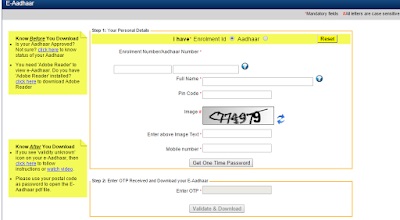
Step 1: Visit Eaadhar Website By just click on Button here. : https://eaadhaar.uidai.gov.in/

Step 2: Please keep your Enrollment ID Keep With you. Here it will be required For E aadhar. Now Select ( I have Enrollment Id ).

Now Check your Enrollment Id that looks like Given image and You Need to Enter Accurate detail.like Enrollment Id, Date and Time. That format is like Enrollment id (1231/23222/12121) time is (00/00/0000 11:11:11) Note: Please Enter Enrollment Detail not this.

The Next Step For Eaadhar is Enter Your Full Name As per your Enrollment Slip.

Step 3 : Please Enter your Six Digits pin Code (It look like 360000).

Step 4 : Enter Captcha Code That shown you.

Step 5 : Finally enter Mobile Number That you have Right Now.

Step 6 : Just Click On “Get One Time password” and entered Number Receive OTP that you need to enter.

Step 7 : Now Click One Validate And Download.

How to Update your Aadhar Card?

In case of an Aadhar card update, first, go to https://ssup.uidai.gov.in/web/guest/update and enter your Aadhar card number. Once you get your OTP, enter the password you shall be redirected to the page where you can choose the option “Address Change”, or any other field that you want to update.

Upload a document which gives a proof of the changes that you have and once you receive a URN number, you can use this to track any update.

Follow Below Step To Update Aadhar Card 

Step 1. Visit Aadhar card Correction website. :

https://ssup.uidai.gov.in/web/guest/update

In this Step, You need To Enter your aadhar number and Text Verification. Then Click On Send OTP.

Step 2. Enter your OTP that received Registered Mobile number. then click on login.

Step 3.  Now Select Respected Correction and click on submit.

Step 4. Update your Incorrect detail. Then Click On Submit Update Request.

Step 5. Upload Valid Document. Then Click On Submit.

Step 6. Click On Yes Button.

Step 7.Select BPO Service Provider Then Submit.

Step 8. After Submit You show Urn Number on next Screen please Noted Down this number For Check Aadhaar update status.

Check Aadhar card update status?

STEP 1: Go to Official Website of UIDAI  https://ssup.uidai.gov.in/web/guest/check-status

STEP 2:. Enter the 12 Digits Aadhar number and URN number and click on Get Status Button

STEP 3: Finally See your status Wether Aadhar card update or not

In case of the offline method, just send an SMS, UID STATUS <14 digit enrollment number> to 51969 and you shall easily receive the status by text.

Aadhar Card Status

Link Aadhaar card with your Voter ID?

Go to the official Adhar card linking page and fill mandatory fields. On the left click the option Feed Adhaar card. When a popup window opens, enter a name in Adhaar card, voter ID number, Aadhar number, mobile and email ID, and submit. Your request thus will be registered. Or you can also send this SMS, ECILINK <EPIC_Number> <Aadhaar_Number> to 166 or 51969.

Link Aadhar with your Mobile Number?

For this visit your nearest Airtel store with the required documents, and in case this does not happen by next year Feb, services on your mobile will be discontinued. There are no fees for this and Adhaar details will be updated in their records. Biometric verification is a mandate for this.

link Mobile Number with Aadhar card

Filed Under: Aadhar Card

  • « Previous Page
  • 1
  • …
  • 7
  • 8
  • 9
  • 10
  • 11
  • …
  • 13
  • Next Page »

Search List 1

Search List 2

Search List 3

How to Search Ration Card Number by Name

District Wise Ration Card Search

 Anantapur

Chittoor

East Godavari

Guntur

Kadapa

Krishna

Kurnool

Nellore

Prakasam

Srikakulam

Visakhapatnam

Vizianagaram

West Godavari

Recent Posts

  • APRationCard Smart Card Download
  • AP Smart Ration Card Now Available
  • What is the Process for member addition in Ration Card in Andhra Pradesh state ?
  • How to check AP Employee’s / Pensioner’s Salary / Pension Bill Status Online
  • How to Check Ration Card Status Online

Recent Comments

  • BUTCHI BABU on Guntur (District’s) Ration Shop Dealer Address | Phone Number | Status Check Online | FPS
  • A Lakshmi kanth on Circle Ii Urban (Mandal), Visakhapatnam (District) – Ration Card Search | Print Online Download
  • Sreerama Mary Aruna kumari on STO, Kamalapuram
  • Nagamalli on Visakhapatnam District’s Ration Card Download Online | YAP | TAP | WAP | RAP | JAP | White Card
  • M ESWARI on Makavarapalem (Mandal), Visakhapatnam (District) – Ration Card Search | Print Online Download
  • M ESWARI on Makavarapalem (Mandal), Visakhapatnam (District) – Ration Card Search | Print Online Download
  • Yogesh Kumar on PALWAL – Dist. BHARAT GAS AGENCIES Contact Details | Address | Online Booking
  • Devaraj on KOPPAL – Dist. BHARAT GAS AGENCIES Contact Details | Address | Online Booking
  • V.MAHABOOB BASHA on Rice Card Services in Mana Mitra (WhatsApp Governance).
  • Anand on Circle Iii Urban (Mandal), Visakhapatnam (District) – Ration Card Search | Print Online Download

Pages

  • About US
  • Apply for New Ration Card Andhra Pradesh | Download Ration Card Online | Status Check
  • Buy Adspace
  • Contact us
  • Hide Ads for Premium Members
  • Privacy Policy

Copyright © 2021 · eleven40 Pro Theme on Genesis Framework · WordPress .