APRationCard

  • Help
    • Ration Shops List 1
    • Ration Shops List 2
    • Ration Shops List 3
  • News
    • Media
    • Bharatgas
    • Indane Gas
    • HP Gas
    • Home
    • Elections
    • Rules
    • Passport
    • Birth Certificate
    • ATM Card
    • APSRTC
  • Aadhar Card
    • Revenue
    • epos
    • PAN Card
  • Ration Card
    • Ration Shop
    • Spandana
    • Mandal
    • District
    • Helpline
  • Contact us
You are here: Home / Archives for News

e-kalyan Scholarship Jharkhand Post Matric Scholarship 2019-20 | Procedure for apply online

October 3, 2019 by admin Leave a Comment

The welfare department, government of Jharkhand has released notification for e-kalyan Post Matric Scholarships for the year of 2019-20 (Within the State/Outside the State) are online Schemes.its really good news for students, who facing financial problem, those students can apply e-kalyan scholarships for continue their education . students who belong to the SC/ST/OBC  Categories are advised to  visit the e-kalyan scholarship official website  http://ekalyan.cgg.gov.in/ ,  and apply for Post Matric scholarships through online.

e-Kalyan

Eligibility criteria :

  • Student must be residence at Jharkhand state
  • SC/ST/BC categories students are eligible for the scheme
  • Students Annual Family Income from all sources should not exceed as per the list given below.

i)  Schedule Tribe (ST) or Schedule Caste (SC) Rs. 2,50,000/-

ii) Backward Class (BC) Rs. 1,00,000/-

  • All Institutions in Jharkhand recognized by Government of Jharkhand/Competent Authority.

How to apply Jharkhand e-kalyan Scholarships through online ?

Step by step procedure for apply e-Kalyan ( Post Matric Scholarship ) through online

  • Firsit logon to  e-Kalyan official Website http://ekalyan.cgg.gov.in/
  • Than Click on “APPLY ONLINE” option in the Home Page,
  • Students need to register their details in the website, cluck on “Register/Sign up” and filled all necessary details ( Name * Father Name * Date of Birth (dd/mm/yyyy)* Mobile Email Password* ) than click on “Create Account ” Button. After successfully student registration,student will receive sms/email for his/her login details.
  • Student should login to e-Kalyan Account through  their Name/Mobile No/ & Password.
  • Once Logged in, Student is required to fill the Application form in Details and Click on “Save” Button,
  • Upload the Documents (Scan Copy of originals in JPG/JPEG Format,File Size:150 KB) on the website.
  • Student should take a print out of the application by clicking on Print button, then sign and upload the requisite documents.
  • An Application ID will be provided to the candidate once his/her application is completed along with all the scanned documents uploaded successfully. It will be conveyed to candidates through SMS and e-mail. Students should note their Application ID as it will be required while applying for renewal.

Aadhaar Card Number is mandatory for the Students in order to fill up the application form online. Students can also apply for Scholarship entering the Aadhaar no.

What Documents to be uploaded on the Website?

Only Scanned copies for all the Original Documents (Latest Documents only) should be uploaded. The List of Documents Includes

  • Student Photograph
  • Bonafide Certificate Income certificate validity from 01-April-2016
  • Residence Certificate Caste Certificate
  • Previous Year Mark Sheet
  • Bank Pass Book
  • Scan Scanned Copy of Application Form (Signature of Student and Parent/Guardian)

How to check the status of my application?

Student can check the status of Online Application by logging with his/her login details.

last date for  submitting  online application form : in December 2019

If Students have any technical Queries, Contact Helpdesk No’s: +91-7004998291,+91-7004730615, +91-7258010024, 040-23120591,040-23120592,040-23120593 (from 10:30 AM to 5:00 PM Monday to Saturday working days only) E-mail: helpdeskekalyan@gmail.com

For any queries / suggestions regarding above topic, tell us through below comment session.

Filed Under: News

PF Transfer Online: A Definitive Guide By Experts | 3 Rules

October 3, 2019 by admin Leave a Comment

PF transfer details : Complete Guide and other information.The following guide will let you know the complete details about the pf online, and epf transfer claim status online in India 2016.

Sr.No PF Transfer
1 Simple Info-graphic For You
2 UAN Registration Online
3 Check Eligibility On Portal
4 Apply For Transfer Claim
5 Most Frequent Asked Questions

The central government of India has implemented the new scheme to request your transfer status much more efficient and transparent.

The flow of process and registration is quite easy, we do share out the complete guide below do check it out. If you have any doubts regarding pf transfer or claim pf online status do comment here at the end of the post or dedicated team will help you out.

Claiming of your employee account is little bit confusing our guide will let you know the flow of process is entirely understandable. 

Once you fill all such pf transfer request the employer will verify/correct member details and approve the request via online portal website. For online application process , the digital signature of class 2 of the authorized person request is mandatory.

© Info-graphic For You

We do also written the complete guide, below this info-graphic do check it out.

pf-transfer-online

The eligibility criteria of pf transfer and status has been shared over here do check out. Make sure do follow out the complete guide that we are shared over here.

If you have any doubts related to the information about, do comment here at the end of the post our team will help you out related to this query online or whatever doubt related to this guide.

Eligibility For Filling Online Transfer Claim Application & Status

The Employees’ Provident Fund Organisation India had official launched a guide in order to share the complete information about the PF transfer status.

While it may be available on their official site, we do make certain changes in a view to understand quickly.

Below is the complete step by step information about the eligibility criteria for filling the online pf transfer, further by Important guidelines, process for filling online process flow of uan registration, frequently asked questions about pf  status.

  • The Employee must be registered on epf India website (uan member portal to file and online pf transfer claim application).
  • The Employees’ Provident Fund Organisation have certain pre-requests with a view to filing online ).
  • The availability of member’s ID’s EPFO data base and registration of digital signatures of authorized signatures.
  • The EPFO member first has to check eligibility to claim online via an: official link here.

Note .1 : ( Must Read )

Due to some technical issues, the check eligibility link is broken. We do update this article whenever EPFO releases a new portal link website to check eligibility ).

Note : 2 ( Must Read )

In order to know, whether your previous account is eligible for transfer claim. You must need to login to your member portal account.

At top menu bar you can access ” Previous Member Id’s ” Where you can check for eligibility.

  • Between, New version ( 2.0 ) For Employers : Link Here
  • Version ( 2.0 ) For Employees : Link Here

Check Eligibilty Link Is Broken – Don’t consider The Following Image. Before, the link is alive, the page will look alike.

The portal has been divided in to three sectors:

  • Details of previous account ( which has to be transferred ).
  • Details of Present account.

pf-transfer-eligibilty

All you have to do is to fill out the details which were mentioned on that portal website.

Make sure to enter all of the details accurate. Once, you were done now click on check eligibility ( you must login to check your eligibility ) for epfo online transfer from one account to another account via online.

  • Once, the details have been matched, and it has shown as your current pf account has eligibility for epfo transfer online in India 2017.

The process of further steps has been categorized in to three sectors as follows :

  • Process of Registration On member portal ( Mandatory )
  • Process of Filling Online Claim procedure ( Mandatory )
  • EPF Transfer claim status check online

Now, you can proceed with the further steps which have been shared below like process of claiming the pf transfer status and flow of registration online via epfo India 2016.

Process Of Registration On Member Portal (For Employer’s)

To transfer pf online via EPFO official website all, you need to carry out the certain task which were shared below by step by step wise. If you have any doubts related to the information about epf transfer or online pf transfer claim status you can do comment here at the end of the post our dedicated team will help you out related to this query online in 2016 Employees’ Provident Fund Organisation.

The process of pf transfer online registration as follows:

  • The official website link to register ( For Employer’s only ) as: Now, all you need to click on Member Portal under for Employees on the home page of epfo official website.
  • Once,you click on that link the following image will appear ( In order to claim pf transfer procedure you must register first as shown below ).


  • Now , the actual screen will appear as follows, fill up the application form as shown below and choose at the at least one document as listed below :
  • PAN number
  • Aadhaar Number
  • NPR ( National Population Register )
  • Bank account Number or Voter Id card
  • Driving license or Ration Card Or Passport Number

Note : As per EPFO rules and regulations, you can use multiple documents for login purpose, but the one first document that you used for registration cannot be edited at the later stage.

NOTE : The above registration process steps for Employers. Once the employer created an account, he then assigned PF and UAN number to you ( Employee ).

NOTE ( For Employees ): If you already have an account, then you can login here and further proceed the online pf transfer.

So , please be careful while choosing your document online – EPFO transfer claim status official.

Once, you were done the methods that we were shared above now ; you can log in via epfo member portal website to claim your online pf transfer and find out the pf transfer claim status online 2016.

Process Of Filling Online Transfer Claim ( Read Step By Step ) With Images

The process of filling pf transfer claim, online all you need to read out the complete step by step guide which we were shared below so that you will get an idea. In any case if you require knowing more information about epfo transfer and status do leave a comment here at the end of the post our dedicated team will help you out related to this query online. The flow of claiming the pf transfer status and procedure has follows :

If you were eligible for epfo transfer ( which were mentioned above ) on portal website.

Now, the next step is to register your account on the official website which were mentioned above already.

  • If you already have an account all, you need to log in as shown in the following figure.

Login-to-apply-for-transfer


  • Note: The log-in details for this portal are same as are used in Member Portal by the members.

Once, you were login into that pf transfer website, the screen will look alike in the following figure.

Note 3 :

In any case if the images did not appear as we shown here , means the portal of the epf website is updated to the latest version ) Do let us know in any case our team will take fastest ensure action and update the current version of the article.

Once, you were logged in to that screen, check out the menu header bar where you can see as follows:

  • Request for Transfer account
  • View Transfer of claim status

epfo-online-transfer-portal

  • Now, all you need to click on ” Request for transfer account .”
  • Once, you proceeded with that an online application form will open ( in a uan portal way ) to file an transfer
  • The online application form has been divided into three parts as ” Part A and ” Part B ” and ” Part C” First, you have to fill up the ” Part A “ as per instructions followed by ” Part B ” and “C.”

pf-portal-transfer-status

  • In ” Part B ” Registration You have to fill up the PF account N.O and to retrieve the details online.
  • Once you were done, it automatically displays the information like name of the company establishment, address of the establishment.
  • EPF account held by EPFO office, and other information to  the pf details and claiming of EPFO status.

pf-transfer-status

Now , you have to fill up the ” Part C “, Now in part c you have to enter your present pf account and click on ” click here to get details online “.

As usual all of the details will be displayed as follows. If any of the details were missing in that form, we are request you to fill out the complete application form there by it self in order to know your pf transfer.

  • Now, the member will have the option to get the claim attested through a previous of his/her employer or present employer.
  • Once, the application form is completed filled up you can check out the ” Preview Button .” The preview will look as alike follows:

pf-online-preview-10

Once, you think everything is correct then all you to do is get PIN. The PIN is an authorized secure.

Now, once the PIN verification is completed you will get a claim form which has been saved in the system.

Now ,printout that file sign it and submit to the employer chosen by the member to complete the process of claim online.

Tranfser-epfo

  • Now printout that file sign it and submit to the employer chosen by the member to complete the process of claim online.

epf-transfer-status

  • Member has the option to get his/her claim form attested by the present or the previous employer.
  • However, if the present establishment is exempted, the member can submit his claim only through the present employer as the Bank Account No.
  • And IFS Code of the exempted trust would be required to be furnished for transfer of P.F. accumulations to the bank account of Trust.

In case the Previous Account was maintained by PF Trust of the exempted establishment, the member should submit a physical Transfer Claim Form (Form 13) to the Trust.

while submitting Online Transfer Claim Form (Form 13) to the PF Office for transferring the service details under the Pension Fund to the new account.

In such case, the physical Transfer Claim Form (Form 13) to be submitted to the Trust would be available for print from the data entered by the member while filing online claim on the UAN Portal.

  • The member is required to take the printout of the submitted online claim application, sign it and submit it to the employer, previous or present, depending on the option chosen by the member while submitting the online claim.

Most Frequent Asked Questions About PF Transfer:

We cover the most of the questions about the Employees’ Provident Fund Organisation transfer here do check it out. If you have any doubts do let us know. Our team will help you out related to this query online.

1) Is it necessary to register on member portal to transfer claim online? Is there any option to do without registration ?

A: The Employees’ Provident Fund Organisation ( EPFO ) had not launch any of that kinda portal website. You must register first as per the UAN guide and claim the pf transfer online.

2) What are the pre-requisite conditions to file the Transfer Claim online?

A: Both present and previous member ( P.F account number id mandatory ) and it should be available in the EPFO website database. The employer should have registered the digital signature certificate of his authorized signatures with EPFO.

3) How Can I find out that A’m eligible to file the pf transfer claim online ?

A: We already share the link above in order to know the eligibility of your account with complete procedure do check it out

4) Why my member ID is not available in EPFO data base ?

A: May be the member is not yet submitted the ( Electronic Challan Cum return [ ECR ] having the member identity card. If you submitted the ECR it may take some time ( around week ) in order to update in their portal website.

5) Can I edit my personal details in EPFO database ?

A: Yes! You can change the profile details.

Want to know any more information related to EPF transfer claim status ? Do comment here our team will help you out

Filed Under: News

EPF Online Payment : How To Make EPF Payment

October 3, 2019 by admin Leave a Comment

EPF online payment in India the following guide will let you know the complete procedure about the process of online pf payment in India via Employees Provident Fund Organisation.

The following article will be divided into six categories which will be helpful for beginners who are new into the field of the corporate sector.

Starting with the core sectors, if a company should have more than 20+ people should proceed the epf payment online demo( employers provident fund ) or via offline.

As per government rules and regulations, the last date of PF contribution is 10th to 15th of every month doing any delay can cause troublesome.

As an employer, you need to follow certain rules and regulations which will share by the government of India(EPFO) in 2011 under the epfo(employers provident fund) act.

The process of proceeding the epf payment online under corporate account has been discussed below. Please do check it out. If you encounter any problems while you have been proceeding the pf online payment, then do leave a comment below our dedicated team will help you related to this query about epf payment via EPFO ( Employees Provident Fund – e sewa ) portal.

EPFO LOGIN: Registration Process For New Account

Before you have to make an pf online payment, you need to register first via e – sewa website which was launched back in 2011.

This process should be done first, later followed by, generate ECR ( Electronic Challan Return ), submitting of ECR which will be discussed here through step by step wise.

Please make sure that you need to have a working mobile number to complete the registration process for epf payment online.

  • Do let us know if you encounter any problems while e- filling out the new registration process for pf payment online in India.

REGISTRATION PROCESS:

  • Here is the official link to create your account: Link here
  • In case if you have an account then do check out here: Link here

And skip the following tutorial about the creating of a new account – If you already have an account you can proceed the upload of ECR followed by pf challan online payment.

Once, you have visited the above link ( New registration ), then all you need to do is check out the following tutorial about the creation of a new account with images.

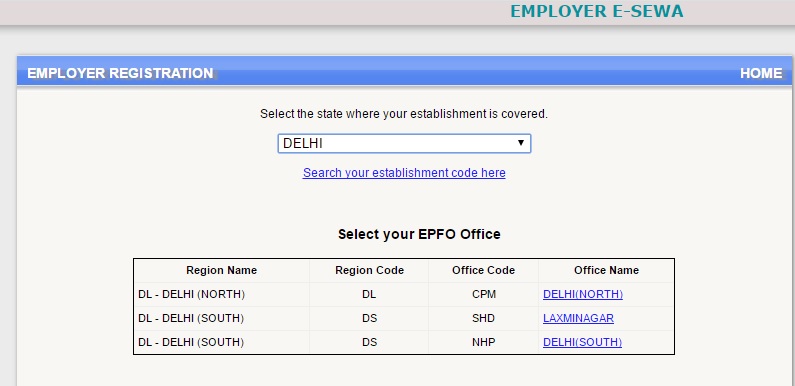
  • First of all, you need to select the state where your employer tax and other department belongs – this is crucial part if you done any mistake you won’t make online PF payment.
  • Then after choosing your office code and region code followed by office name as shown in the following image.

epf-payment-online

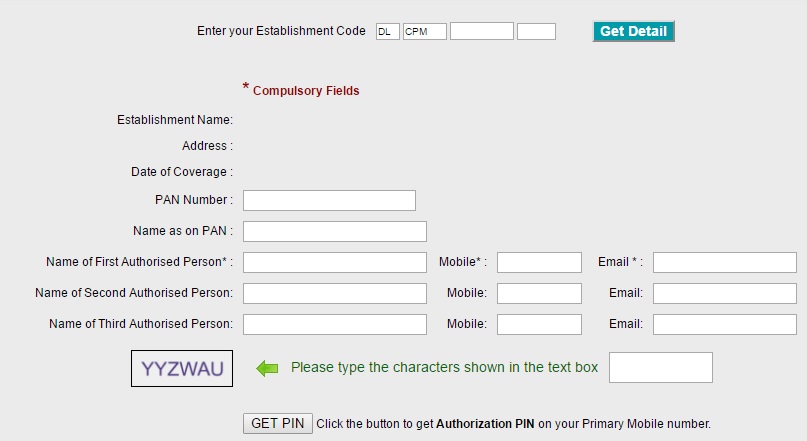
  • Now, once, you choose the office name, the web page will automatically redirect to a new webpage where you can fill out the application form details to proceed the registration of new PF account.
  • This is how the web page will look alike once, you have been redirected.

pf-online-payment

  • Now, choose your establishment code, in case if you have forgotten or no idea about the establishment code, you can check out here. This will help you out to find your establishment code:

Note: Establishment Code – Maximum 7 Digits, No leading or trailing zeros (e.g. 3467, 987654, etc.Once,) and Extension – Maximum 3 Characters / Can be left blank in case no extension.

Proceed further by filling out the application form :

  1. Pan Number
  2. Name as on pan :
  3. Name of First Authorized Person
  4. Name of Second Authorized Person
  5. Name Of Third Authorized Person
  6. Followed by the mobile number and Email Id of all

Once, you did those filling out the  new application form to make epf online payment Now, click on get authorization pin which will receive to the first Authorized person mobile number.

  • Now, enter that pin at the end of the page and get access to enter into the portal website to complete the rest of the process of pf online payment.

That’s the first step you need to do. Now, the second phase is to fill generate Electronic Cum Challan Return.

Generate Electronic Challan (ECR)

The Electronic Challan Return : Two Phases ( Must )

  1. Process of Creating The ECR File ( Text Version )
  2. Uploading The ECR In a Portal Website

Process Of Creating The ECR File – Text Version

This is one of the biggest hurdles to those, however, with our tutorial, you can make it more easier than you thought.

We are pretty sure that as employer, maybe your team will have good command on Excel Sheet I think so.

  • Okay whatever, here is the complete format which we are going to share with you which will be helpful on how to generate ECR, electronic challan return format in order pf payment online.

First of all download the pdf file, the .pdf file consists of complete format on how to fill out the CSV and convert into ( Hash Tilda hash ) – #~#

The Electronic Challan cum Return (ECR) will be an electronic return in plain text format and will consist of DETAILED lines (one line for each member).

How To Prepare ECR as a Text File:

Once, you downloaded the above pdf file, you will get to know on the complete mandatory fields to be filled for epf online payment.

However, there is another file that you need to be download. The file will contains .js scripts which will explain you the complete info.

  • Here is the link to download ( Zip File )
  • Once, you have done with a download ( Zip file) extract it with by using WinRAR software.
  • Now, you will see HTML file with an extension ( ECRPRESENTATIONWORK.HTML) just open that one.
  • Make sure to open that .html file in google chrome only.
  • This is how it would look alike once you opened the file.

This zip file contains the other extensions, like .js, will help you to automatically explain on how to create an ECR text file format.

  • Please go through the tutorial as shown in the above .html version
  • Once, you have complete in filling out the data in a CSV format.
  • Now , save as (*.csv ) – Comma delimited.
  • Now, open that file with TextPad.
  • Replace comma (,) with ( #~# ) and save that file.
  • Remove the top header on a text file, and save as .txt format.

That’s it

Now, Your ECR file is ready to upload on portal website. Hope the above tutorial will help you out in case if you need any information about the creating of ECR ( Electronic chall cum return ) to make pf online challan payment text file do let us know in the comment section.

  • NOTE: Please do refer the above steps in case if you won’t understand. Two files that are mandatory to download are PDF file and .zip Version. Once you downloaded the .zip version, unzip it and open the Ecrpresentation.html file in google chrome only and follow the instructions.

Upload ECR File Via Portal With Images – EPF Payment Online

Back in 2012, the EPFO government launches an online facility  to make epf online payment.

where you can generate online signed ECR and proceed the payment online via any bank sector under a corporate account.

Once, the employers uploaded the electronic challan (ECR), the uploaded return data will be displayed through digitally signed copy which will further available in a PDF format ( Printout purpose ).

Once it was approved by the employer either you can make payment via online through net banking or submit those details near by any bank via offline and proceed the payment.

Here are the complete information about on how to proceed to upload the ECR challan online through epfo login portal.

We make sure to cover each and every point which will further helpful in case if you are done any mistake. Check out the tutorial here.

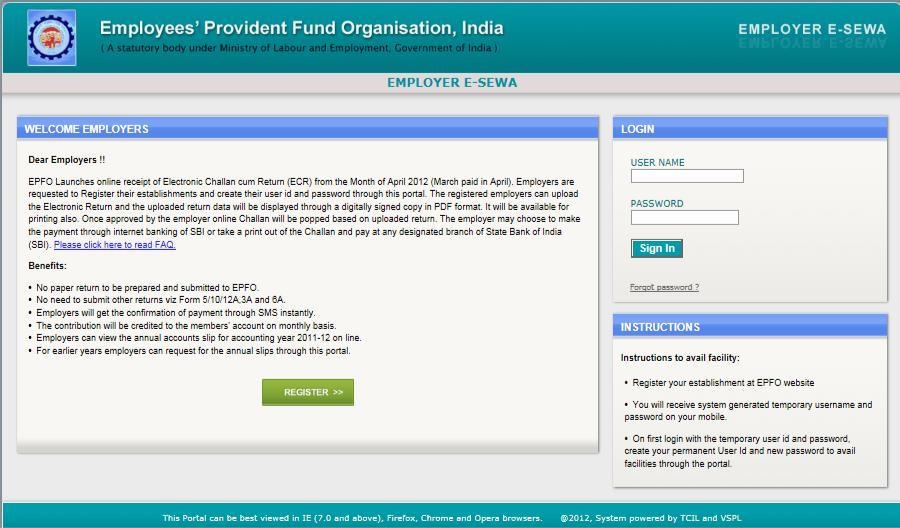
  • As we mentioned above once you have done your registration, then all you need to login via that webpage.

Once, you logged into the web page it looks alike as follows:

pf-online-payment-1

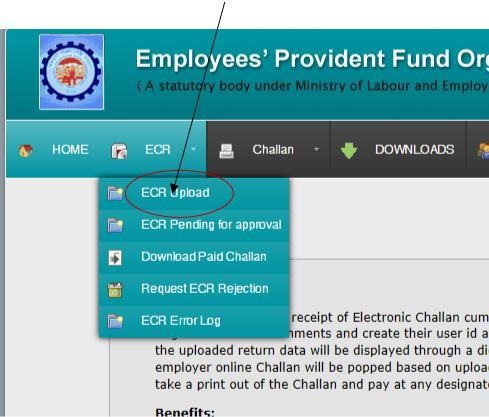
  • Now, at the top of the menu bar, you will see an option to upload ECR ( Electronic challan cum Return ). Just check out to that webpage as shown as below.

online-epf-payment

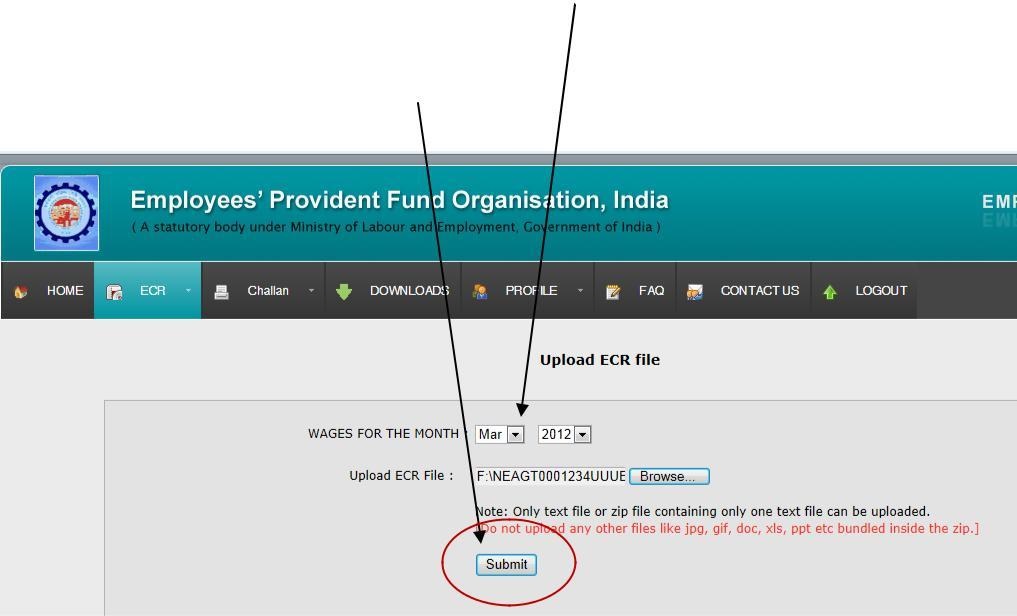
  • Once, you click on that ECR Upload button, then it will open a new web page as shown as below.
  • Now, upload your ECR file that you have been saved on your harddrive.
  • Make sure it was completely in the best format that we had explained above and choose the wage month and year where you are going to upload your ECR ( Electronic Cum Challan ) as shown in the following image.

epf-payment

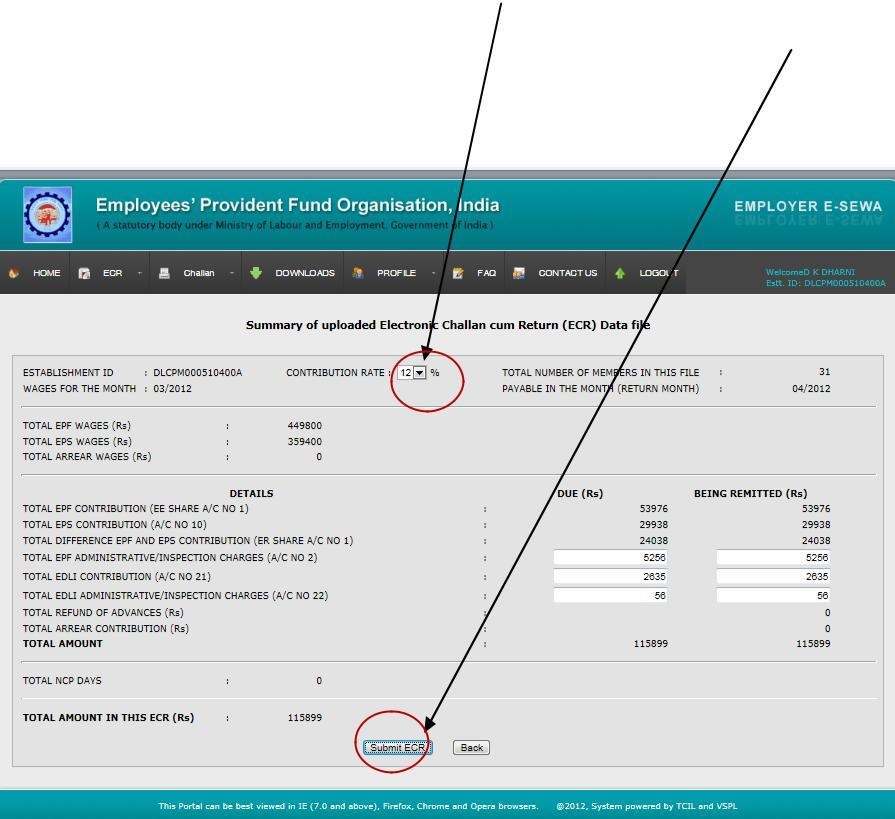
  • If the uploaded ECR file doesn’t contain any mistakes, then the next webpage will look alike this, once you click on submit button.
  • Now, enter additional information as like ” EDLI and EPF/EDLI administrative and inspection charges.
  • It’s all up to you choose the contribution percentage, as per EPF online payment portal the contribution rate is 12% by default.
  • You can even decrease or increase it. As shown in the following image.

epf-payment-online-2


  • Now, click on submit ECR button. Make sure to check out the complete information over and over again. Once you have done a conformation alert popup will display on the screen click on OK and proceed the next steps.
  • Once you were done. A digitally signed PDF file will appear on screen with both time and date. Now, just click on ” Approve .”

Note: Some times, the digitally signed ECR may not appear due to the more number of employees ( 200+ ) in that case wait for some time,

until you receive an SMS to view or download the ECR file online in order to proceed the epf online payment.

Download The ECR Challan:

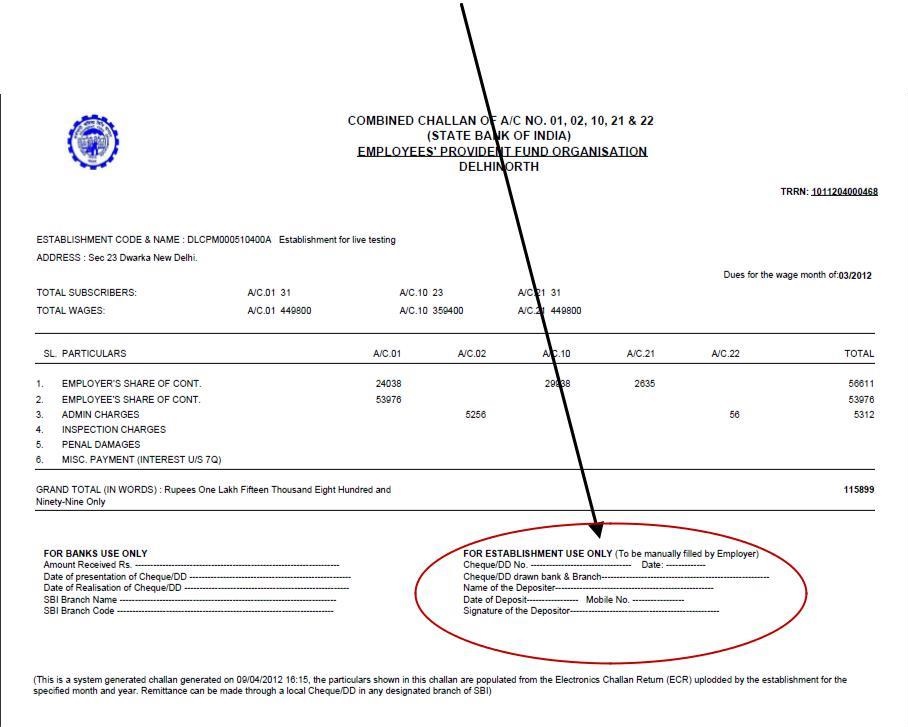
Once, you click on approve button, then the next page is to ” downloaded the challan form.” On Approval of challan, a temporary reference number ( TRRN ) will generate for the uploaded file.

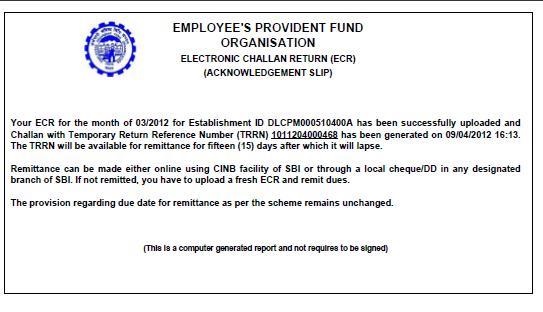
  • Here you can access both ” Challan and ” Acknowledgment Receipt ” for your uploaded file for online epf payment online.

Below we share the following images how ” Challan ” and ” Acknowledgment receipt “

Challan Will look alike as follows:

Pf-challan

And, Acknowledgment File will look alike as follows:

pf-acknowledgment

Note: The challan that has been generated will last 15 days if remittance not made.

  • Until this time, the employer will have an option to reject the approval ECR. In case if remittance is done, there is no option to decline once remittance was done.

Make EPF online Payment : ( Offline has been shared below )

So, you successfully done both steps now next step is PF online payment.

Creating an account and generate ECR and uploaded it – At the right top bar menu, you will see an option to note down your TRRN ( Temporary Return reference number).

As we told earlier the temporary return reference number will only stay for 15 days.

If you failed to make remittance, then you need to upload it again to proceed the EPF payment online.

Make EPF Online Payment:

There is two processes to make pf online payment via online or offline.

Here we cover the online process followed by offline.

Make sure you have a TRRN number along with you while you can make the pf payment online.

  • For Instance: We will choose the Two Banking sectors which were popular and most of the people will use in order to do the payments online via net banking under a corporate account.

SBI – Flow Of process ( To make EPF Online payment Via SBI followed By HDFC )

  • Here is the official Link to log on to SBI corporate account: Link Here
  • Now choose a corporate account and login with your credentials.
  • There is an option at the top of the menu bar as ” Payments/Transfer “ And pick EPF there by.
  • Proceed the payment from your account and authorize the details.
  • Once, it was done now you can take printout of challan.

That’s the complete step by a process to proceed via SBI corporate account in order to make epf payment via online. Here we do cover the another bank ( HDFC ) in case if you follow this bank.

HDFC – Process Flow Of EPF Online payment

  • Log on to HDFC Corporate Bank ( For Enet ) enter TRRN number.
  • HDFC Bank for Net-banking enter TRRN number.
  • Proceed the payment.

Procedure Of Payment Via Offline

If you have no corporate account, you can make remittance via offline to proceed the EPFO payment. Do check it out.

  • The remittance cane be made through Demand draft/local cheque in any bank / branch.
  • Once the cheque against realized ,you will get an sms alert of a specific month.

Below we do share the list of banks that accept epf payment online.

Almost on all banking sectors, the option is same as like above. Make sure to follow all the rules that were mentioned in above.

List Of Banks For EPF Online Payment Facility

The following are the list of banks that accept epf payment online. All of the banks will have both Retail And Corporate Internet Banking.

If you have any doubts regarding the list of banks that accept for the pf online payment.

Then do leave a comment here at the end of the post. Our team will help you out 🙂

Bank Name Bank Name Bank Name Bank Name
1.Axis 2.Bank Of Baroda 3. Bank Of India 4.Bank Of Maharashtra
5.BNP Paribas 6. Canara 7. Catholic Syrian 8. City Union
9. Corpoation 10. Cosmos 11. Deutsche 12. Development Credit
13. Federal 14. HDFC Limited 15. ICICI Limited 16. Indian Overseas
17. Jammu and Kashmir 18. Janta Sahkari 19. Karur Vysya 20. Kotak
21. Lakshmi Vilas 22. Oriental Bank of Commerce 23. Punjab & Maharashtra Coop. 24. Punjab and Sind
25. Punjab National 26. Ratnakar 27. Shamrao Vithal Co-op. 28. South Indian
29. State Bank of Bikaner and Jaipur 30. State Bank of Hyderabad 31. State Bank of India 32. State Bank of Mysore
33. State Bank of Patiala 34. State Bank of Travancore 35. Syndicate 36. UCO
37. Union Bank of India 38. United Bank of India 39. Vijaya 40. Allahabad
41. Andhra 42. Bank of Bahrain and Kuwait 43. Central Bank of India 44. Dena Bank
45. Dhanlaxmi 46. IDBI 47. Indian 48. IndusInd
49. ING Vysya 50. Karnataka 51. RBS (The Royal Bank of Scotland) 52. Saraswat
53. Standard Chartered 54. Tamilnad Mercantile 55. TNSC And, 56. Yes Bank

Most Frequent Asked Questions About The EPF payment :

Here we cover the most frequent asked questions, hope this will help you in case if you need to know any more information check out here: List of 50+ Most Frequent Asked Questions

1) Why it is mandatory for employers to register on a portal website?

A: With effect from 01/04/2012 any remittance would be done after generating challan from a portal website.

It is mandatory to view your data online. In case if any mistake will happen during the ECR.

2) What If I don’t register on the portal ?

A: Simple! You won’t have any access to generate the online challan.

3) What if my establishment I’d won’t retrieve our details?

A: Please do check it out once.

In case if this still happening then contact the concerned EPFO office to solve your problems asap.

4) Whenever I entered my establishment info and click on ” Get details ” The message showing as ” Your establishment is already registered ” What should I do now?

A: Please check whether you have entered the correct code number and extension number, if any and have selected the right EPFO Office.

  • If correct, click the link for generation of request letter.

Print the letter and submit it under the signature and seal of the Employer/Authorized Signatory to the EPFO Office where the establishment is covered.

  • Please mention your mobile number in the letter.

Once the EPFO Office clears the registration, you will get an SMS on that mobile, and then you can register.

Here is the list of 50+ questions covered under each category taken from the EPFO office.

which will help you a lot in case if you were done any mistake while filling out the registration process or generating ECR or making epfo online payment.

Benefits Of EPF Payment Via ECR:

The EPFO government had done this change back in 2012 for employers.

As per survey under an act of EPFO, it is very hard to complete the flow of process payment via online. So, to done this process hassle free the central government has made this decision.

Here are some of the benefits:

  • The employer, No need to submit other returns from 5/10/12A, 3A, and 6A.
  • Say good bye to a paper return.
  • Once an employer is doing the payment, within a fraction of second, they will receive the message of success payment via EPFO.
  • Now, employers will have access to view the annual account slips during a year.
  • The contribution will automatically credit to the member’s account on a monthly basis.
  • You can access annual slips for earlier years through this portal website.

That’s the comprehensive benefits.

The central EPFO government is also planning to launch the new portal where they provide 24×7 support to the employees if they made any mistake and can resolve instantly.

Then do leave a comment here our dedicated team will help you out related to this query.

Filed Under: News

Gift Tax : Exemption Rules And How To Save Tax | Guide

October 3, 2019 by admin Leave a Comment

According to economics, gift tax is generally preferred as the tax on money or property that one person gives to another received upon some circumstances like death of a person are considered separately under the tax of inheritance generally many gifts does not undergo taxation because of exceptions given in tax laws.

Tax Amount Is Proportional To Jurisdiction

gif-tax-india

The gift tax amount is proportional to jurisdiction and international comparison of rates is complex and fluid gift tax in India comes under gift tax act which was constituted on April 1, 1958 as per the act all gifts which are above Rs 25,000 in the form of liquid cash, draft check or others received from one who doesn’t have any blood relations or any relation with the recipient involves taxable gift tax came into existence except in some areas like jammu and Kashmir.

However with the effect of gift tax from October 1, 1998  gift tax  got demolished and all the gifts made on or after the date were free from tax exception but, in 2004 the gift tax act was revived partially a new provision came into existence in the income tax act 1961 under section 56(2).

  • According  to the changes made in gift tax the gifts received by any individual or Hindu joint family or Hindu undivided family(HUF) in excess of Rs 50,000 in a year would be taxable.

Generally a country like India who express our love and affection through gifts for example brothers gifts on raksha bandan for every occasion parents gift their children this gifts is mostly seen in marriages.

Is Tax Really Applicable Above 50,000

income-tax-india

where grandchildren are the recipients of loads of gifts from grandparents we often hear of cars being gifted and homes being given to family members but do these gifts turn taxable for a limit but do elders need to pay income tax on gifts before presenting them ?

However this rule is not applicable :

If one of your relatives presenting you the gifts this is one of way to escape gift tax in India you generally can’t call a person your relative saying he is son of my neighbour’s vendor’s sister to avoid sceneries like these :

  • some exceptions are made in the income tax rules which specially specify relatives from whom tax gifts can be received these are as follows :

Parents, cousin, spouse we and our spouse brother and sister, brothers and sisters of our parents and our lineal descendants also gifts can be exempt if the gifts is not received from these relative if they are received during our marriage.

so stop panic about the income tax department questioning you about the house that was gifted by a distant relative at your wedding but ensure that the date mentioned on the gift deed is of your marriage day or at least close to that date.

Just like marriages on inheritance also has no tax implication of gifts received if the gifts we receive is according to the will then we don’t  need to pay tax on the amount however the income generated on the inheritance would be taxable like interest on money and house rent you does not need to include the amount you got from one of your local authorities or educational institutions as gifts for your good deeds or on the basis of merit.

Always Maintain Necessary Proof Documents

Always we have get the documentation right when there is exchange of big gifts and note the occasion on the document it would be easy if we have enough proof to convince the officer on tax security we have to consult our charted account on the liability of tax.

Due to investing money received as gifts some rules may be related to clubbing of income would apply on certain instances thereby increasing the liability on tax beware of I-t clubbing provisions if you gift your child who is a student a cheque of R 1 lakh cheque if he gets interest on it, this interest would be clubbed with your income.

What To Do If It Is Crossed Over 50k

Cash or gifts up to 50,000 from non relatives is non taxable in a year however if it is  say Rs 55,000 then this entire value of Rs 55000 is added to your gross total income and we have to pay for it a per our tax slab.

In case if you gift an immovable property without any consideration and the stamp value exceeds of Rs 50,000 it is stamp duty value which is one of the part of our gross income but if we pay some consideration but it is still less than the stamp duty value the difference is added to our income for some other presents other than the immovable property say like jewellery the same principle applies to it except that market value such a gift is considered.

Under IT law any total sum of money any movable or immovable property received by you without any consideration is chargeable to tax as income from other source even if we win a lottery or a interest income these all fall under this category  .

  • A separate gift tax does not exists but if you receive a gift or if we win the lottery this comes to our gross income and be taxable.

Article 246 of the Indian constitution it distributes the legislative powers including taxation is divided between the parliament of India and the state legislature schedule 7 in the parliament enumerates these subject matters with the use of three lists

  • List-I entailing some of the areas on which only the parliament is competent to make laws.
  • List-II entailing some areas on which state legislature can make laws.
  • List-III listing all the areas on which both the parliament and the legislature of state can make laws upon concurrently.

GIFTS EXCEMPTED FROM TAX

Gifts can be exempted from the gift taxation in the following cases :

  • If the gift was given by any blood relative it is irrespective of the value of the gift and the immovable properties outside India.
  • An individual cannot take the movable properties outside India unless the donor who gives to the recipient.
  • Is an Indian citizen who is resident of India or he is the resident of India during the year of gift.
  •  Out of the balance gift from NRI (Non resident of India) in his non resident account.
  • Foreign currency exchange from a convertible exchange of gift remitted outside India by an NRI to a resident relative.

According to special bearer bonds in 1991

  1. Special certificates issued by the central government is exempted.
  2. Up to 10, 00,000 capital investment bonds per year.
  3. Some relief bonds by an original subscriber.
  4. Gift to the local government or local authority.
  5. Gifts to any of the charitable trusts.
  6. Gifts to any notified temples, churches, mosques, gurudwars, and other places of worship.
  7. Gifts to the children for the occasion and educational purpose.
  • Gifts by the boss of a company to its employees in the form of bonus, gratituty, or pension.
  • Gifts under inheritance under will and the contemplation of death.
  • Gifts of some certain bonds from the NRI to his friends or relatives which are subscribed in foreign currency generally it is specified by the central government.

According to the laws in the Indian constitution we can receive gifts from some following sources

  1. Relatives or blood relations
  2. At the time of marriage and at inheritance
  3. In contemplation of death of the individual

However gift act 1958 was not initially applicable to Jammu and Kashmir however certain changes are made in the income tax provisions in income tax act 1961 would be applicable of movable properties in the said state as well.

Generally gift means the transfer by one individual to another individual of any existing movable or immovable property made voluntarily and without consideration in money or money’s worth

Donne means any person who accures the property under the gift and where the gift acts as a trustee for the benefit of another person includes both the trustee and beneficiary, donor means any person who makes a gift.

If anyone unexpectedly deposits some money in our bank account what is taxation angle a lot of persons take money from another friend for few months with some interest and then return it back but we never think about taxation angle if your parents pay some money to your account to pay loan then we never think of who would pay tax on that amount for.

A gift is deed that is executed and delivered in which the donor transfers to the receiver without any payment or considerations it is a document which transfer the legal title of the property to the Donne which the consideration is not mandatory but it is made with the love and affection.

Gift is made in  the form of cash or cheque does not mandatory requires to be executed through a gift deed generally writing a plain typed note on a paper  will generally sufficient it is not required to be stamped or registered.

As far as we make the transactions with justification we need not to worry about any tax however it is always helpful it is good and safe practice to document things on paper with perfect signatures this will be helpful during economic scrutiny,

  • Stronger the documentation and proofs available the smoother the situation will be during income tax raids.

For any queries regarding above topic, please tell us through below comment session.

Filed Under: News

UAN : Universal Account Number Registration | Guide

October 3, 2019 by admin Leave a Comment

UAN Registration : UAN stands for Universal account number. It’s a 12 digit unique number allocated to each member of employee provident fund India. Back in 2010, it was a very hurdle process for pf transfer amount via offline from one account to another account. Thereby people are getting faced a lot of problems while checking their pf balance and transferring of their details.

The Employee provident fund organization in India has introduced a new concept called universal account number. Thereby you can access the comprehensive benefits of your pf account under one unique 12 digit number which can make very easy for everyone to check their pf details online in India and also can transfer their pf funds very easily without any problems.

Here we share the complete guide for beginners on how to create a new UAN registration number.

The process of registering a new universal account number number is quite easy all you need to follow our guide so that you can access to your( employee ) account number within minutes.

Not only the process of creating a new UAN Registration (Universal account number ) number, but we do also share the complete guide on the above topics as per mentioned on the table of contents. There you go complete guide.

UAN Registration Online – Step By Step With Images Online

Here we cover the in-depth information how to register a new universal account number account number. In case if you face any problems while creating a new UAN registration, account number then do comment here at the end of the post our team will help you out related to any query.

Their you go the complete process of registering the new UAN account number online.

Note: An Employer takes the process of registering a new UAN registration account to their employees.

Because they need to link your PF account number to UAN number. Once the KYC documents are verified by employer. Then you need to activate your UAN account.

  • If you an employer you need to follow up our guide with step by step on submitting your employee’s details to creating a new UAN  account.

For Employees: Here is the new official Link to register a new UAN registration account number ( Universal account number ).

For Employers: Even you can use the Official link to create a new UAN registration account on behalf of your employees and link back to pf account to get accessed easily.

  • But, before that you need to submit your employee documents with a digital signature and verify it.

The process of providing the documents via Text file is a little bit complicated however with our tutorial you can get it done easy without any issue.

First Step – Uploading KYC Documents Of Employee’s Via EPFO Portal

Here we go step by step process on how to submit the employee details on EPFO website and get it verified by the employer.

First of all, you have to log in via EPFO login new version (2.0) website here.

Step – 1 – Learn How To Add Employee Details As Text File

Create employee information in a text file. The process of setting up the ECR text file is such an important thing. Here we shared complete step by step process on how to create a Text file of your employee database for UAN and verification process.

  • The government of India had already launched complete step by step tutorial for this.
  • Please download the .zip version generating or creating a text file using ( Hash Tilda hash ) #~#

Now, extract that zip file and you can access the HTML file as ( ECRPRESENTATIONWORK.HTML ) and open that file.

Once, you opened that file you can able to access the tutorial on how to create the Text file. Here is the screenshot of that HTML version page.

Step – 2 Collect Employee Document Details

As an employer, it’s your responsible to collect the necessary documents from employees for the process of UAN(Universal account number ) account and verification of KYC documents.

List Of Documents:

Address Proof Documents

  • Passport
  • Driving License
  • Ration Card
  • Voter Id Card

Other Documents

  • Aadhaar Card
  • Bank Account Number + IFSC code
  • Pan Card

Once, you collected those details from employees.

Now, all you need to gather those details into one Text File and upload it followed by verification method online to generate universal account number registration Id.

  • Now, please refer to the above ( ECRPRESENTATIONWORK.HTML ) Tutorial and followed the instructions.

Just fill out the member details as per their instructions:

Please go through the tutorial as shown in the above .html version.

  • Once, you have complete in filling out the data in a csv format.
  • Now, save as (*.csv) – comma delimited.
  • Now, open that file with textpad.
  • Replace comma(,) with ( #~# ) and save that file
  • Remove the top header on a text file and save as .txt format.

Things to kept in mind before uploading the data:

  • Use Only alphabets and number in file names. Special characters or spaces are not allowed in that file name.
  • Text files are not exceeding more then 2MB of data.
  • Each row of the text file format is must meet the instruction which is provided here in Zipping File.

That’s it ( If you have any doubts on creating a Text file, then please do comment here at the end of the post our dedicated team will help you out in creating the necessary text file for your employees to get universal account number  account number ).

Step – 3 (Uploading KYC Documents)

Now, you have successfully completed the employee details in a text file as shown as above.

The next step followed by is to Upload those documents and verify it.

  • Now, Login into the employer esewa page. At top right column, there is an option to upload KYC documents.
  • Choose KYC>Upload Bulk KYC Text File
  • Here is the screenshot of that web page.

Once, you click on ” Upload Bulk KYC Text File “ then all you need to browse your employee text file and submit on that web page.

  • Here is the screenshot of that web page, right after when you click on ” Upload KYC Documents “.

Step – 4 Approving Your KYC Documents Online Here

Once, you have uploaded those text file for generation of UAN registration (Universal account number ).

The next step is to verify those certificates.

In login page at top right column menu, you can access the option as ” Approve Bulk KYC Pdf.”

  • KYC > Approve Bulk KYC

Here is the screenshot of that Image:

Now, click on Approve Bulk KYC and a web page will redirect to a new webpage where you can approve the list that you have been provided.

  • Here is how the screen will appear once you check out from Approve link web page.

The PDF is made in respect  to all the members for whom the member master is complete and will not have the members for whom some data such as DoB/DoJ etc is not available.

  • Do check out all the details from the list you have been provided.
  • The UAN registration number is automatically generated by respective employees as shown on the screen.
  • Do proofread of all those documents and Approve the submission.

Here is the sample Image on where to click to Approve Button. For only example purpose.

As usual, once, the employer will submit the Approve button a popup will open asked for a digital signature ( Sign with .PFX file or USB token ). Submit it right away.

That’s it.

You are now successfully registered a new account number respective to their member I’d details and documents.

The next step is an allocation of universal account number registration number allotment to new members.

  • On filling the ECR of the Month July 2014 on wards, the EPFO system will identify the new Member IDs for which the establishment is making payment.
  • On identification of new Member IDs, the system will throw back to employers the Member IDs for either declaring them as the first employment or tagging them with already allotted UAN.
  • Here is the complete step by step guide on how to allot UAN registration number to member Ids.

Here is the screenshot of an image on where to proceed. Just click on ” Confirm Previous Employment .”

Once, you click on confirm previous employment. The next web page will appear as follows.

In the case of first-time employment select first-time employment and submit.

On submission, the EPFO would allot the UAN and disseminate the same to the member through an employer.

  • And, the list of number will be available under the menu on employers tab. Here is the sample screenshot of the process.

Tagging Of UAN To New Members

  • Employers are required to collect the declaration form of the previous employment for each new employee.
  • Employers can either provide previous member Id or UAN to confirm prior payment.

Details of a member against the Member ID/ UAN (Universal account number ) as furnished shall be displayed along with “Confirmed/ Not Confirmed” radio button in Verification Column.

In case the system finds out that there is a difference in name or DOB after conformation by an employer.

The system alerts the employer to verify the details of that particular member. Post verification, records can be submitted.

  • Once the details were feeding, for new joiners.
  • Now, an employer has to press Form F11 to verify the details and generate the PDF of the same.

Now, the employer has to approve the pdf file that has been generated. In case if an employer is not satisfied he can just reject it.

  • Once, you approved, the pdf file will look alike as follows:

At the end, you can access the files under tab section as ” Approved PDF and Rejected PDF.

Activate Employee UAN Number

There you go the last process. This process either can be done by employer or employee.

But, we suggest employee can do this thing because the authorization pin and password can access by himself only.

In future, if he shifted to other company it will be easy for him to handle all the member Id’s under one account.

Here you go the process of activation of the new account. The EPF India launched a new UAN portal website thereby you can access all of the information under one portal.

  • The central government of India launched a new portal ( version 2.0 ) on Jan 1st, 2017.
  • All of the screenshots will be soon updated in this article. Check out the step by the process on how to activate the UAN registration number.
  • New Version ( 2.0 ) Official Link To Activate Your Account: Link Here

Once you check out from that link, now all you need to do fill out the form as shown in the web page.

  • Fill out all the details like as follows:
  • Enter your universal Account number
  • Enter your mobile number
  • Select the state
  • Enter Account Number

Once, you entered all the details shown as above. Now click on Get authorization pin.

Once the pin is verified, you can access to another web page where you can enter the details like username, password, and Email Id.

  • Username
  • Password
  • Email Id

The next step is to login via your username and password.

Username and password must be noted down anywhere for future reference.

  • Here is the link to login to employee member portal: Link here

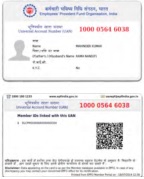
From here you can download the Passbook and universal account number card under the tab menu, as shown in the below image.

  • There you go Passbook here
  • And, UAN card download here

UAN-card

That’s it.

Benefits Of Having UAN Account For PF Holders

PF is one of the greatest innovation started early in the 19th century, and it was first established in Europe.

There are so many benefits will have of having UAN account number for PF holders.

In simple, the PF is the small amount which is deducted from your salary for every month until you quit the company.

The same method will follow by both private and government organization. Here are some of the benefits that you need to with UAN number.

1) Insurance Benefits: You can avail the insurance benefits, the insurance benefits will be provided through EDL ( Employee Deposit Linked Insurance )

2) Medical Benefits: If any emergency situation is occurred, then the company will pay the entire amount on behalf of you and deducted little bit of amount from your salary on every month.

3) Pension Scheme: PF has been usually divided into two sectors like as EPF ( Employee Provident Fund ) and EPS ( Employee Pension Scheme ) so you can avail the benefit of pension too.

3) Deduct More than 70%: If you have any  plan to start business, then you can take out the PF amount at any time more than 70-80%.

There were so many benefits were there for having a UAN account number.

The UAN number will joint all your PF member details at one point.

Thereby you can access all the PF account details at one place without any hustle. That’s where the complete benefits of having a Universal Account Number.

Main benefits Having a UAN Number

When you shifted from one company to other company, you need to either transfer your PF account ( only with UAN ) or withdraw the money.

But, as our lives are busy we haven’t even touched those accounts and by the end it’s very hustle process to gather those all accounts at one place.

Realizing this, the central government of India had started a new innovative scheme called ” UAN .”

Here we share some of the major benefits that you will have do check it out once.

  • UAN – Itself states that Universal Account Number. With that 12 digit unique number, you can access link all your PF accounts under one account.
  • High protection and authority on your account through PF. No other third parties will not interfere on your Pf accounts. Thereby you can access top level protection.
  • Now, the process of withdrawing your money is a very easy process. Because your bank account is now synced with the UAN and can transfer the amount accessible.
  • Download the Official Android App and receive all the updates.
  • With UAN account you will find out the how much money is deducting from your account at the end of each month. You just need to log in and check out there by itself.
  • Access all PF accounts at one place thereby reducing the chance of account lost.( Mostly It won’t happen with the help of UAN ).
  • Transferring your amount from one account to other account is quite an easy process. Here we share the complete guide on this topic hope it will help you out.

That’s the list of total benefits of having a UAN Number.

We do update this content whenever we came across any new updated about the UAN universal account number.

Most Frequent Asked Questions About UAN – EPFO India

Most frequent asked from our users. Check out the here. If you have any doubts related to any query then do post here.

Our dedicated team will help you out.

1. What is UAN?

A: In simple UAN stands for Universal Account Number. It acts a bridge between your all PF accounts and connects with high security.

2. How Do I Obtain My UAN account number?

A: Contact your employer. If you already submitted the necessary KYC documents to your employer, it’s time to contact them for your UAN number.

3. Once, I obtain my UAN registration number how can I activate it?

A: Simple, just log in here, but before that, please do read out our guide that we have shared above.

4. The old portal seems to be down? How Can I access new portal?

A: We do already share a new version ( 2.0 ) portal. In case if you missed it here we go: New Portal link

5. How Can I Create username? Was I unable to login to the portal website?

A: Have you activated your account? Without activation of your account, you can’t access to login. Please do check out the above images.

6. How can I download the passbook?

A: It’s so simple just log in to the portal website using your username and password.

Thereby at top right column menu, you can access to view or download pdf of your passbook.

You can even access to the UAN registration number Id card.

7. What is the purpose of Listing previous Member Ids?

A: From EPFO: The idea is to list multiple Member Identification Numbers (Member Id) allotted to a single member under single Universal Account Number.

This will help the member to view details of all the Member Identification Numbers (Member Id) and further enable to check the eligibility for online transfer claim through the options ‘List Previous Member ID’ and ‘View Status’ from the Menu ‘Previous Member ID.’

In future, there is no need to list the member ids as it will be linked automatically by Form-11 information.

Member needs to disclose his/her UAN/Previous Member ID to the new employer through Form-11.

8. Unfortunately, My KYC documents are uploaded wrong. Is there any way to upload or make any changes in it?

A: Yes! You can make necessary changes through your portal login page.

Once, you upload or modify any documents. The status will show as pending until the employer accepts that.

Once he accepted. The status would change to modified.

9. If my mobile lost? And, now I have taken a new number, is there any way to change my mobile number?

A: Yes! Just log into UAN registration portal web page and thereby you can access to change the mobile number.

Make sure you have working number to receive OPT. Even you can change your E-mail Id too.

10. In the case of change JOB do I need to get another UAN registration number?

A: No! You don’t need to get another UAN ( Universal account number ) number. It’s a unique number and will remain same throughout your career.

11. Have I few more doubts about UAN registration OR UAN?

A: Just leave a comment here our team will help you out related to any query as soon as possible.

If you have any doubts related to universal account number do comment here at the end of the post. Our team will look in to this and will solve your problem as soon as possible.

Filed Under: News

  • « Previous Page
  • 1
  • …
  • 14
  • 15
  • 16
  • 17
  • 18
  • …
  • 36
  • Next Page »

Search List 1

Search List 2

Search List 3

How to Search Ration Card Number by Name

District Wise Ration Card Search

 Anantapur

Chittoor

East Godavari

Guntur

Kadapa

Krishna

Kurnool

Nellore

Prakasam

Srikakulam

Visakhapatnam

Vizianagaram

West Godavari

Recent Posts

  • APRationCard Smart Card Download
  • AP Smart Ration Card Now Available
  • What is the Process for member addition in Ration Card in Andhra Pradesh state ?
  • How to check AP Employee’s / Pensioner’s Salary / Pension Bill Status Online
  • How to Check Ration Card Status Online

Recent Comments

  • BUTCHI BABU on Guntur (District’s) Ration Shop Dealer Address | Phone Number | Status Check Online | FPS
  • A Lakshmi kanth on Circle Ii Urban (Mandal), Visakhapatnam (District) – Ration Card Search | Print Online Download
  • Sreerama Mary Aruna kumari on STO, Kamalapuram
  • Nagamalli on Visakhapatnam District’s Ration Card Download Online | YAP | TAP | WAP | RAP | JAP | White Card
  • M ESWARI on Makavarapalem (Mandal), Visakhapatnam (District) – Ration Card Search | Print Online Download
  • M ESWARI on Makavarapalem (Mandal), Visakhapatnam (District) – Ration Card Search | Print Online Download
  • Yogesh Kumar on PALWAL – Dist. BHARAT GAS AGENCIES Contact Details | Address | Online Booking
  • Devaraj on KOPPAL – Dist. BHARAT GAS AGENCIES Contact Details | Address | Online Booking
  • V.MAHABOOB BASHA on Rice Card Services in Mana Mitra (WhatsApp Governance).
  • Anand on Circle Iii Urban (Mandal), Visakhapatnam (District) – Ration Card Search | Print Online Download

Pages

  • About US
  • Apply for New Ration Card Andhra Pradesh | Download Ration Card Online | Status Check
  • Buy Adspace
  • Contact us
  • Hide Ads for Premium Members
  • Privacy Policy

Copyright © 2021 · eleven40 Pro Theme on Genesis Framework · WordPress .