APRationCard

  • Help
    • Ration Shops List 1
    • Ration Shops List 2
    • Ration Shops List 3
  • News
    • Media
    • Bharatgas
    • Indane Gas
    • HP Gas
    • Home
    • Elections
    • Rules
    • Passport
    • Birth Certificate
    • ATM Card
    • APSRTC
  • Aadhar Card
    • Revenue
    • epos
    • PAN Card
  • Ration Card
    • Ration Shop
    • Spandana
    • Mandal
    • District
    • Helpline
  • Contact us
You are here: Home / Archives for News

EPF Kadapa Office Address | Balance Details | Other Info

October 3, 2019 by admin Leave a Comment

EPF Kadapa office address and balance details online in 2017. We at epf status share most of the information about the latest changes in employee provident fund in kadapa 2019.

To Know more information about the office and customer care number details, other epf office details then do check out our complete guide below.
epf-office-kadapa

As quick through guide we share most of the info to get you know the EPF Kadapa office address and pf balance details. Not only pf balance details we do cover rest of the information in just a couple of lines. First of all we should go through the pf cudapah office address. Recent post – How to save Income Tax On Gifts check it out. Have you any doubts related to employee provident fund organisation online in cudapa do leave a comment here.

EPF Kadapa Office address:

Check out the address also don’t forgot to know the more information about pf balance and establishment code.

Address:

  • Sub regional Office, cudapa
  • Bhavishyanidhi Bhawan, 1/30, Railway Station Road,
  • Yerramukkapalli,
  • Kadapa – 516 004
  • sro.cuddapah@epfindia.gov.in

Customer care number of Pf Office kadapa:

  • STD Code: 08562

Contact Number as follows:

  • Regional Pf Commissioner Office ( GR.) – 244189
  • Shri S Srinivas Kumar As Follows:
  • Assitiant Pf Commissioner – 256114
  • Assitant Pf Commissioner – 244108
  • Public Relation Officer – 244902

Fax Number for cudapa -27563993

Address In google maps:

Employees Provident Fund Organisation Kadapa

Employees-Provident-Fund-Organisation-KADAPA

ఎంప్లాయీస్ ప్రావిడెంట్ ఫండ్ ఆర్గనైజేషన్

Address : A.P.H.B Colony, Kadapa, Andhra Pradesh 516001

Plus Code : FR5G+6C Kadapa, Andhra Pradesh

Website : epfindia.gov.in

Phone Number : 085622 58164

direct link : https://maps.google.com/maps?ll=14.222613,78.800536&z=12&t=m&hl=en-US&gl=IN&mapclient=embed&cid=12843180418121679783

All of the information that we are shared over there is collected from the epf India via kadapa employee provident organisation online.

However, most of the people in are still looking for more information that may not available on online. For that reason we shared complete brief guide about epf kadapa. In case if any information that you have been looking out, and if not available here do let us know by leaving a comment here at the end of the post.

Check PF Balance online in kadapa

The process of checking or enquiry your pf balance online in kadapa is quite simple. We do shared the complete guide on this topic about epf kadapa balance.

  • Here is the official guide that our team has shared over here : Check epf balance and enquiry details online in cudapa

Basically, you have five options to know your balance:

  • You can download official android application
  • Via missed call service
  • Via logging in to the uan member portal
  • Via epf India portal website
  • Through Official link

There seems to be endless possibility to know your current account or member balance. You can even contact your regional office which has been shared above complete address and customer care number and email Identity card.

Apply For Universal Account Number & Activate That Account

If you were an employee then you must have an UAN number. UAN number referd as a Universal account number, with the help of the uan account number you can track all your previous member Id’s seamlessly possibly.

  • For the people who don’t have an UAN number here we do shared the complete guide : How to register a new uan account number in kadapa in 2017.

Basically, it’s employer responsibility to create a new universal account number on behalf of you. However, even you can do that.

Activation Of Account:

The process of activation your account is quite easy. All you have to follow the necessary steps which has been shared on uan member portal.

Just enter the UAN number, there by you can activate your account.

  • Here is the official link : How to activate your new UAN account for the people of kadapa.

PF Status & Apply For Transfer Claim:

Tracking your provident fund status is simple. All you have to know your establishment code and your member Id. Once you entered those details establishment code and member Id you can instantly know your status online without much effort.

  • Here is the official Guide we shared : How to track your pf claim status online in Kadapa 2017

Apply For Transfer Claim

If you were changed from one company to other company too often. It’s very hard task to know track all your pf member Id’s at one place, in order to avoid this problem the government introduced the UAN number.

Once, you were registered and activated your universal account:

Then after in uan member portal page you can access your previous member Id’s there by you apply for PF Transfer in kadapa.

  • If you faced any problems, you can simply contact the pf office in cuddapa address which has been shared above.

With the help of the uan you can know the cuddapah epf establishment code.

If you were unable to find the uddapah epf establishment code or epf kadapa code. Then do leave a comment here. Our team will respond to it asap.
Filed Under: News

How to Get a Duplicate Voter ID Card in India

October 3, 2019 by admin Leave a Comment

A complete guide on ‘How to Get a Duplicate Voter ID Card in India’ with detailed steps so that you can get Voter ID If you lost yours. 

Voter ID plays a crucial role in many scenarios. It also determines your Indian citizenship and helps you exercise your “Right to Vote” during elections. It not only acts as a medium to exercise your vote but also it acts as  a Valid Identity proof which you can use for the Passport Verification. They are usually issued by “Chief Election Commission” and also by the officers at booth level after successful verification of necessary details and proofs.

It’s quite a common thing if he or she loses Voter ID but when you lost it when elections are fast approaching, you may miss the chance of voting.To avoid all these, you can apply for duplicate voter id card in India.  To do so you need to know few details on the process of getting a duplicate voter id. In general you need to submit a duly filled “Duplicate Voter ID Card Issuance” to your nearest office.

Procedure to Get a Duplicate Election Card

You may lose the Voter ID in transit or you may give it to your friend and forgot to take it back or misplaced it somewhere. There are many reasons for the loss of Voter ID Card. “Every Problem will have a solution” so does this problem. You can easily get a duplicate election card and you need to follow a few tasks or steps to get duplicate voter id card.  By following the steps, we are sure that you will get a duplicate of your Voter Card.

  • First, You need to file an FIR for the loss of Voter ID.
  • You need to keep it safe as it will be helpful in further steps.
  • You need to collect Form 002 for the issuance of duplicate voter id card.
  • You need to fill all required fields in the form.
  • Next attach FIR and necessary documents as Proof of Identity to the form and submit it.

After that submit it at your regional chief election commission office and collect the receipt. That’s it you can track the status of your Voter ID card online and an estimate about the delivery of your Duplicate Voter ID Card.

If you don’t have much time for the offline method you can also follow online method to apply for duplicate election card.  You can login to election commission official site and fill up details on form 002. Download the form and attach necessary documents submit it at local election commission center. If you failed to attach any mandatory documents Election Commission won’t issue duplicate voter id card for you.

If you have any queries on “How to Get a Duplicate Voter ID Card in India” do comment below.

Filed Under: News

How to Get Voter ID in Delhi – Check Your Status Online

October 3, 2019 by admin Leave a Comment

Voter ID is one of the most essential and important identity proof which is provided for all Indian citizens. It not only acts as a medium to utilize your right to vote but also as proof for many things. Anyone who are 18 or above can get Voter ID card. As mentioned you can use your Voter ID card as your address proof for many applications including Passport Application.

Procedure to Get Voter ID in Delhi

You can get Voter ID Card in Delhi easily using either “Offline method” or “Online method”. Many people prefer the online method which is hassle free and convenient for all. Those who prefer offline methods are mostly from village background who are computer illiterates and they have no clue about the online process so they stick with the Offline method of applying voter ID. You can find the procedure of both Online & Offline method to Get Voter ID in Delhi.

Offline Procedure to Get Voter ID in Delhi

  • You need to find the nearest electoral office to enroll your name in the Voter List by filling “Form-6“.
  • You need to attach “Address Proof” & “ID Proof” along with the application.
  • Submit the mandatory forms in the electoral office.
  • Electoral Office will verify your details and issue your Election Card which you will get at your doorstep.
  • You can track the status of your application online by visiting “http://ceodelhi.gov.in/onlineerms/CheckApplicationStatus.aspx” or give a call to 180011400.

Online Procedure to Get Voter ID in Delhi

If you don’t have time for  offline registration then you can follow below steps for applying Voter ID in Delhi through Online.

  • Navigate to “http://www.ceodelhi.gov.in/OnlineErms/login.aspx” on your browser.
  • Create a new account if you don’t have a account.
  • Now search for “Form-6” and fill all the mandatory fields.
  • Next you need to upload your passport size photograph.
  • You also need to upload scanned copies of address and id proofs.
  • If you are having trouble uploading them then you can submit them at your local electoral office.

Alternative Method to Get Voter ID in Delhi

If you are having trouble with the above methods then there is an alternative method to get election card in Delhi.

  1. Download “Form-6” online and download it.
  2. Now take the printout of the application and fill it out.
  3. Attach necessary documents and mail it to the electoral office of Delhi by post.

You can easily get voter id in Delhi by following any of the above methods. If you are having trouble do drop your comments below.

Filed Under: News

How to Check Voter ID Card Status Online ?

October 3, 2019 by admin Leave a Comment

Voters ID is one of the most important and needed proof if you are an Indian citizen. Today in here we will be sharing How to Check Voter ID Card status online? Since India is a democratic country, Voting is one’s birthright. Voter ID card is essential for the voting process. You can register Voter ID card online, and keep getting updates on Voter ID card status through official websites. Well, this is a complete guide on how to check voter id card online?

How to Check Voter ID Card Status Online?

While logging on to voter id card status website, following things are to be filled up.

  • Name
  • Date of birth
  • Gender
  • State
  • Fathers name
  • Consistency

Let’s now have a look at the complete procedure for checking voter id card status.

  1. Login to http://electoralsearch.in/ for checking your voter id card status.
  2. After logging in, you have to fill the above-asked questions in the correct order.
  3. There is an alternative for the above step, you can just enter the EPIC no and state in which you are residing for checking your voter id card status.

Voter ID card is a requisite for the election process, in order to avoid a total fuss, Government of India distributed the voter id card works to different states. That is, if you are a Keralite, you can either use the general website or Kerala CEO website for checking voter id card status, but for the application process you have to check with regional CEO’s.

If you haven’t registered for your Voter Id Card you can check out our detailed post on How to register for a Voter ID card?

If you want to correct some mistakes on Voter ID Card: Check out our detailed post on How to correct mistakes on Voter ID Card online?

I hope you all loved reading the article, this website is meant to help everyone with Voter ID card registration. So subscribe us and stay tuned for further updates.

Filed Under: News

How to check Vehicle ( Car ) insurance policy status online

October 3, 2019 by admin Leave a Comment

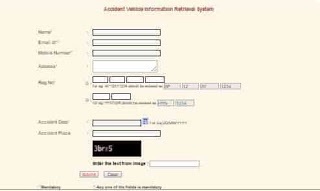
IIB India ( Insurance information Bureau of India created by IRDA, has provides all insurance related online Services like as Vehicle insurance status information system (VISSS), Vehicle Stolen status search system (VSSSS), Stolen Vehicle recovery information system (SVRIS), Accident Vehicle information submission system (AVISS), Accident Vehicle information retrieval system (AVIRS ), Vehicle claim History Verification system ( VCHVS ) services related to motor insurance to multiple stakeholders such as public, police, transport departments and insurers through V- Seva.

Vehicle ( Car ) insurance policy status online

This is Web enabled facility to assist the victims of any road accident and do not know the insurance details of the vehicle responsible for accident towards lodging a claim with the concerned insurer, Clients can furnish some basic information such as details of accident, Registration no. of vehicle etc. in the IIB Web portal for get Vehicle insurance Status online.

Procedure for Check Vehicle (Car) Insurance Policy Status online

  • People can First logon to https://iib.gov.in
  • Click on “Vehicle Insurance Status Search” or you can visit directly following link https://iib.gov.in/IIB/PublicSearchIntro.htm
  • Click on “Proceed” Button,
  • Now Enter Name, Address, Email-id or Mobile number, Registration number, accident date and place of accident in the online form,
  • Enter captch code in the mentioned box,
  • Click on “Submit” Button.
  • Finally Vehicle (car) insurance Policy status will be displayed.

Vehicle_car_insurance_policy_status-min

Search Instructions :

1) Registration Number has to be entered without any special characters E.g.(AP01AT1234). Entering of Registration Number is mandatory.

2) There is a time lag of two months in submission of policy data by insurers to Data Repository.As such there is a possibility of Insured Vehicles not appearing in the Data base.

3) In case of new vehicles, only Chassis and Engine Numbers are submitted by insurers at the time of issuing the policy.

4) The search is based on data submitted by insurers for the period starting from 1/4/2010.

5) For such vehicles where details are not available, the Querist may approach the concerned RTA for details of vehicle owner, address etc.

6) You will be allowed to search up to a maximum of 3 times for a particular mobile number or Email ID.

For any queries regarding above topic, please tell us through below comment session.

Filed Under: News

  • « Previous Page
  • 1
  • …
  • 16
  • 17
  • 18
  • 19
  • 20
  • …
  • 36
  • Next Page »

Search List 1

Search List 2

Search List 3

How to Search Ration Card Number by Name

District Wise Ration Card Search

 Anantapur

Chittoor

East Godavari

Guntur

Kadapa

Krishna

Kurnool

Nellore

Prakasam

Srikakulam

Visakhapatnam

Vizianagaram

West Godavari

Recent Posts

  • APRationCard Smart Card Download
  • AP Smart Ration Card Now Available
  • What is the Process for member addition in Ration Card in Andhra Pradesh state ?
  • How to check AP Employee’s / Pensioner’s Salary / Pension Bill Status Online
  • How to Check Ration Card Status Online

Recent Comments

  • BUTCHI BABU on Guntur (District’s) Ration Shop Dealer Address | Phone Number | Status Check Online | FPS
  • A Lakshmi kanth on Circle Ii Urban (Mandal), Visakhapatnam (District) – Ration Card Search | Print Online Download
  • Sreerama Mary Aruna kumari on STO, Kamalapuram
  • Nagamalli on Visakhapatnam District’s Ration Card Download Online | YAP | TAP | WAP | RAP | JAP | White Card
  • M ESWARI on Makavarapalem (Mandal), Visakhapatnam (District) – Ration Card Search | Print Online Download
  • M ESWARI on Makavarapalem (Mandal), Visakhapatnam (District) – Ration Card Search | Print Online Download
  • Yogesh Kumar on PALWAL – Dist. BHARAT GAS AGENCIES Contact Details | Address | Online Booking
  • Devaraj on KOPPAL – Dist. BHARAT GAS AGENCIES Contact Details | Address | Online Booking
  • V.MAHABOOB BASHA on Rice Card Services in Mana Mitra (WhatsApp Governance).
  • Anand on Circle Iii Urban (Mandal), Visakhapatnam (District) – Ration Card Search | Print Online Download

Pages

  • About US
  • Apply for New Ration Card Andhra Pradesh | Download Ration Card Online | Status Check
  • Buy Adspace
  • Contact us
  • Hide Ads for Premium Members
  • Privacy Policy

Copyright © 2021 · eleven40 Pro Theme on Genesis Framework · WordPress .