APRationCard

  • Help
    • Ration Shops List 1
    • Ration Shops List 2
    • Ration Shops List 3
  • News
    • Media
    • Bharatgas
    • Indane Gas
    • HP Gas
    • Home
    • Elections
    • Rules
    • Passport
    • Birth Certificate
    • ATM Card
    • APSRTC
  • Aadhar Card
    • Revenue
    • epos
    • PAN Card
  • Ration Card
    • Ration Shop
    • Spandana
    • Mandal
    • District
    • Helpline
  • Contact us
You are here: Home / Archives for News

LIC online policy status from www licindia in

October 3, 2019 by admin Leave a Comment

LIC ( Life Insurance corporation of India ) has providing Policy Status online, in this services has been created for Policy holders can check their policy status online, New customers and existing policy holders can know their Policy related information like as  Premium date, amount, Last Premium details, through LIC Website https://www.licindia.in . New customers need to complete the Registration Process for get policy details online,you should follow below instruction for get Username & Password.
Jeremy+Cooper-min

How to check LIC Poicy Status online ?

All new users are required to complete the Registration Form online selecting username and password of their choice.

Step by step procedure for get LIC Policy Status online

1) First you need to Click on “LIC’s eServices” option

2) Select “New User Registration” option,

3) Now fill your policy details like as Policy Number, Installment Premium, DOB, Mobile Number & Email id,

4) Than Click on “Proceed” Button ,

5) Choose your User Id & Password, Than click on “Submit” Button,

6) The username can be alpha, numeric, with characters dot and underscore.

7) The password must be in between 8 to 30 characters.

8) The information marked with (*) are mandatory fields and cannot be left blank.

9) The pin-code cannot be more than 6-digits.

10) The e-mail id entered should be a valid one for further correspondence.

11) The user-id chosen should be unique. Password should be unique and be kept confidential.

12) Now Update your Profile information, Than click on ” Submit” Button,

Once your Profile details is updated, You can avail LIC online services like as Policy Schedule, Policy Status, Pay Premium online, online payment receipts,Claim Status, Loan Status etc,

How to check LIC Policy status on Mobile Phone ?

You can also get your policy status on your mobile phone, Just send one SMS through your Registered Mobile Number as per below instructions.

(ASKLIC < policy no > PREMIUM/LOAN/BONUS/REVIVAL/NOMINATION) and send it to 9222492224
Filed Under: News

Voter Card Registration, Status Kerala CEO

October 3, 2019 by admin Leave a Comment

If you are an Indian citizen, then you may know the importance of having Voter ID card. Voter ID card is a necessary proof which can be used in many areas, primary use of an ID card is, it gives the right to vote which is quite important in a democratic country. In the olden days in order to enroll your name in the Voter list one have to stand in long queues and wait for their turn but now things have changed. Nowadays you don’t have to stand in long queues and wait for your turn all you have to do is apply online. In here we will walk through you with the complete procedure of Voter ID card registration kerala CEO.

How to Apply for Voter ID Card – Kerala CEO ?

People who have recently migrated to kerala from abroad or any other Indian states can apply for their individual voter id card online. You can apply for individual voter id card online through the official website www.ceo.kerala.gov.in.home.html. The official site has got all options for enroll your name into the voter list. After entering into the official website look for e-registration portal option. After clicking on e-registration portal you will be directed to a new webpage www.ceo.kerala.gov.in/eregistration .html, enter the presonal details like name, phone no and email after entering the required details you will be provided with an unique id and pass.  Unique id and pass will be sent to your email id and mobile phone. Using that id enter the site and fill the form for Voter registration. While entering the details you have to enter one of your family member’s Voter ID card number and their relation with you.  Follow the instructions and do the step by step procedure. After completing the form press submit, before submitting ensure the details once again. 

How to Verify Voter Card ?

After completing the online procedure, block officer will visit your house for ensuring whether the details provided are correct and up to date. After this procedure you will receive a call from the nearest electoral office asking you to collect the Voter ID card. Voter ID card will be handed over to the concerned person only.

Name of the Organisation : Chief Electoral Officer, Kerala
Type of Facility : Online Voter Registration Apply

Online Voter Registration – Apply Here : http://www.ceo.kerala.gov.in/eregistration.html
Home Page : http://www.ceo.kerala.gov.in/home.html

You can check whether your name is enrolled in the voter list or not by the following link

eci.nic.in/eci_main1/Linkto_erollpdf.aspx . If you are having any complaints regarding Voter card registration you can use the toll free number provided in the website.

Filed Under: News

How to Apply Voter ID Card Online in Any Indian State

October 3, 2019 by admin Leave a Comment

Voter ID is one of the most important document which is must for every individual who is of 18 years and above to exercise their right to vote in elections. Not only to vote for a right candidate but it is also useful in many ways. Voter ID also serves as a government identification card. So if you are 18 and thinking to apply voter id card for yourself and don’t know how? You can apply Voter ID card online if your age is 18 or above. You can find the step by step procedure to apply Voter ID card Online in any state.

Election-Commission-of-India-App-qr-Scan

What are the Benefits of Applying Voter ID Card Online ?

The first thing that comes to your mind after reading the heading is, What are the benefits of applying voter id card online rather than applying offline. So we tried our best listing the amazing benefits you can enjoy by applying Voter ID online right from your computer desk.

  • The timings are flexible which means you can apply whenever you want no matter it is morning 6 AM or evening 10 PM.
  • You can finally skip those long queues which will test your patience and Yeah you can enjoy applying online from your AC room rather than standing in hot sun.
  • By applying voter id online the status is also updated in the same site itself which means you can check voter id card status on the go.
  • Another amazing benefit is that you can get your voter id card in a min of 3 weeks to a max of 4 weeks. If you apply via offline ways then you need to wait for almost 9-12 months and If you are newly married then I guess by the time you get your Voter ID you will be having a kid.

Pretty amazing benefits right. Let’s see how one can apply voter id card online with just a few keyboard and mouse clicks.

Step by Step process to apply  Voter ID Card Online

When compared to the offline procedure the online procedure for applying voter card is fast, easy and quick. The best part is that different states have different sites rather than a centralized site which makes the overall process fast.  The sites are optimized for local languages which is an added benefit.

  1. Navigate to the Official site of Election Commission of India (ECI).
  2. Next click on “Enrollment for new Voter ID Card“.
  3. Fill up the necessary details which will create a login for you.
  4. Login using the details.
  5. Now find “Form 6″ and fill all the mandatory details.
  6. Now you need to upload a passport photograph which is mandatory.
  7. Next you will be redirected to a confirmation page where you need to check whether all enetered details are correct or not.
  8. If all the details are correct and Submit it.
  9. You will receive a mail about the status of the voter id.

You have successfully applied for voter card online. Now you need to submit your documents or verification at Voters facilitates center. That is the last and final part of process. Wait for the Voter id delivered at your door step.

You have successfully applied for Voter ID card online. In case if you are having any issues do leave your queries below and we will get back to you with necessary solutions.

Election Commission of India
भारत निर्वाचन आयोग
Nirvachan Sadan, Ashoka Road, New Delhi-110001
Tel: +91-11-23052205-18, Fax: +91-11-23052219
Website: ecisveep.nic.in, nvsp.in
Helpline: 1950

Filed Under: News

How to Change the Address in Your Voter ID card ?

October 3, 2019 by admin Leave a Comment

Address is one of the most important thing in an voter id card, any discrepancy on that would cause several severe issues. A correct residential address is required for getting voter id card, and it is pretty much important to correct any mistakes on it. Today in here we will be giving you a brief idea on how to change/correct the address of your voter id card?

A voter id card is a primary thing which ensures you as the citizen of India. You have to keep it safely, losing or tampering may cause severe problems. Voter Id cards are mainly used for verification purposes. Election Commission of India provides the voter card through registration, verification and distributive processes.

How to Change the Address in Your Voter ID card ?

Here is the complete procedure for changing an address in a voter id card. Election Commission of India or ECI appoints CEO ( Chief Election Officer ) in every states. CEO plays a vital role in elections, voter id registration, transposing and much more. Each states will be having their own websites, the site provides many useful links. Out of many useful links, changing or correcting your voters id card is one. Since it is a sensitive thing, CEO’s procedure for correcting or changing Voter id card credentials may feel like shit some times.

If you are applying for an address change or address correction you should apply it through FORM 8. Form 8 is used for changing or correcting the address given during the time of registration.

Fill up the first part of FORM 8

  • Part Number as well as Serial Number of the voter list should be entered
  • Electors Photo Identity Card Number
  • Relation’s Name

Fill up second part, by illustrating:

  • Residential Address of the new place where you are shifted or about to shift:

Fill up the third part, by illustrating:

  • Part Number of the new region of residence or the nearest polling booth where you will carry out your franchise

It is mandatory to submit proof and xerox copies along with form 8 while applying for address change.

Filed Under: News

Verify your Address | LPG Status | Ration Quantity in AP Ration Card

September 20, 2019 by admin Leave a Comment

Now it is very simple to find your address which registered in your ration card, Number of units in your ration card, Remarks, LPG Status, S.Rice/AAY/AAP, K.Oil, Wheat, Sugar, RG.Dall, AATA & BlackGram Dal status through online very easily.

Ration Card Registered Address Check Online
You can please follow the below mentioned procedure in-order to check your ration card address, LPG status and all information through online.

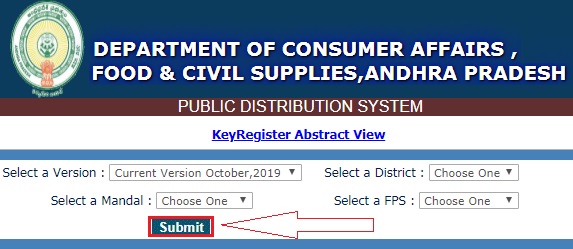
epds-ap-KeyRegister-Abstract-View

Procedure to check registered address in your ration card

  • Open official website: https://epdsap.ap.gov.in/epdsAP/epds
  • On “Public Reports” tab you can find “Key Register”
  • Now you are at “Key Register Abstract View”
  • Here you can Select a “Version, District, Mandal & FPS” and click on submit button
  • Now find your “Head of the Family” name and all details are shown in the same page.

Note : From few months we are seeing that the print ration card disable, but still you have option to check your ration card details through “Search Ration Card”. You can also take printout from Search Ration Card option instead of Print RationCard and use it as your ration card for temporary (until we get enable the “Print RationCard” option.

For any queries while checking address (or) taking printout of ration card online, please tell us through below comment session. We will try to assist you as soon as possible.

Filed Under: News

  • « Previous Page
  • 1
  • …
  • 17
  • 18
  • 19
  • 20
  • 21
  • …
  • 36
  • Next Page »

Search List 1

Search List 2

Search List 3

How to Search Ration Card Number by Name

District Wise Ration Card Search

 Anantapur

Chittoor

East Godavari

Guntur

Kadapa

Krishna

Kurnool

Nellore

Prakasam

Srikakulam

Visakhapatnam

Vizianagaram

West Godavari

Recent Posts

  • APRationCard Smart Card Download
  • AP Smart Ration Card Now Available
  • What is the Process for member addition in Ration Card in Andhra Pradesh state ?
  • How to check AP Employee’s / Pensioner’s Salary / Pension Bill Status Online
  • How to Check Ration Card Status Online

Recent Comments

  • BUTCHI BABU on Guntur (District’s) Ration Shop Dealer Address | Phone Number | Status Check Online | FPS
  • A Lakshmi kanth on Circle Ii Urban (Mandal), Visakhapatnam (District) – Ration Card Search | Print Online Download
  • Sreerama Mary Aruna kumari on STO, Kamalapuram
  • Nagamalli on Visakhapatnam District’s Ration Card Download Online | YAP | TAP | WAP | RAP | JAP | White Card
  • M ESWARI on Makavarapalem (Mandal), Visakhapatnam (District) – Ration Card Search | Print Online Download
  • M ESWARI on Makavarapalem (Mandal), Visakhapatnam (District) – Ration Card Search | Print Online Download
  • Yogesh Kumar on PALWAL – Dist. BHARAT GAS AGENCIES Contact Details | Address | Online Booking
  • Devaraj on KOPPAL – Dist. BHARAT GAS AGENCIES Contact Details | Address | Online Booking
  • V.MAHABOOB BASHA on Rice Card Services in Mana Mitra (WhatsApp Governance).
  • Anand on Circle Iii Urban (Mandal), Visakhapatnam (District) – Ration Card Search | Print Online Download

Pages

  • About US
  • Apply for New Ration Card Andhra Pradesh | Download Ration Card Online | Status Check
  • Buy Adspace
  • Contact us
  • Hide Ads for Premium Members
  • Privacy Policy

Copyright © 2021 · eleven40 Pro Theme on Genesis Framework · WordPress .