You have enrolled for Aadhaar Card. You can now check if your Aadhaar is generated, in this article we showing How to check aadhaar Card status online. You should have EID ( Aadhaar enrollment Id ) to check your Aadhaar Card Status online. UIDAI (Unique Identification Authority of India ) has providing facility for Check Aadhaar Card status online, In case you have lost your EID, you can Retrieve Lost EID/UID. For this you will require your registered mobile number which you had declared at the time of your Enrollment.
What is Aadhaar Enrollment number?
Aadhaar Enrollment ID or Enrollment number is a 28 digit numeric number. Enrollment number is generated at the time of your Enrollment. If you want to check your Aadhaar Card, or get eAadhaar Card through online, you must be entered Aadhaar Enrollment id in the mentioned format.
The top of your acknowledgement slip contains 14 digit enrolment number (1234/12345/12345) and the 14 digit date and time (dd/mm/yyyy hh:mm:ss) of enrolment. These 28 digits together form your Enrolment ID (EID).
How to Check my Aadhaar Card Status online ?
- First you need to logon to https://uidai.gov.in/, for get Aadhaar card status online,
- Than Click on “Check Aadhaar Status” option, in the lift side of Website, below Aadhaar online Services option,
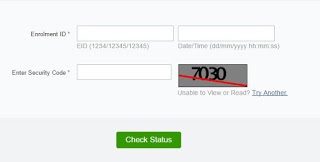
- You’ll see new webpage as shown in the below screen shot.
- Now Enter your 28 Digits Numeric number & Security Code in the mentioned box,
- Than Click on “Check Status” option,
- Finally your Aadhaar Card Status will be displayed.
How to Retrieve Lost EID/UID online ?
- You need to click on “Retrieve Lost UID/EID” Option
- (If you have lost your Enrolment slip or Aadhaar number you can retrieve the same on your registered mobile. )
- Now Select UID or EID ( You want to retrieve your lost )
- Enter your Full Name
- Email Id,
- Mobile Number,
- Than Enter Security Code in the mentioned box,
- Click on “Send one time password” option,
- Now you’ll receive OTP in your Registered mobile,
- Enter received OTP in the mentioned box,
- Click on “Verify OTP” option,
- Finally you will get your enrollment number.
For any more information on above topic, please tell us through below comment session.
Leave a Reply