Update Information on Aadhaar card through Online. Aadhar data correction process is given below. Candidates may amend Surname, Name, Gender modification, edit Date of Birth on Adhaar letter, and update new mobile number to your aadaar card. Even if you have given a information for your aadhar, when you check your aadhaar card, the information was updated wrongly on database and print the same. In this case, you can match it with you certificates and other documents. In order to correct, your data on aadhaar letter such as Name, Gender, Date of Birth, Address and Mobile Number, you have two ways either through online from http://uidai.gov.in or by sending their request through post.
No need to worry, if your Aadhaar details are incorrect on your card. Because you are given a chance to amend the the aadhaar information. Citizen of India may update their Aadhaar data such as Name , Gender, Date of Birth, Address and Mobile Number.
Update Aadhaar Card Information Online at : http://uidai.gov.in/update-your-aadhaar-data.html

Note: Please read the instructions carefully at (uidai.gov.in/update-your-aadhaar-data.html), Before submitting/sending the request.
If you want to know how to update aadhaar details (Amend UID data), Read below information yourself knew every thing.
Check Status of Update Aadhaar Data
Candidates who already submitted their details for Update Aadhaar, can check their status here: https://ssup.uidai.gov.in/web/guest/check-status by entering your Aadhaar and URN to check status
Aadhaar Important Links
How to check Aadhaar letter status
How to change Information on Aadhaar
Steps to Validate Digital Signatures
UPDATE AADHAAR DATA THOUGH ONLINE PORTAL:
Resident of India may update/amend their aadhaar data through online from UIDAI’s official site at https://ssup.uidai.gov.in/web/guest/ssup-home
There are Three easy steps to update aadhaar profile information those are as follow
- STEP 1: Login with Aadhaar,
- STEP 2: Upload Documents and
- STEP 3: Select BPO Service Provide and submit request.
Procedure to Update Aadhaar Info through Online:
- Having a mobile number is mandatory for using the Update Portal
- If you have declared a mobile number at the time of enrolment, enter your Aadhaar Number to get an OTP (One Time Pin) at that mobile. If you have not declared your mobile at the time of enrolment, then enter your Aadhaar number. You will be asked to provide a mobile number to receive OTP. In case you have lost/do not possess anymore, the mobile, that you declared at the time of enrolment, you will have to either visit nearest Update Centre or send your Update request through Post.
- Enter OTP and captcha to login to the Update Portal
- Select the fields you want to be updated /corrected. You can select more than one field also.
- Fill the fields with current details in English as well as Local Language.
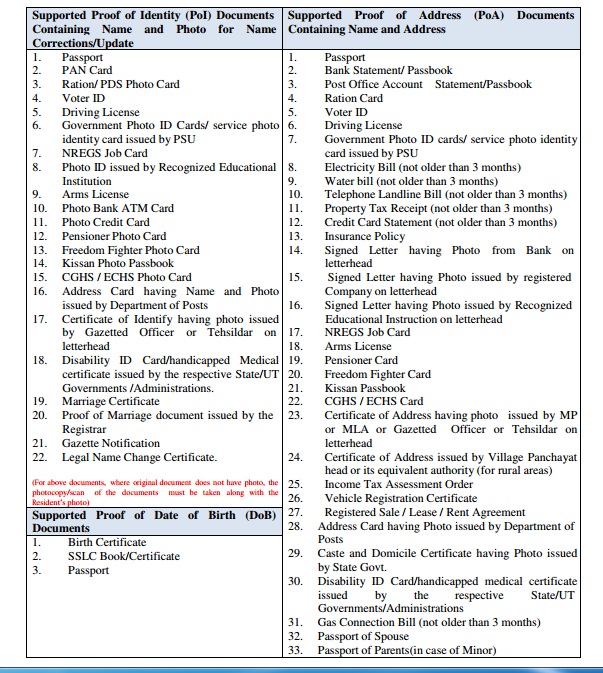
- Depending on the field to be updated, attach self attested supporting documents as per the Valid Documents List. Refer Link for valid documents.
- Name Correction/Update : Requires PoI listed in “Supported Proof of Identity(PoI) Documents Containing Name and Photo for Name Corrections/Update“
- Date of Birth Correction : Requires DoB listed in “Supported Proof of Date of Birth (DoB) Documents“
- Address Corrections/Change : Requires PoA listed in “Supported Proof of Address (PoA) Documents Containing Name and Address“
- 7. Review the data entered for correctness and completeness in English as well as local language. Note that Date of Birth will not appear in local language. Also any numeric figures will not be transliterated in local language. UIDAI will not make any corrections to the information in your request.
- 8. Submit the request. Note down your Update Request Number (URN) carefully for future reference and tracking. You can also download /Print your Update Request copy.
- 9. Currently SSUP portal is supporting update request for below languages.
SEND UPDATE REQUEST THROUGH POST:
If you want to change Aadhaar card information through post, you may below steps
Residents can Update/Correct the following six information on their Aadhaar letter by sending an Application through Post to UIDAI:
Aadhaar Data Correction Application Form Download
Instructions for Sending Update Request Through Post
Procedure to Update Aadhaar Info through Offline:
1. Click here to Download the Aadhaar Update/Correction Form
2.Fill the Update request form in capital letters and mention the Mobile number correctly.
Mobile number is mandatory for sending an update request by post.
3.Depending upon the field to be updated, send self-signed (self attested) supporting documents as per the Valid Documents List attached in Annexure I.
a. Name Correction/Update – Requires PoI listed in “Supported Proof of Identity (PoI) Documents Containing Name and Photo for Name Corrections/Update”
b. Date of Birth Correction – Requires DoB listed in “Supported Proof of Date of Birth (DoB) Documents”
c. Address Corrections/Change – Requires PoA listed in “Supported Proof of Address (PoA) Documents Containing Name and Address”
4.In case a child is below five years, parent/guardian can sign the copies of documents. In all other cases, the resident must sign the copies of documents themselves
5.Aadhaar Number on all copies of documents. Mention Type of Document (PoI/PoA/DoB) on the copy of the document
6.Mark the envelope as “Aadhaar Update/Correction” on top. Seal the envelope properly.
7.Send the Aadhaar Correction form along with the supporting documents to one of the addresses given in Annexure II.
List of Valid Documents for Data Update
Annexure I
Annexure II

Aadhaar Help Desk:-
- Aadhar Toll Free Number- 1800-300-1947
- Aadhar Email – help@uidai.gov.in
Aadhaar Telephone Numbers:-
- Lucknow (UP): 0522- 2304978
- Ranchi: 0651-246016
- Mumbai : 022 – 22186168
- Bangalore: 080-22340862
- Hyderabad: 040-23119269
- Chandigarh: 0172 25085983
Note :- You Must refer and follow uidai.gov.in which is the ONLY official website of the UIDAI.
How to get a duplicate Aadhaar card
Very nice