APRationCard

  • Help
    • Ration Shops List 1
    • Ration Shops List 2
    • Ration Shops List 3
  • News
    • Media
    • Bharatgas
    • Indane Gas
    • HP Gas
    • Home
    • Elections
    • Rules
    • Passport
    • Birth Certificate
    • ATM Card
    • APSRTC
  • Aadhar Card
    • Revenue
    • epos
    • PAN Card
  • Ration Card
    • Ration Shop
    • Spandana
    • Mandal
    • District
    • Helpline
  • Contact us
You are here: Home / Archives for Aadhar Card

SSUP Update – How to Update Your Aadhaar Card

October 5, 2019 by admin Leave a Comment

SSUP update – aadhaar card self service updated portal. The following article will let you know on how to update your aadhaar card using ssup website. SSUP – aadhaar card self service update portal was launched back in in 2014.

With the help of the online self service update portal you can make all the necessary changes to your aadhar card. Below we do share the complete reference guide so that you can easily understand the flow of process.

Basically there are two methods that you have to follow. One is via online and other is via offline.

If you are familiar with online efilling you can update your card via online. In case choose the offline method Check out the two methods here as follows.

Via online:

In case of online you have to fill up the application form by visiting the official link here. With the help of the ssup you can make whatever changes you wish for it. Here are the list of changes that you can make it for.

  • Address
  • Name
  • DOB
  • Gender
  • Email Id
  • Mobile Number

Now, after all that just visit the official link here.

Once you visited the official link : All you have to do is enter your aadhaar card number and mobile number.

If your aadhaar card is not registered on your mobile number. Please do contact the official aadhaar card support center in order to get it updated.

Updating your personal details without your mobile number is won’t possible.

Once fill out your UIDAI number and mobile number. You will receive an OTP. One time password for the process of verification online.

  1. It’s time to get it updated your aadhaar card.
  2. Just fill out what the changes that you want to do for your self.
  3. Attach the necessary documents that – mostly prefer the color scanned documents.
  4. Verify it again and again. And submit the details.

Now, note down the URN number for future reference in order to track your application form status.

That’s the complete process. Via online. Below we do share the producer via offline do check it out.

Offline Procedure:

The difference between online and offline producer is quite same, but in offline you have to send the post.

Here is the complete step by step producer offline.

  1. First download the application form here – Link here
  2. Now, make sure to fill all the details in Capital letters.
  3. Also do fill both in local language and English.
  4. Attach the necessary documents to it.
  5. Prefer color scanned documents.

once you made the necessary changes. Send the post to the following address.

But, make sure that you represent as “Aadhaar card correction / update request ” on top of the envelop.

Here is the address:

  • UIDAI
  • Post box number 10.
  • chhindwara
  • Madhya Pradesh
  • India

That’s the complete process. If you have any doubts related to the above guide on ssup you can leave a comment here at the end of the post.

Please make sure not to make nay mistakes again. Just before submitting the application form do verify it again.

Between, you have only one time option to update the DOB.
Filed Under: Aadhar Card

uidai gov check your aadhaar status | Retrieve Lost EID/UID online

October 3, 2019 by admin Leave a Comment

You have enrolled for Aadhaar Card. You can now check if your Aadhaar is generated, in this article we showing How to check aadhaar Card status online. You should have EID ( Aadhaar enrollment Id ) to check your Aadhaar Card Status online. UIDAI (Unique Identification Authority of India ) has providing facility for Check Aadhaar Card status online, In case you have lost your EID, you can Retrieve Lost EID/UID. For this you will require your registered mobile number which you had declared at the time of your Enrollment.

What is Aadhaar Enrollment number?

Aadhaar Enrollment ID or Enrollment number  is a 28 digit numeric number. Enrollment number is generated at the time of your Enrollment. If you want to check your Aadhaar Card, or get eAadhaar Card through online, you must be entered Aadhaar Enrollment id in the mentioned format.

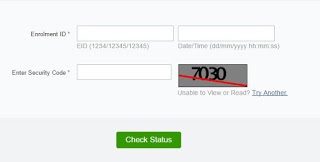
The top of your acknowledgement slip contains 14 digit enrolment number (1234/12345/12345) and the 14 digit date and time (dd/mm/yyyy hh:mm:ss) of enrolment. These 28 digits together form your Enrolment ID (EID).

How to Check my Aadhaar Card Status online ?

  • First you need to logon to https://uidai.gov.in/, for get Aadhaar card status online,
  • Than Click on “Check Aadhaar Status” option, in the lift side of Website, below Aadhaar online Services option,
  • You’ll see new webpage as shown in the below screen shot.
  • Now Enter your 28  Digits Numeric number & Security Code  in the mentioned box,
  • Than Click on “Check Status” option,
  • Finally your Aadhaar Card Status will be displayed.

Aadhaar_card_status

How to Retrieve Lost EID/UID  online ?

  • You need to click on  “Retrieve Lost UID/EID” Option
  • (If you have lost your Enrolment slip or Aadhaar number you can retrieve the same on your registered mobile. )
  • Now Select UID or EID ( You want to retrieve your lost  )
  • Enter your Full Name
  • Email Id,
  • Mobile Number,
  • Than Enter Security Code in the mentioned box,
  • Click on “Send one time password” option,
  • Now you’ll receive OTP in your Registered mobile,
  • Enter received OTP in the mentioned box,
  • Click on “Verify OTP” option,
  • Finally you will get your enrollment number.

For any more information on above topic, please tell us through below comment session.

Filed Under: Aadhar Card

How to link PAN Card Number with Aadhar Card/UIDAI Number by SMS and Online incometaxindiaefiling.gov.in

July 17, 2019 by admin Leave a Comment

How to link PAN Number with Aadhar Card? How to file ITR using PAN integration with Aadhar | Link Aadhar yo PAN | link aadhaar to pan | aadhar link to pan and many such questions will be answered here. Indian Government has made it a compulsion to link PAN number with UIDAI Aadhar Card on or before 31st July 2017. Procedure to apply for ITR is going to be bit different this time. In case you have a UIDAI card then you need to integrate it with PAN and mention the same during ITR process.

In this article we are going to explain 2 ways to integrate PAN to Aadhar. One is through simple mobile message and other is through web portal. You are suggested to have this integration completed if you want to complete a hassle free income tax return process this year.

Link Aadhar Card with PAN Number using Mobile SMS

Follow below steps:

  • Type message in format UIDPAN< 12 digit Aadhaar>< 10 digit PAN>
  • Send it to 567678 or 56161
  • Complete next steps as displayed on screen

This is how simple you can link your pan details with uidai aadhar card by sending simple message from your mobile phone. You don’t need to have registered mobile number (issued on your name or anything like) to get this integration done. Only thing you need to care about is your PAN and Aadhar Card numbers. Make sure you have sent correct numbers using given format.

Link Aadhar Card with PAN Number using Mobile Online

Income Tax Office has provided the provision to link both details online as well. They have launched a setup on their official portal. Best thing about it is ease of application. In order to keep the process hassle free they have not made it necessary to get registered (or any other such formality) before linking both numbers. Please follow below steps to link your adhar number with PAN card:

  • Visit official website at https://www.incometaxindiaefiling.gov.in/

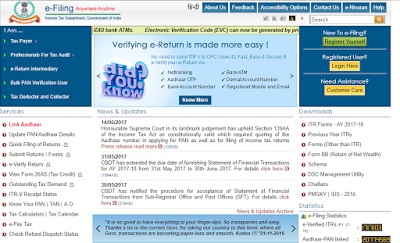
ITR-Homepage

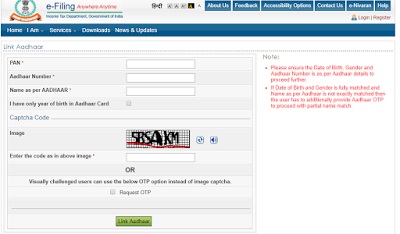
  • Check for first option in left menu which reads “Link Aadhar” to open below page

Link-Aadhar-Card-to-PAN-Number

  • Fill in all the columns and select “Link Aadhar” button
  • That’s it! Your aadhar card will not be linked to PAN card

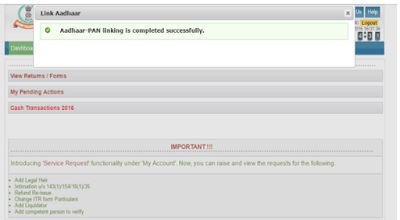
In case you are already registered with ITR website then you can avail the same option either through left bar (steps already explained above) or through the “profile” tab of your account. If everything is successful and as per expectation then you will get below message confirmation message:

Aadhar-Card-Linked-with-PAN-Number

If you don;t have the Aadhar number yet then you are requested to apply for it as soon as possible and use acknowledgment number till that time (you can still link both numbers through acknowledgment number issued at time of registration).

What is Aadhar Card is not linked to PAN Number till 30th June 2017?

Although no clear instructions about what to do if someone miss the chance to link aadhar card with PAN till 30th June are mentioned. However after the given date you will probably have to come up with additional approval from government officials (or the timeline might be increased as well).

Do I need to link PAN and Aadhar even if I apply for ITR on or before 30th June 2017?

No, you do not need to link both the systems in this case.

Documents required for linking PAN with Aadhar

Please do not worry about documents part. You don’t need to carry/upload any document for linking uidai with PAN. Simply fill in pan and adhar numbers along with basic details like name, captcha etc. That’s it, you don’t need to upload any other document after this.

Please let us know if you have any questions.

Filed Under: Aadhar Card

Aadhar Card download online | www.eaadhaar.uidai.gov.in

June 27, 2019 by admin Leave a Comment

eaadhaar.uidai.gov.in aadhar card status

It is Really Good News for the one who are immensely Seeking Aadhar Card. Because, Now Who have not  received Aadhaar Card manually Can Download e Aadhaar Letter from the official Website at eaadhaar.uidai.gov.in. All they  need is to enter some credentials to get your Aadhaar Card Copy through Online at it’s home portal www.eaadhaar.uidai.gov.in. You Can Print the generated Aadhaar and use it anywhere. Further Details are Provided below

How to Download Aadhar Card Online

What are Required To Download Aadhaar Card through Online:You must possess the following to access the aadhar letter pdf form to get a new card:

  • Enrollment Number
  • Resident Name
  • Area Pin Code

Enrollment Numer: 
Enrollment Number would be available at Right Side of the aadhar card, Like 1234/12345/12345 And date time (dd/mm/yyyy hh:mm:ss)

Download at www.eaadhaar.uidai.gov.in

Here are the step by step process on How to Download the Aadhar letter from the official website of www.eaadhaar.uidai.gov.in:

  • Go to Official web site: http://eaadhaar.uidai.gov.in
  • Enter the details Like Enrollment Number, ate Time , Resident Name, Pin Code After enter Captcha.
  • Click on ” Submit” to Move Forward
  • In this Step, the portal will ask for your mobile number (the phone number you registered in enrollment center)
  • Now you get OTP ( One time Password) from Aadhaar e-portal as a part of Verification Process.
  • Enter the password which was sent to the registered Mobile number to Proceed further..
  • Now Download the Aadhaar Card copy in PDF Format and enter your pin code Number to open it.

enter Your area pin code Correctly when  opening the pdf e Aadhaar Card, And Download that Copy

If you are still getting any problem, regarding the process of How to Download the e-aadhar card from the official portal at eaadhaar.uidai.gov.in , in the comment box below..we will try to update the details for your.

Video Tutorial of Download eaadhar card online

Filed Under: Aadhar Card

Aadhar Card Online

June 7, 2019 by admin Leave a Comment

This portal has been launched in public interest. The motto of this Aadhar Card Portal is to provide with useful information about Aadhar Card and Aadhar Enrollment Centers. We have provided a lot of information related to Aadhar Card on this website.

Aadhar Card has 12 unique digits printed on it. A unique QR Code (not Bar Code) is also printed on the card to verify the card is original or not. This code contains all the information of card holder in electronic form.

Important Links

Aadhar Card Online

Link Aadhaar Card with LPG/ Bank Account/ Voter ID & Pension Account Online

Steps to Apply Aadhar Card – Online or Offline

List of Required Documents for Aadhar Card

Aadhar Card Print – How to Print Aadhar Card Online?

Aadhar Card Status – Steps to Check at Aadhar Status

Update Aadhar Card- Make Online Correction in Aadhar (Method)

What is Aadhar Card?
Aadhar Card is the unique proof of Identity of individuals in India. It is a card which is issued by government of India after taking the finger prints and iris scan of people. The AADHAR Card is issued by UIDAI (Unique Identification Authority of India, Govt of India. This card can be used anywhere in India as a proof of Identity. It is provided by the government absolutely Free Of Cost.

Every individual’s unique demographic like residence address and bio-metric information like photo, fingerprints and iris scan details is taken by the Aadhar operator and the same information is stored in main database of UIDAI.

On front, the information like Name, Sex, Date Of Birth is printed along with the QR Code and Aadhar Number. Other information like Father’s Name and Address is printed on the back side. This information is available on the card both in Hindi and English language.

As it is mentioned on Aadhar Card- “Aadhar Card is proof of identity, not citizenship”, it is understood that the Aadhar Card can be used anywhere in India as the Proof of Identity only. It can not be used as a proof of citizenship. However it can be used on many places and departments in lieu of Voter ID Card.

Aadhar-Card-Online

The project of Aadhaar Card in India is maintained by the Unique Identification Authority of India (UIDAI). It was established by Government of India in Jan. 2009 under the Planning Commission of India.

Who can get Aadhar Card?

Any individual of any age and sex can apply for Aadhar Card. The persons having no citizenship of India also apply and get their Aadhar Card. That’s why it is also made compulsory for Kids (Children) also.

Validity of Aadhar Card

AADHAR Card once generated remains valid for lifetime. There is need not to renew the Aadhar Card in future.

Aadhar Compulsory or Not?

However Aadhaar Card is not compulsory for everyone, but the interested people can get their Aadhar Card as it may be used to get benefit of many government schemes like Pahal DBTL Scheme for getting subsidy in bank accounts. Aadhaar Card is completely voluntary and optional in country. It is not mandatory for everyone to get enrolled with it.

For any queries on above topic, please tell us through below comment session.

Filed Under: Aadhar Card Tagged With: Aadhar Card

  • « Previous Page
  • 1
  • …
  • 8
  • 9
  • 10
  • 11
  • 12
  • 13
  • Next Page »

Search List 1

Search List 2

Search List 3

How to Search Ration Card Number by Name

District Wise Ration Card Search

 Anantapur

Chittoor

East Godavari

Guntur

Kadapa

Krishna

Kurnool

Nellore

Prakasam

Srikakulam

Visakhapatnam

Vizianagaram

West Godavari

Recent Posts

  • APRationCard Smart Card Download
  • AP Smart Ration Card Now Available
  • What is the Process for member addition in Ration Card in Andhra Pradesh state ?
  • How to check AP Employee’s / Pensioner’s Salary / Pension Bill Status Online
  • How to Check Ration Card Status Online

Recent Comments

  • BUTCHI BABU on Guntur (District’s) Ration Shop Dealer Address | Phone Number | Status Check Online | FPS
  • A Lakshmi kanth on Circle Ii Urban (Mandal), Visakhapatnam (District) – Ration Card Search | Print Online Download
  • Sreerama Mary Aruna kumari on STO, Kamalapuram
  • Nagamalli on Visakhapatnam District’s Ration Card Download Online | YAP | TAP | WAP | RAP | JAP | White Card
  • M ESWARI on Makavarapalem (Mandal), Visakhapatnam (District) – Ration Card Search | Print Online Download
  • M ESWARI on Makavarapalem (Mandal), Visakhapatnam (District) – Ration Card Search | Print Online Download
  • Yogesh Kumar on PALWAL – Dist. BHARAT GAS AGENCIES Contact Details | Address | Online Booking
  • Devaraj on KOPPAL – Dist. BHARAT GAS AGENCIES Contact Details | Address | Online Booking
  • V.MAHABOOB BASHA on Rice Card Services in Mana Mitra (WhatsApp Governance).
  • Anand on Circle Iii Urban (Mandal), Visakhapatnam (District) – Ration Card Search | Print Online Download

Pages

  • About US
  • Apply for New Ration Card Andhra Pradesh | Download Ration Card Online | Status Check
  • Buy Adspace
  • Contact us
  • Hide Ads for Premium Members
  • Privacy Policy

Copyright © 2021 · eleven40 Pro Theme on Genesis Framework · WordPress .