MEE BHOOMI ; Download Adangal, 1B, FMB,Land Records Details of Andhra Pradesh

MEE BHOOMI ; Download Adangal, 1B, FMB,Land Records Details of Andhra Pradesh : Andhra Pradesh Chief Minister N. Chandrababu Naidu has launched New Website http://meebhoomi.ap.gov.in/ a digital depository of land records.for download Adangal, 1B,FMB through online . Mee Bhoomi Portal makes all land details along with Adangal/Pahani and 1-B details,available to the andhra Pradesh people. Andhra Pradesh Citizens avail this web portal for Check their Land Records details, download Adangal, 1B,FMB online. It is really good News for Andhra Pradesh People. Andhra Pradesh know their land records status easily.

The Revenue department recently computerized land information which will be connected to banks,sub-register offices and Meeseva centres. Now AP State Government launched Mee Bhoomi Web Portal for e-governance. People access land record details personally. If any mistakes for modifications or complaints, Land owners go to Mandal Revenue Office ( MRO office ) or Mee Seva Centers for Submit their grievances. Now Andhra Pradesh People logon to Mee Bhoomi Web Portal for Check their land records, download Adangals, 1B, FMB, and View their Village Map and check status of Village land records and download their Village adangal ,Village 1B through online. People can necessary entering their Aadhaar card number (UID) for view his land details.

How to download Adangal through Mee Bhoomi Portal ?

1. Visit to Mee Bhoomi Home Page

2. Click on “Adangal”

3. Select ” Mee Adangal” for download your personal Adangal, If you want to download Village Adangal than Select “Grama Adangal “.

4. Now Select your optional document (Survey Number / Account Number / Adhaar Number / Account Number)

5. Select your District Name in the Drop-down Menu

6. Select your Mandal Name in the Drop-down Menu.

7. Select your village Name in the Drop -down menu.

8. Enter your Selected Document Number.

9. Enter Capt-ch code in the below mentioned Box

10. Then Click on “Submit” Button ( Allow Pop up Window in your browser )

Finally Get Your Adangal online. If you want to download Village Adangal, Same Process will be apply ( Enter District, Mandal, village Name ) for download Village Adangal.

How to Download 1B through Mee Bhoome Portal ?

1. Visit to Mee Bhoomi Home Page

2. Click on “1B”

3. Select ” Mee 1B” for download your personal 1B, If you want to download Village 1B than Select “Grama 1B “.

4. Now Select your optional document ( Survey Number / Account Number / Adhaar Number / Account Number )

5. Select your District Name in the Drop-down Menu

6. Select your Mandal Name in the Drop-down Menu.

7. Select your village Name in the Drop -down menu.

8. Enter your Selected Document Number.

9. Enter Capt-ch code in the below mentioned Box

10. Than Click on “Submit” Button ( Allow Pop up Window in your browser )

11. finally get your 1B online.

If You Want to download Village 1B Than enter ( District Name, Mandal Name, Village Name ) remaining process will be same.

How To check Aadhaar linking status of Account Number ?

1. Click on “Aadhaar Linking

2. Select your Aadhaar Number or Account Number.

3. Select your District Name in the Drop-down Menu

4. Select your Mandal Name in the Drop-down Menu.

5. Select your village Name in the Drop -down menu.

6. Enter your Selected Document Number ( Aadhaar Number / Account Number )

7. Enter Capt-ch code in the below mentioned Box

8. Than Click on “Submit” Button.

How to Check Field Measurement Book (FMB) status online ?

1. Select your District Name in the Drop-down Menu

2. Select your Mandal Name in the Drop-down Menu.

3. Select your village Name in the Drop -down menu.

4. Select “Survey Number” in the Drop-down menu.

5. Enter Capt-ch code in the below mentioned Box

6. Click on “Submit” Button.

How to find Village Map through Mee Bhoomi Portal ?

1. Select your District Name

2. Select your Mandal Name

3. Select your village

4. Enter Capt-ch code in the below mentioned Box

5. Click on “Submit” Button.

How to download Mee Bhoomi Android App online ?

1. Go to the Mee-Bhoomi Home Page.

2. Than click on ” Download Mee Bhoomi Android App ” Option or Click below link for download Mee Bhoomi Android App : http://meebhoomi.ap.gov.in/Meebhoomi.apk

MA BHOOMI Telangana
Telangna State Government launched New Web portal “Ma Bhoomi Portal” (http://mabhoomi.telangana.gov.in/), will be launched by Chief Minister K Chandrashekar Rao and Deputy Chief Minister Md Mahmood Ali on 17-Feb-2016.Telangna People can avail this website for check their land record, Adangal/ Pahani, EC (Encumbrance Certificate), Market Value, Patta, Ownership and other details through online, and ROR1B, FMD Status through “Maa Bhoomi Portal“.

Ma Bhoomi Website : http://mabhoomi.telangana.gov.in/

For any queries regarding above topic, please tell us through below comment session.
Assam : How to Remove / Add name in Ration Card from

How to remove / add name in ration card from Assam, In case of birth of child For the addition to be made in the ration card , or if any in case of Death of family number, remove that person name in ration card in Assam, in this article we showing Procedure for Include / Delete name in ration card. we hope this article very useful to who searching Ration card related information in Assam.

How to include (add ) name in Ration card from Assam ?

In case of birth of child: For the addition to be made in the ration card , the birth certificate of the child is required along with ration card in which the addition has to be made along with the application neatly handwritten or typed on a plain paper addressed to the FCS&CA authority.

How to Remove / Delete name in Ration Card From Assam ?

In case of Death of Family number / Change Head of family or otherwise, remove name in Ration card from Assam, the death certificate is require along with ration card for remove name in Ration card or Change Head of family in the Ration card,in which the addition has to be made along with the application neatly handwritten or typed on a plain paper addressed to the FCS&CA authority.

What is the require document for Surrender/Add/ Remove name in Ration card ?

  • Original Ration Card
  • Local Certificate / Election Card / PAN / Driving license / Passport
  • Proof of Date of Birth(Birth Certificate/X Pass Certificate/declared/other)
  • Surrender Certificate in original (for inclusion, if any)
  • Death Certificate in case of death of a member

What is the required documents for Change of Head of Family ?

  • Original Ration Card
  • Death Certificate in case of death of Head of Family
  • No Objection Certificate

What is the required documents for Child to Adult Conversion ?

  • Original Ration Card
  • Proof of Date of Birth (Birth Certificate / X Pass Certificate / as declared / other)

Whare to submit Ration card application in assam ?

The application ration card should be made to the FCS & CA authority of the District/Sub-Division(C)

For any queries regarding above topic, please tell us through below comment session.

Andaman and Nicobar New Ration Card Application Procedure | Download Application online

How to obtain New Ration Card in Andaman and Nicobar | Download Application online : Ration Card ( Family Identity Card )  Very important document in India. and it is a family identify f document issued by each state government for the people to buy goods like food grains, wheat, sugar and kerosene in subsidy rates depending on their economic condition. Ration Card is Very important document for poor people. this article helpful to how to apply New Ration card in Andaman Nicobar. The Directorate of Civil Supplies and Consumer Affairs  of Andaman Nicobar has providing Various online Services for people. putting all ration card information in department official Website.

How to apply New Ration Card in Andaman Nicobar ?

Complete Procedure for Apply New Ration Card in Andaman Nicobar.
The Directorate of Civil Supplies and Consumer Affairs issuing ration cards to residents of Andaman and Nicobar Islands . Andaman Nicobar people who apply for new ration card those people first download New ration card application  through department website. You’ll also use below link for download Ration Card application  http://db.and.nic.in/csca/Downloads/NEW%20DUPLICATE%20FIC.pdf

Attach below documents for obtain New Ration Card .

  • Required Documents for New Ration Card
  • Self Declaration and Certificate from Pradhan / Ward Councilor
  • Local Certificate / Islander’s Identity Card
  • Proof of Date of Birth
  • Birth Certificate / X Pass Certificate / as declared / other)
  • Proof of Residence
  • Photo Identity – Islander’s Identity Card / Election Identity Card/ PAN/ Driving license/ Passport)

After filled all required information and attached necessary document, Submit the application form to the below mentioned offices for obtaining Ration Cards.


  • Directorate of Civil Supplies & Consumer Affairs office at Port Blair for the residents of Port Blair, Ferrargunj, Neil and Havelock Island.
  • Circle Office, Rangat (Tehsildar, Rangat) for residents of Rangat Tehsil.
  • Assistant Director (CS&CA), Mayabunder for residents of Mayabunder Tehsil.
  • Circle Office, Diglipur (Tehsildar, Diglipur) for residents of Diglipur Tehsil.
  • Circle Office, Little Andaman (Tehsildar, Little Andaman) for residents of Little Andaman Tehsil. Assistant Director (CS&CA), Car Nicobar for residents of Car Nicobar Island.
  • Circle Office, Nancowry (Assistant Commissioner, Nancowry) for residents of Nancowry group of Islands.
  • Circle Office, Campbell Bay (Assistant Commissioner, Campbell Bay) for residents of Great Nicobar Islands

Eligibility for Apply New Ration Card in Andaman Nicobar.

  • Citizen of India.
  • Permanent resident / old inhabitant of the Island.
  • Not in possession of any ration card.

For any queries regarding above topic, please tell us trough below comment session.

Andaman and Nicobar Know Your Ration Card Details online through db.and.nic.in

Andaman and Nicobar Know Your Ration Card Details online through db.and.nic.in : Ration Card Information in Andaman & Nicobar Islands Directorate of Civil Supplies and Consumer Affairs Providing Ration card Status online, If you Want to know your Ration card details, Check / Verify your Ration Card details online. Just you Need to your Ration card Number OR Family Holder Name OR FPS No / Member Name, Get your Ration Card information online. Andaman And Nicobar People who applied New Ration card online those person check their Ration Card Application Status online, Though Acknowledgement Number.

About  Andaman & Nicobar Islands by Directorate of Civil Supplies and Consumer Affairs Department

The Andaman and Nicobar Administration views the Targeted Public Distribution System (TPD. The Administration is committed to implement the TPDS to the best advantage of the beneficiaries. At present TPDS benefits the poorest of the poor identified families under the Antyodaya Anna Yojna (AAY) and other identified population living Below the Poverty Line (BPL) within the overall norms approved by the Department of Food and Public Distribution, Government of India.issuing ration cards to eligible families living below the Poverty Line, including the AAY families, as per the norms approved by the Family Identity Cards are being issued to all the heads of families,with details about family members included in the card.Based on their economic condition, Above Poverty Line (APL), Below Poverty Line (BPL) and Antyodhaya Anna Yojana (AAY) Ration card issued by Government of India.

How To check Andaman and Nicobar Ration Card Status online ?

How-To-check-Andaman-and-Nicobar-Ration-Card-Status-online

1. Beneficiaries can Visit Civil Supplies and Consumer Affairs Official Website.

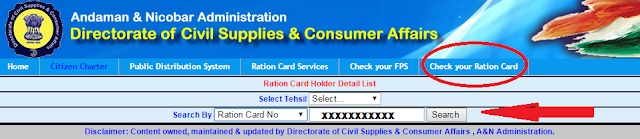
2. Than Click on “Check Your Ration Card” Option in the Main Menu Bar.

3. Selecting tehsil (Ration card Number, Family head name, Fair Price Shop (FPS) number or Member name)

4.  Now Enter Selected Document details in the mentioned Box.

5. Click on “Search” Button.

6. Finally You’ll get Ration Card Details.

Official Website : http://dcsca.andaman.gov.in/

For any queries regarding above topic, please tell us through below comment session.