APRationCard

  • Help
    • Ration Shops List 1
    • Ration Shops List 2
    • Ration Shops List 3
  • News
    • Media
    • Bharatgas
    • Indane Gas
    • HP Gas
    • Home
    • Elections
    • Rules
    • Passport
    • Birth Certificate
    • ATM Card
    • APSRTC
  • Aadhar Card
    • Revenue
    • epos
    • PAN Card
  • Ration Card
    • Ration Shop
    • Spandana
    • Mandal
    • District
    • Helpline
  • Contact us
You are here: Home / Archives for Aadhar Card

Update Aadhar Card- Make Online Correction in Aadhar (Method)

June 7, 2019 by admin Leave a Comment

It is noted some times we find mistakes in our Aadhar Card like Wrong Name, Date of Birth (DOB), Address, Mobile Number, Sex (Gender) etc. That time we want to know from where we can correct these details and Update (Make Correction) Aadhar Card. In some cases we have changed our Name or Address and want to update our New Name/ Address in Aadhar Database, need not worry about these things.

Important Links

Aadhar Card Online

Link Aadhaar Card with LPG/ Bank Account/ Voter ID & Pension Account Online

Steps to Apply Aadhar Card – Online or Offline

List of Required Documents for Aadhar Card

Aadhar Card Print – How to Print Aadhar Card Online?

Aadhar Card Status – Steps to Check at Aadhar Status

Update Aadhar Card- Make Online Correction in Aadhar (Method)

Update Aadhar Card Methods

UIDAI (Unique Identification Authority of India), Government of India has provided both Online and Offline facilities to update your Aadhar Card Data/ Record in UIDAI database. Using online method, you can update Aadhar Card details through the UIDAI website. UIDAI has provided separate portal for Aadhar Data Updation. For offline method, you will have to send your Aadhar Correction Form to the Aadhar Regional Office.

The applicants applying online for any correction in Aadhar Card will have to visit the Official Aadhar Website and fill up the Online Aadhar Update/ Correction Form. You can visit the “Aadhar Self Service Portal” at the URL i.e. https://ssup.uidai.gov.in/web/guest/ssup-home online.

When you will visit the above website, you should read the instruction given on the page. After reading the full instructions, you will have to click on the link i.e. “To submit your update/ correction request”. The website will give you the option to fill your application form online and update aadhar card through online mode. We’re giving here step by step instructions-

Step 1– Login with Aadhar

After clicking on the “Submit Update/ Correction Request” link , you will see Step 1 as Login with Aadhar. You will have to enter you Aadhar Card Number in given text box. In the text verification box, enter the text given on the screen. After this process click on the Send OTP button. You will instantly receive the OTP code on your mobile.

Step 2– Data Update Request

Here you will see a form, in which you have to mention the required changes you want in your Aadhar Card. Enter your data in this form very carefully. After doing it submit the form.

Step 3– Document Upload

Here you will have to upload the Supporting Documents for Aadhar Card through the upload options given on the page.

Step 4– BPO Service Provider Selection

Select a BPO service provider i.e. Karvy or Aegis and submit your form.

After following al these steps, you will receive an SMS, in which your request reference number will be mentioned. You can Track your Aadhar Card and Check Status after a few days.

The Supporting Necessary Documents you can submit through online mode.

As per the changes you require, you will have to upload the related document on UIDAI website as a proof. For example if you want to make change in your name, you will have to supply any government issued document or identity which authenticate your real name, which you want to fee in Aadhar Database. As Second example, if you want Aadhar Card Update or to change or correct your date of birth, you will provide a document like Date of Birth Certificate or any other document which proves your Date of Birth.

In case of Sur Name

It is common that after marriage the sur name of a Girl (woman) is changed in India. So, if you are married and your Aadhar Card was made before marriage, you can easily change/ update your Sur Name.

Detailed Instructions about Offline & Online Aadhar Data Update can be found at official Aadhar Card Website through the URL at https://uidai.gov.in/update-your-aadhaar-data.html. Visit the Online Update Aadhar Card Portal at- https://ssup.uidai.gov.in/web/guest/ssup-home

The Online Data Update in Aadhar Card is easy process and can be done from your home. In case you have not Internet facility or computer at your home, you can visit a cyber cafe or any internet shop for the same. However, you can also Update Your Aadhar Card Offline and you need not to use any internet facility. You only need to Fill Up Aadhar Card Update/ Correction Form, and send to UIDAI.

After sending the form you can Check your Aadhar Card Update Status after a few days on UIDAI website, and also can Download your Aadhar Card.

For any queries on above topic, please tell us through below comment session.

Filed Under: Aadhar Card Tagged With: Aadhar Card

How To Apply for AADHAAR Card in Andhra Pradesh & Telangana

May 6, 2019 by admin Leave a Comment

How To Apply AADHAAR Card :- AADHAAR Card is a unique identification card which is referred for address and identity proof across India. The AADHAAR Card which contains 12 digits provided by Govt of India for every individual residents of India (including migrants).

How To Apply AADHAAR Card:-
Candidates only apply through online for an appointment date by selecting enrollment center. Candidate may apply without online appointment, by physically visiting to the AADHAAR card enrollment center.

NOTE:– That not all AADHAAR card centers have online appointment facility. Whatever having the online appointment facility are listed in the official of UIDAI. You CAN NOT apply for AADHAAR card through online, You can only book your slot for an appointment date at AADHAAR card enrollment center.

Online Booking of Appointment for Aadhaar Enrollments has been started on a trial basis at selected Enrollment Centers

AADHAAR-Card

UIDAI – AADHAAR Card – Appointment for Aadhaar Enrollment (Available for Few Centers)

AADHAAR Card Online Appointment date booking Process :-

  • Log on to website http://appointments.uidai.gov.in/ESLocator.aspx
  • Enter The Following details such as “Name, Email ID, Phone No and No. Of Persons“
  • Go to second table and Choose State, District, Locality and enrollment center and finally click on “Check Availability” in order to check the availability status
  • In the third table enter date and time along with verification code
  • Finally Click on Fix Appointment.

Go to AADHAAR card center, for which you booked appointment date on the given date and time along with all required documents

How to apply for AADHAAR card at the center without appointment?
Go to Near by AADHAAR card center which falls under your region along with required documents such as Generally 1 identity and 1 address proof document is required to apply for AADHAAR card. Enquire about date and time and also about the documents required to apply AADHAAR card.

Contact Info:-
Toll-Free Number- 1800-300-1947
Email – help@uidai.gov.in

Note :- You Must refer and follow uidai.gov.in which is the ONLY official website of the UIDAI

Filed Under: Aadhar Card Tagged With: AADHAAR

AADHAAR CARD STATUS, Check Online through UIDAI official website www.uidai.gov.in

January 27, 2019 by admin Leave a Comment

AADHAAR CARD STATUS, Check Online through UIDAI official website www.uidai.gov.in : Procedure for Check Aadhaar card status enquiry online : If you have already applied your Aadhaar card, You wants to check that aadhar card status, Now Aadhaar Card Status check online through UIDAI official Website www.uidai.gov.in . Unique Identification Authority of India Government of India has Providing online Services for Citizens Check Aadhaar Card Status online, Update Aadhaar Card Data online, Download Aaadhaar Card online etc. Now days Aaddhar Card is important Document from India.Aadhaar can be used in any system which needs to establish the identity of a resident and/or provide secure access for the resident to services/benefits offered by the system. Aadhaar can be used in the delivery of the Public Distribution System, Food Security, Mid Day Meals, Integrated Child Development Scheme,Mahatma Gandhi National Rural Employment Guarantee Scheme, Swarnajayanti Gram Swarozgar Yojana, Indira Awaaz Yojana, Prime Minister’s Employment Guarantee Program, Indira Gandhi National Old Age Pension Scheme,Healthcare, Other miscellaneous purposes including Property Transactions, Voter ID, PAN Card etc.

Aadhaar-Card-Status-online
If any person can lost their Aadhaar Card, those person can download their e-Aadhaarthrough Uidai website, Uidai Providing Aadhaar Card Correction facility through Aadhaar Self Service Update Portal. If any citizen have mistakes in Aadhaar Card those person Can visit Aadhaar Self Service Portal for correct their mistakes in Aadhaar Card. People can update their Name, Address, Gender, Date of Birth, Mobile Number and Email ID through this Aadhaar Self Service update portal.in this article, I am Showing to How to check Aaadhaar Card Status online. If any person can check their Aadhar card, those person can follow below instruction for Check aadhaar Card Status online.

How To Check Aadhaar Card Status online ?

Aadhar-Card-Status

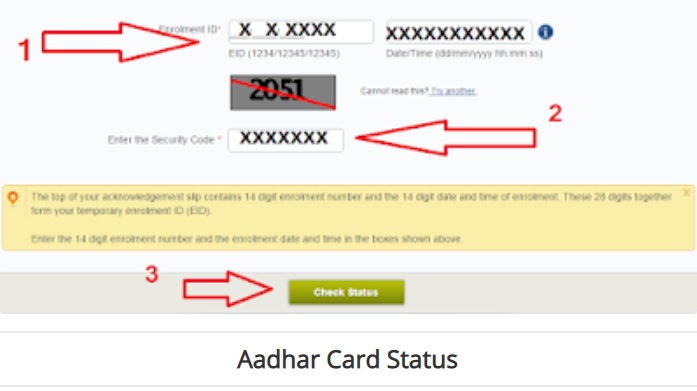
1. Visit Uidai official website http://www.uidai.gov.in/

2. Than Click on “Aadhaar Services > Enrolment/Download E-aadhaar/Update Option“

3. Now Click on “Aadhaar Card Status” Button.

3. Now you’ll See Aaadhaar Status Web page.

4. Enter you Aaadhaar Card enrolment ID in the mentioned Box

5. Than Enter Captch code in the Below mentioned Box ,

6. Than Click on “Check Status” Button.

7. Finally Get your Aaadhar Card Enrolment Status online.

You can also Visit Aadhaar Card Status Webpage Directly following link https://resident.uidai.net.in/check-aadhaar-status

For any queries regarding above topic, please tell us through below comment session.
Filed Under: Aadhar Card Tagged With: AADHAAR

E-Ration Card Jammu and Kashmir linked With Aadhaar Card

January 26, 2019 by admin Leave a Comment

Consumer Affairs and Public Distribution (CAPD) of Jammu and Kashmir will soon launch E-Ration card and link them with Adhaar Number, which would enable the beneficiaries to get the E-Ration Card online, Ration card details will be available from department website http://jkcapd.nic.in/ really it’s good news for Ration card Card holders, “E-ration cards download facility  will be given in Jammu and Kashmir“, Minister for Consumer Affairs and Public Distribution.

Read : Jammu and Kashmir e-Ration card  News

Related Search : Jammu and Kashmir, E-Ration Card, Ration card download, Ration card details, Ration card status, Ration card linked with Aadhaar number, Digital Ration Card,

Filed Under: Aadhar Card Tagged With: Jammu and Kashmir

Tamilnadu Ration card link with aadhaar Number through Mobile app

January 24, 2019 by admin 2 Comments

Tamilnadu Ration card link with aadhaar Number through Mobile app : TamilNadu Government decides to automate PDS Operations, moving from Manual to Automated, Improved Consumer Online Services through  Public Portal, Mobile App, SMS, Call Center, eMail, Linking of Aadhaar number in ration card has been enabled through Mobile app and website.

Tamilnadu-Ration-card-link-with-aadhaar-Number

How to Tamilnadu Ration card link with aadhaar Number ?

Step by Step Procedure for Link Tamilnadu Ration Card with Aadhaar Number.

  • People can First Visit EPDS Tamilnadu Poral https://www.tnpds.gov.in/,
  • Click on ” Free download PDS Public Mobile app” ( You Can also download Mobile app in Google Pay store )
  • After Completed Download Process, Than Install mobile app in your Android mobile,
  • After Completed Installation Process, Now Choose you language in the Android app,
  • Enter Your Mobile Phone Number in the mentioned Box, Than click “Submit” Button,
  • OTP (One Time Password ) will be Send to Your Mobile Phone, Than Enter OTP send in your mobile number
  • If your Mobile Number not Registered with PDS System, Again Register your Details in the PDS System,
  • Click on “SCAN”  option, Now Put your Aadhaar Card QR Code, Front of your Mobile Camera, Now PDS System Will be  automatically collects your Aadhaar Details,
  • After completed Registration Process, Login with your Mobile Number,
  • Now Enter Your all Family Members Aadhaar Card Details  by scan Aadhar Option,
  • After Completed all process,  all your family members Aadhaar Number linked With Smart Ration Card.

For any queries regarding above topic, please tell us through below comment session.
Filed Under: Aadhar Card Tagged With: Tamil Nadu, Tamilnadu

  • « Previous Page
  • 1
  • …
  • 10
  • 11
  • 12
  • 13
  • Next Page »

Search List 1

Search List 2

Search List 3

How to Search Ration Card Number by Name

District Wise Ration Card Search

 Anantapur

Chittoor

East Godavari

Guntur

Kadapa

Krishna

Kurnool

Nellore

Prakasam

Srikakulam

Visakhapatnam

Vizianagaram

West Godavari

Recent Posts

  • APRationCard Smart Card Download
  • AP Smart Ration Card Now Available
  • What is the Process for member addition in Ration Card in Andhra Pradesh state ?
  • How to check AP Employee’s / Pensioner’s Salary / Pension Bill Status Online
  • How to Check Ration Card Status Online

Recent Comments

  • BUTCHI BABU on Guntur (District’s) Ration Shop Dealer Address | Phone Number | Status Check Online | FPS
  • A Lakshmi kanth on Circle Ii Urban (Mandal), Visakhapatnam (District) – Ration Card Search | Print Online Download
  • Sreerama Mary Aruna kumari on STO, Kamalapuram
  • Nagamalli on Visakhapatnam District’s Ration Card Download Online | YAP | TAP | WAP | RAP | JAP | White Card
  • M ESWARI on Makavarapalem (Mandal), Visakhapatnam (District) – Ration Card Search | Print Online Download
  • M ESWARI on Makavarapalem (Mandal), Visakhapatnam (District) – Ration Card Search | Print Online Download
  • Yogesh Kumar on PALWAL – Dist. BHARAT GAS AGENCIES Contact Details | Address | Online Booking
  • Devaraj on KOPPAL – Dist. BHARAT GAS AGENCIES Contact Details | Address | Online Booking
  • V.MAHABOOB BASHA on Rice Card Services in Mana Mitra (WhatsApp Governance).
  • Anand on Circle Iii Urban (Mandal), Visakhapatnam (District) – Ration Card Search | Print Online Download

Pages

  • About US
  • Apply for New Ration Card Andhra Pradesh | Download Ration Card Online | Status Check
  • Buy Adspace
  • Contact us
  • Hide Ads for Premium Members
  • Privacy Policy

Copyright © 2021 · eleven40 Pro Theme on Genesis Framework · WordPress .