APRationCard

  • Help
    • Ration Shops List 1
    • Ration Shops List 2
    • Ration Shops List 3
  • News
    • Media
    • Bharatgas
    • Indane Gas
    • HP Gas
    • Home
    • Elections
    • Rules
    • Passport
    • Birth Certificate
    • ATM Card
    • APSRTC
  • Aadhar Card
    • Revenue
    • epos
    • PAN Card
  • Ration Card
    • Ration Shop
    • Spandana
    • Mandal
    • District
    • Helpline
  • Contact us
You are here: Home / Archives for Aadhar Card

Update Aadhaar Card Information Online / Amend Your Aadhaar data Offline/Post

April 7, 2016 by admin 2 Comments

Update Information on Aadhaar card through Online. Aadhar data correction process is given below. Candidates may amend Surname, Name, Gender modification, edit Date of Birth on Adhaar letter, and update new mobile number to your aadaar card. Even if you have given a information for your aadhar, when you check your aadhaar card, the information was updated wrongly on database and print the same. In this case, you can match it with you certificates and other documents. In order to correct, your data on aadhaar letter such as Name, Gender, Date of Birth, Address and Mobile Number, you have two ways either through online from http://uidai.gov.in or by sending their request through post.

No need to worry, if your Aadhaar details are incorrect on your card. Because you are given a chance to amend the the aadhaar information. Citizen of India may update their Aadhaar data such as Name , Gender, Date of Birth, Address and Mobile Number.

Update Aadhaar Card Information Online at : http://uidai.gov.in/update-your-aadhaar-data.html

Update-Aadhaar-Card-in-Telugu

Update-Aadhaar-Card-in-Telugu

Note: Please read the instructions carefully at (uidai.gov.in/update-your-aadhaar-data.html), Before submitting/sending the request.

If you want to know how to update aadhaar details (Amend UID data), Read below information yourself knew every thing.
aadhaar-cards

Check Status of Update Aadhaar Data

Candidates who already submitted their details for Update Aadhaar, can check their status here: https://ssup.uidai.gov.in/web/guest/check-status by entering your Aadhaar and URN to check status

Aadhaar Important Links

How to apply for Aadhaar Card

How to check Aadhaar letter status

How to Download Aadhaar Card

How to change Information on Aadhaar

Steps to Validate Digital Signatures

UPDATE AADHAAR DATA THOUGH ONLINE PORTAL:

Resident of India may update/amend their aadhaar data through online from UIDAI’s official site at https://ssup.uidai.gov.in/web/guest/ssup-home

There are Three easy steps to update aadhaar profile information those are as follow

  • STEP 1: Login with Aadhaar,
  • STEP 2: Upload Documents and
  • STEP 3: Select BPO Service Provide and submit request.

Procedure to Update Aadhaar Info through Online:

  1. Having a mobile number is mandatory for using the Update Portal
  2. If you have declared a mobile number at the time of enrolment, enter your Aadhaar Number to get an OTP (One Time Pin) at that mobile. If you have not declared your mobile at the time of enrolment, then enter your Aadhaar number. You will be asked to provide a mobile number to receive OTP. In case you have lost/do not possess anymore, the mobile, that you declared at the time of enrolment, you will have to either visit nearest Update Centre or send your Update request through Post.
  3. Enter OTP and captcha to login to the Update Portal
  4. Select the fields you want to be updated /corrected. You can select more than one field also.
  5. Fill the fields with current details in English as well as Local Language.
  6. Depending on the field to be updated, attach self attested supporting documents as per the Valid Documents List. Refer Link for valid documents.
  • Name Correction/Update : Requires PoI listed in “Supported Proof of Identity(PoI) Documents Containing Name and Photo for Name Corrections/Update“
  • Date of Birth Correction : Requires DoB listed in “Supported Proof of Date of Birth (DoB) Documents“
  • Address Corrections/Change : Requires PoA listed in “Supported Proof of Address (PoA) Documents Containing Name and Address“
  • 7. Review the data entered for correctness and completeness in English as well as local language. Note that Date of Birth will not appear in local language. Also any numeric figures will not be transliterated in local language. UIDAI will not make any corrections to the information in your request.
  • 8. Submit the request. Note down your Update Request Number (URN) carefully for future reference and tracking. You can also download /Print your Update Request copy.
  • 9. Currently SSUP portal is supporting update request for below languages.

SEND UPDATE REQUEST THROUGH POST:

If you want to change Aadhaar card information through post, you may below steps

Residents can Update/Correct the following six information on their Aadhaar letter by sending an Application through Post to UIDAI:

Aadhaar Data Correction Application Form Download

Instructions for Sending Update Request Through Post

Procedure to Update Aadhaar Info through Offline:

1. Click here to Download the Aadhaar Update/Correction Form

2.Fill the Update request form in capital letters and mention the Mobile number correctly.

Mobile number is mandatory for sending an update request by post.

3.Depending upon the field to be updated, send self-signed (self attested) supporting documents as per the Valid Documents List attached in Annexure I.

a. Name Correction/Update – Requires PoI listed in “Supported Proof of Identity (PoI) Documents Containing Name and Photo for Name Corrections/Update”

b. Date of Birth Correction – Requires DoB listed in “Supported Proof of Date of Birth (DoB) Documents”

c. Address Corrections/Change – Requires PoA listed in “Supported Proof of Address (PoA) Documents Containing Name and Address”

4.In case a child is below five years, parent/guardian can sign the copies of documents. In all other cases, the resident must sign the copies of documents themselves

5.Aadhaar Number on all copies of documents. Mention Type of Document (PoI/PoA/DoB) on the copy of the document

6.Mark the envelope as “Aadhaar Update/Correction” on top. Seal the envelope properly.

7.Send the Aadhaar Correction form along with the supporting documents to one of the addresses given in Annexure II.

List of Valid Documents for Data Update

Annexure I
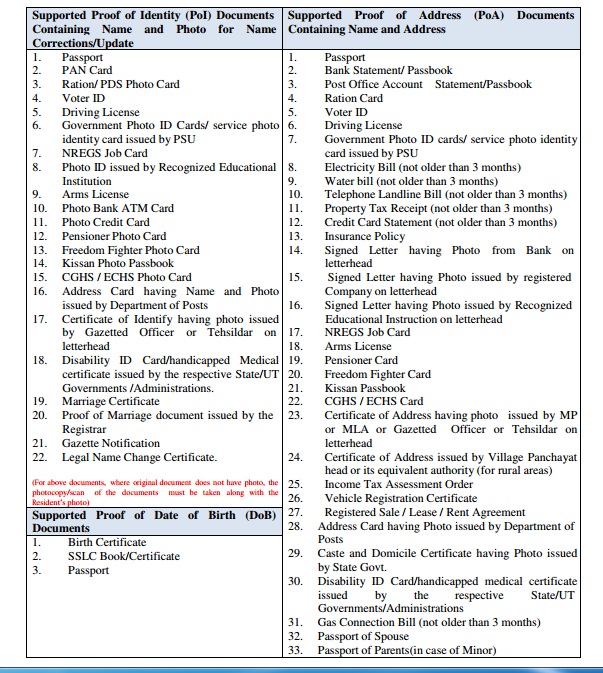
list-of-proof-doc

Annexure II

aadhaar-address-details

Aadhaar Help Desk:-

  • Aadhar Toll Free Number- 1800-300-1947
  • Aadhar Email – help@uidai.gov.in

Aadhaar Telephone Numbers:-

  • Lucknow (UP): 0522- 2304978
  • Ranchi: 0651-246016
  • Mumbai : 022 – 22186168
  • Bangalore: 080-22340862
  • Hyderabad: 040-23119269
  • Chandigarh: 0172 25085983

Note :- You Must refer and follow uidai.gov.in which is the ONLY official website of the UIDAI.

Filed Under: Aadhar Card

Download Aadhaar letter – eaadhaar.uidai.gov.in (Online Aadhar card)

April 7, 2016 by admin Leave a Comment

Apply for aadhaar, check Aadhar status, track aadhar letter details and download e-aadhaar card online. How to download e-aadhaar procedure is given below. UIDAI details find at eaadhaar.uidai.gov.in.After a long wait of time, Unique Identification Authority of India (UIDAI) has finally launch its e-Aadhaar portal through which the people who have enrolled for Aadhar Card and waiting for their Aadhaar letter / Aadhaar Card may download their Aadhaar letter / Card in a easy way through online from UIDAI’s website and use it any where by just taking a printout of the same. In order to download the Aadhaar letter, it is necessary to have both your enrollment number and date time of your enrollment. The complete details regarding to downloading procedure of Aadhaar letter or Aadhar card through online is given below

aadhaar-card-letter

How to Download E-aadhaar Letter / Card ?

You can download your e-aadhaar letter through online from https://eaadhaar.uidai.gov.in/. If Your Aadhaar has been generated, you may follow the below given steps to download your e-aadhaar Letter / Card.

Aadhaar Important Links

How to apply for Aadhaar Card

How to check Aadhaar letter status

How to Download Aadhaar Card

How to change Information on Aadhaar

Steps to Validate Digital Signatures

I have Enrollment Id :-

Step 1:-

  • You are required to open the website : https://eaadhaar.uidai.gov.in
  • Check on Enrollment Id
  • Enter your Enrollment Number/Aadhaar Number
  • Full Name
  • Pin Code
  • Image Text
  • Mobile number
  • Click on GET ONE TIME PASSWORD button
  • (One time password will be sent to the mobile Number that is enter in the above Mobile number column)

Step 2 :-

  • Enter the Enter OTP in the given box
  • Finally Click on Validate & Download button.

If you see ‘validity unknown’ icon on your e-Aadhaar, then click here to follow instructions or you can validity your e-Aadhaar card by watching video.

Video Link : https://eaadhaar.uidai.gov.in/resources/how_to_validate_digital_Signature.webm

OR

I have Aadhaar :-

Step 1:-

  • Log on to the website : https://eaadhaar.uidai.gov.in
  • Check on Aadhaar
  • Enter Your Enrollment Number/Aadhaar Number
  • Full Name
  • Pin Code
  • Verification Image Text
  • Click on GET ONE TIME PASSWORD button
  • (One Time Password would be send to your registered mobile number)

Step 2 :-

  • Enter the Enter OTP in the given box
  • Finally Click on Validate & Download button.

If you see ‘validity unknown’ icon on your e-Aadhaar, then click here to follow instructions or you may validity your e-Aadhaar card by watching video.

Video Link : https://eaadhaar.uidai.gov.in/resources/how_to_validate_digital_Signature.webm

To see your downloaded e-Aadhaar letter which will be in pdf format and password protected, Please enter your postal code as password and you take printout of your Aadhaar card by pressing Ctrl + P.

If you have access to the mobile number that was submitted in aadhar registration, you can proceed through “I have Aadhaar” procedure in which you have to produce your Aadhaar Number, in order to download your aadhaar letter / card.

  • Else You can Use “I have Enrolment Id” procedure to download e-Aadhaar letter

Aadhaar Helpline:

Candidates who are having queries regarding to Aadhaar card may dial or email below given contact inform.

Aadhar Toll Free Number:- 1800-300-1947

Aadhaar Email: – help@uidai.gov.in

Note :- You Must refer and follow uidai.gov.in which is the ONLY official website of the UIDAI

Citizens of India may download their aadhar card through internet from any where and you belong any state of India.

Filed Under: Aadhar Card

Check Aadhaar Card Status (UIDAI) Through Online / Via Mobile Phone

April 6, 2016 by admin Leave a Comment

Check Aadhaar Card Status or Check UIDAI application status through online at Aadhaar Kiosk resident.uidai.net. Aadhar Letter Status may be also check via Mobile Phone / SMS as well. The procedure how to check e-aadhar letter status is given below in detailed.

After applying for Aadhaar, people want to know their status whether it is rejected or approved. If it is rejected, what is reason ? So it is very important to know your Aadhaar Card status.

Aadhaar Important Links

How to apply for Aadhaar Card

How to check Aadhaar letter status

How to Download Aadhaar Card

How to change Information on Aadhaar

Steps to Validate Digital Signatures

How to find the Enrollment Id on your acknowledgement slip?

Candidate who don’t know how to find the Enrollment Number on your acknowledgement slip may CLICK HERE in order to know where the enrollment id seen on your acknowledgement receipt.

Click Here to know How to apply for Fresh Passport

Candidates those who applied for Aadhaar Card and willing to knew the Status of their Aadhaar letter may find the Status through resident.uidai.net.in by entering the required 14 digit Enrollment Id or 28 digit Enrollment Id with date time stamp which is printed on your acknowledgement slip. Acknowledgement slip is nothing but the slip that is given to you at the time of aadhar registration.

Click here to know How to apply for Aadhaar

How to Check your Aadhaar Card Status?

  1. Candidate may log on to website https://resident.uidai.net.in/web/resident/check-aadhaar-status
  2. Enter 14 digit Enrollment ID/Number or 28 digit Enrollment Id with date time stamp (The Enrollment ID, date time stamp are available on your acknowledgement slip)
  3. Enter “Verification code” in an appropriate box
  4. Finally click on “Submit” button
  5. Check your Aadhaar Card Status

OR

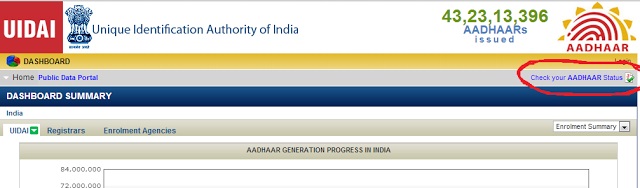
  • Log on the website https://portal.uidai.gov.in
  • Click on the ” Check your AADHAAR Status ” Link at top right as below shown.

Aadhaar-Status

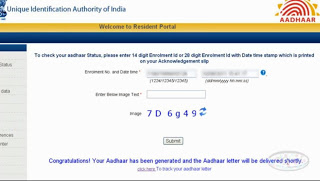
  • Enter 14 digit Enrollment ID/Number or 28 digit Enrollment Id with date time stamp
  • Type “Verification code” in an appropriate box
  • Click on “Submit” button to check your Aadhaar Card Status.
  • Now You can see the status of Your Aadhaar card on your screen, if you have entered all the details correctly. Status will be like “IN PROCESS” or “Congratulations! Your Aadhaar has been generated and the Aadhaar letter will delivered shortly”.

If your Aadhaar status is In Process, you will get message like in the below given image.

In-Process-Aadhaar-status

If your Aadhaar status is “Congratulations! Your Aadhaar has been generated and the Aadhaar letter will be delivered shortly”, you will get message like in the below given image.

Aadhaar-has-been-generated

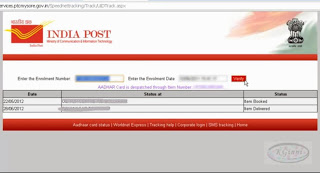
To track your aadhaar letter Click on Click here to track your aadhaar letter under “Congratulations! Your Aadhaar has been generated and the Aadhaar letter will delivered shortly”.

how-to-track-your-aadhaar-letter

Once you have clicked on click here, you will get screen as above shown in which you have enter your Enrolment Number and date to track your aadhaar card. The status will be item booked or item delivered etc..

Aadhar-status

Click here to Update Aadhaar Card Data Online / Offline Aadhar Card Status via Mobile Phone:-
Candidates also find their Aadhar Card Status via Mobile. In order to check your aadhaar card status. you may follow the below given steps.

Type “ UID STATUS + 14 Digits Enrollment Number” and send it to 51969

If your Aadhar Card is completed UIDAI send your Aadhar Card Number to your mobile ( If Aadhar Card is not created UIDAI send you the Status of Aadhar Card )

Example:-
Type <UID STATUS 12345678901234> Send SMS to 51969.

Click Here to Download Aadhaar letter

Contact Info:-

Toll-Free Number- 1800-300-1947

Email – help@uidai.gov.in

Note :- You Must refer and follow uidai.gov.in which is the ONLY official website of the UIDAIBirth Certificate application Process

You can check the status for the following states & UT Rajasthan, Madhya Pradesh, Maharashtra, Andhra Pradesh, Uttar Pradesh, Jammu and Kashmir, Gujarat, Karnataka, Odisha, Chhattisgarh, Tamil Nadu, Bihar, West Bengal, Arunachal Pradesh, Jharkhand, Assam, Himachal Pradesh, Uttarakhand, Punjab, Haryana, Kerala, Meghalaya, Manipur, Mizoram, Nagaland, Tripura, Andaman and Nicobar Islands, Sikkim, Goa, Delhi, Puducherry, Dadra and Nagar Haveli, Chandigarh and Daman and Diu Lakshadweep

Visit: eaadhaar.uidai.gov.in

Filed Under: Aadhar Card

How To Apply Aadhaar Card / Letter (UIDAI) – 1,177,946,048 AADHAARs issued across India

April 6, 2016 by admin Leave a Comment

Do you want to know that what is Aadhar card ? and How To Apply Aadhaar Card / Letter (UIDAI). Aadhaar Card is been issued for the Residents of India and AADHAARs Letter which contains a unique number for which various transaction will be linked. So citizen of of India need to apply for Adhar Card which will be issued on free of cost. The process how to apply aadhaar card, How to get Aadhaar or Download Aadhaar card and other things are given below.

AADHAAR-Card

What is AADHAAR Card ? it is a unique identification card which is referred for address and identity proof across India. The AADHAAR Card which contains 12 digits provided by Govt of India for every individual residents of India (including migrants). The Concept of Aadhaar is introduced to tag various transactions with one Unique number like bank account, gas connection, employer record and ration etc.

Total Aadhaar Generated : 1,177,946,048

Total Authentication Transaction : 9,842,694,539

Note: If you have any queries on Aadhaar Card, please post your questions in the below comments. We will reply you as soon as possible.

Aadhaar Important Links

How to apply for Aadhaar Card

How to check Aadhaar letter status

How to Download Aadhaar Card

How to change Information on Aadhaar

Steps to Validate Digital Signatures

How To Apply AADHAAR Card ?

Candidates only apply through online for an appointment date by selecting enrollment center which is near to their place. Candidate may also apply for Aadhaar without online appointment, by physically visiting to the AADHAAR card enrollment center.

NOTE:-

  • That not all AADHAAR card centres have online appointment facility.
  • Whatever having the online appointment facility are listed in the official of UIDAI.
  • You CAN NOT apply for AADHAAR card through online,
  • You can only book your slot for an appointment date at AADHAAR card enrollment center.
  • You can enroll for an Aadhaar at any of the Enrolment Centres in your state. These centres are run by UIDAI appointed Registrars.
  • Online Booking of Appointment for Aadhaar Enrollments has been started on a trial basis at selected Enrollment Centers

UIDAI – AADHAAR Card

Click Here for Appointment for Aadhaar Enrolment (Available for Few Centers)

AADHAAR Card Online Appointment date booking Process

  1. Log on to website http://appointments.uidai.gov.in/ESLocator.aspx
  2. Enter The Following details such as “Name, Email ID, Phone No and No. Of Persons”
  3. Go to second table and Choose State, District, Locality and enrollment center and finally click on “Check Availability” in order to check the availability status
  4. In the third table enter date and time along with verification code
  5. Finally Click on Fix Appointment.

Go to AADHAAR card center, for which you booked appointment date on the given date and time along with all required documents

How to apply for AADHAAR card at the center without appointment?
Go to Near by AADHAAR card center which falls under your region along with required documents such as Generally 1 identity and 1 address proof document is required to apply for AADHAAR card. Enquire about date and time and also about the documents required to apply AADHAAR card.

Contact Info:-

Toll-Free Number- 1800-300-1947
Email – help@uidai.gov.in

  • Note :- You Must refer and follow uidai.gov.in which is the ONLY official website of the UIDAI

Till Now How Many AADHAARs issued?

Till date, 75,92,01,302 AADHAARs issued in all states across India.

Age-band Male Female Transgender
0 to 5 Years 1.908456 1.700268 0.000207
6 to 18 Years 13.44805 11.6922 0.001198
19 to 30 Years 12.96189 11.92629 0.001497
31 to 45 Years 12.26168 12.02769 0.001526
46 to 65 Years 9.249289 8.633473 0.001101
66 Years and Above 2.196571 1.988336 0.000277

Aadhaar Important links:

  • Locate Enrolment Centre: http://appointments.uidai.gov.in/easearch.aspx
  • Book an Appointment: https://appointments.uidai.gov.in/
  • Check Aadhaar Status: https://resident.uidai.net.in/check-aadhaar-status
  • Find Uid/Eid: https://resident.uidai.net.in/find-uid-eid
  • Get e-Aadhaar: http://eaadhaar.uidai.gov.in/
  • Get Aadhaar: https://resident.uidai.net.in/web/resident/get-aadhaar-no
  • Update Aadhaar Data: https://ssup.uidai.gov.in/web/guest/ssup-home

For any queries regarding above topic, please tell us through below comment session.

Filed Under: Aadhar Card

Steps to Validate Digital Signatures – Aadhaar Letter / Card

February 15, 2015 by admin 3 Comments

When you try to download e-Aadhaar, If you see ‘validity unknown’ icon on your e-Aadhaar letter, follow the Steps to Validate Digital Signatures of your Aadhaar Card. The procedure of How to Validate Digital Signatures is given below in step by step process.

Steps to Validate Digital Signatures

  1. Computer must be connected to internet whicle validating digital signature.
  2. Right click on the ‘validity unknown’ icon and click on ‘Validate Signature’.
  3. You will get the signature validation status window, click on ‘Signature Properties’.
  4. Click on ‘Show Certificate..’
  5. Verify that there is a certification path named ‘NIC sub-CA for NIC 2011, National Informatics Center’. This identifies ‘NIC sub-CA for NIC 2011, National Informatics Center’ as the owner of the digital certificate that has been used when signing the document.
  6. Mark the certification path named ‘NIC sub-CA for NIC 2011, National Informatics Center’, click the ‘Trust’ tab and then ‘Add to Trusted Identities’.
  7. Answer ‘OK’ to any security question that follows.
  8. Check(✓) the field for ‘Use this certificate as a trusted root’ and click ‘OK’ twice to close this and the next window.
  9. Click ‘Validate Signature’ to execute the validation.

Note: – Once ‘NIC sub-CA for NIC 2011, National Informatics Center’ has been as a Trusted Identity, any subsequent documents with digital signatures from CCA will be validated automatically when opened.
You can Validate Digital Signatures of your Aadhaar Letter by watching the video; https://eaadhaar.uidai.gov.in/resources/how_to_validate_digital_Signature.webm

Aadhaar Important Links

How to apply for Aadhaar Card

How to check Aadhaar letter status

How to Download Aadhaar Card

How to change Information on Aadhaar

If you have any doubt, write in below comment field.

Filed Under: Aadhar Card

  • « Previous Page
  • 1
  • …
  • 11
  • 12
  • 13

Search List 1

Search List 2

Search List 3

How to Search Ration Card Number by Name

District Wise Ration Card Search

 Anantapur

Chittoor

East Godavari

Guntur

Kadapa

Krishna

Kurnool

Nellore

Prakasam

Srikakulam

Visakhapatnam

Vizianagaram

West Godavari

Recent Posts

  • APRationCard Smart Card Download
  • AP Smart Ration Card Now Available
  • What is the Process for member addition in Ration Card in Andhra Pradesh state ?
  • How to check AP Employee’s / Pensioner’s Salary / Pension Bill Status Online
  • How to Check Ration Card Status Online

Recent Comments

  • BUTCHI BABU on Guntur (District’s) Ration Shop Dealer Address | Phone Number | Status Check Online | FPS
  • A Lakshmi kanth on Circle Ii Urban (Mandal), Visakhapatnam (District) – Ration Card Search | Print Online Download
  • Sreerama Mary Aruna kumari on STO, Kamalapuram
  • Nagamalli on Visakhapatnam District’s Ration Card Download Online | YAP | TAP | WAP | RAP | JAP | White Card
  • M ESWARI on Makavarapalem (Mandal), Visakhapatnam (District) – Ration Card Search | Print Online Download
  • M ESWARI on Makavarapalem (Mandal), Visakhapatnam (District) – Ration Card Search | Print Online Download
  • Yogesh Kumar on PALWAL – Dist. BHARAT GAS AGENCIES Contact Details | Address | Online Booking
  • Devaraj on KOPPAL – Dist. BHARAT GAS AGENCIES Contact Details | Address | Online Booking
  • V.MAHABOOB BASHA on Rice Card Services in Mana Mitra (WhatsApp Governance).
  • Anand on Circle Iii Urban (Mandal), Visakhapatnam (District) – Ration Card Search | Print Online Download

Pages

  • About US
  • Apply for New Ration Card Andhra Pradesh | Download Ration Card Online | Status Check
  • Buy Adspace
  • Contact us
  • Hide Ads for Premium Members
  • Privacy Policy

Copyright © 2021 · eleven40 Pro Theme on Genesis Framework · WordPress .