APRationCard

  • Help
    • Ration Shops List 1
    • Ration Shops List 2
    • Ration Shops List 3
  • News
    • Media
    • Bharatgas
    • Indane Gas
    • HP Gas
    • Home
    • Elections
    • Rules
    • Passport
    • Birth Certificate
    • ATM Card
    • APSRTC
  • Aadhar Card
    • Revenue
    • epos
    • PAN Card
  • Ration Card
    • Ration Shop
    • Spandana
    • Mandal
    • District
    • Helpline
  • Contact us
You are here: Home / Archives for News

Andaman and Nicobar Island – Online Apply for Ration Card

January 9, 2019 by admin Leave a Comment

Here below you can find the procedure for “Apply for Ration Card – Andaman and Nicobar Island”, As well as download the application form.

Eligibility

  • All residents of Andaman & Nicobar Islands.

Concerned Authority

  • Director, Civil Supplies & Consumer Affairs, Port Blair.

Procedure

  • For issuance of new Family Identity Cards, an application has to be made to the Directorate of Civil Supplies, Supply Lane, Port Blair, in respect of Port Blair and South Andaman.
  • For addition/deletion of units and transfer of Family Identity Cards in respect of Port Blair and South Andaman, an application should be made to the Directorate of Civil Supplies, Supply Lane, Port Blair.

Concerned Authority and Time

  • Assistant Director, Civil Supplies, from 09.00 am to 01.00 pm.

Necessary documets/papers

  • Proof of residence.
  • Income certificate from HOD/ Tehsildar.

Fee

  • No fee is charged

Required Forms

Application for family Identity card (External website that opens in a new window) : http://csca.and.nic.in/form3.pdf

The forms can only be downloaded and cannot be submitted online.

For further information, visit : http://csca.and.nic.in

Filed Under: News Tagged With: Andaman and Nicobar Island

Andhra Pradesh Ration Card Lost ? Is your Old Ration Card Lost ? Don’t Know Number ?

December 30, 2018 by admin 112 Comments

Click here to Check your Ration card numbers

Really do you lost your Current Ration Card ?

Note : If you lost your Ration Card please consult your Gram/Ward Volunteer (or) visit your Gram/Ward Sachivalayam for get a New Rice Card Print. They will provide you a new print of Rice Card with the card cost of Rs.25/-. Thank you so much.

Read more at : AP New Ration Card Print Online

No worries about it, here we have few simple steps, in order to downloading your Current (Running) Ration Card online easily. Here below you can find the steps in order to downloading of your ration card online.

Note : Sorry to hear, currently the printing option disabled for Downloading of Ration Card by Government of Andhra Pradesh. It will available soon, untill please wait and follow this page for any recent updates. Thank you..!

Instead of Ration card print out, now you can use duplicate ration card search resulted copy as your Ration card for any of emergencies. I will tell you how to get print out of duplicate ration card online easily.

Procedure to downloading of Duplicate Ration Card Online.

Open the link : https://epdsap.ap.gov.in/epdsAP/epds

Look for “Search Ration Card” option and enter your “Ration card Number”

Now click on “Search” button for view your ration card duplicate form.

Finally take it print out for use instead of your Original Ration card. (At any emergency cases)

Note : Because present the online ration card downloading option disabled by Government of Andhra Pradesh. May be it will available soon in future. Thank you so much..!

New Ration Card Application Form
Ration Card Data Corrections Application Form

Ration Card Modifications Application Form

Ration Card Transfer Application Form

How to Printout Ration Card Online

Open URL : https://epdsap.ap.gov.in/epdsAP/epds

At bottom left side, you will see “Print RationCard“

Please enter your Ration Card Number in that box and click on Print. (If any problem Please tell the problem in below comment section, sure we will assist you)


Really do you lost your Ration Card Number, Ration card and its xerox copies also ?

No worries about it, here we have the best solution for this problem. Lets assume you don’t have current ration card and its number also. In this case you can find the best solution by following few simple steps mentioned at below.

How to get Old (Current) Ration Card Number Online ?

Procedure 1 : Go to your regular ration dealer shop and tell your, Full name and address, they will give your ration card number it’s very simple.

Procedure 2 : Please type your details at below given format in the comment box, we will find and tell your ration card number.

Your Village (or) Town (or) City Name : ______

District : ______

Your Address : ________

Finally Name of Head of Home : ____________

Note : Once you got ration card number, then you are very easy to downloading your ration card online.


Are you facing problem while downloading Ration Card with mobile number verification ?

Yes you need to enter your registered mobile number to downloading your old /new ration card. 

For any doubts Please tell us through below comment session.

Filed Under: News

EPDS AP New / Old Ration Card Download Online | Status Check – A.P Civil Supplies

December 30, 2018 by admin 49 Comments

Public Distribution System (EPDS) , Department of consumer Affairs Food and Civil supplies Department of Andhra Pradesh has been providing the Ration Card Details online through the official website epdsap.ap.gov.in. All the peoples who residence in Andhra Pradesh, you can check / download your New/Old Ration card Status online easily.

రేషన్ కార్డ్ లబ్ధిదారులకు శుభవార్త

Candidates can follow the below mentioned procedure in order to downloading AP Ration Card Online. If you facing any problem to downloading ration card, please tell us we will assist you through below comment session.

Information : మీ బియ్యం కార్డు లో ఎంత మండి వున్నారో ఎప్పుడెపుడు రేషన్ తీసుకున్నారో యే ఏ ఐటమ్స్ తీసుకున్నారో ఎంత పరిమాణం తీసుకున్నారో అన్నీ వివరాలు మీరూ ఈ క్రింద తెలిపిన process ని follow అవ్వడం ద్వారా తెలుసుకోవచ్చు.

Aadhaar enabled Public Distribution System – AePDS
Department of Consumer Affairs,Food & Civil Supplies
Government of Andhra Pradesh

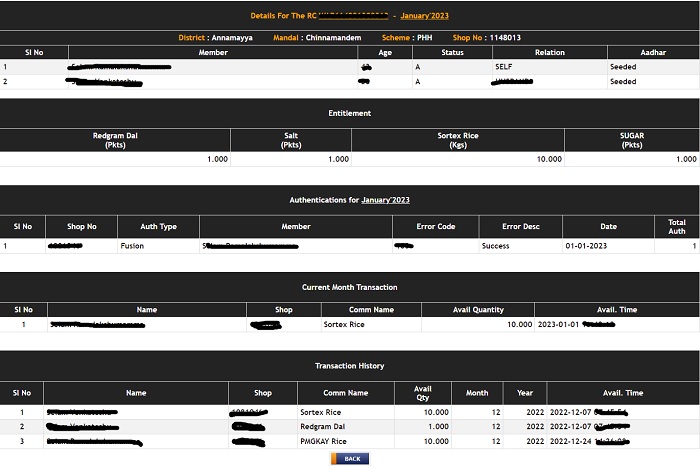
Check Ration Card Details, Aadhar Seeding Status, Rice Quantity, Authentications, Current Month Transaction & Transaction History

aepos-ration-card-search-adhar-seeded

How to Search Ration Card Details Online ?

Click on above image (or) Open link : aepos.ap.gov.in

Enter your Ration Card number “WAP————-“

Click on submit button to see your ration card details.

Afterthat you will see the below mentioned information.

Details For The RC WAP——

Ration-Status-Check-Online


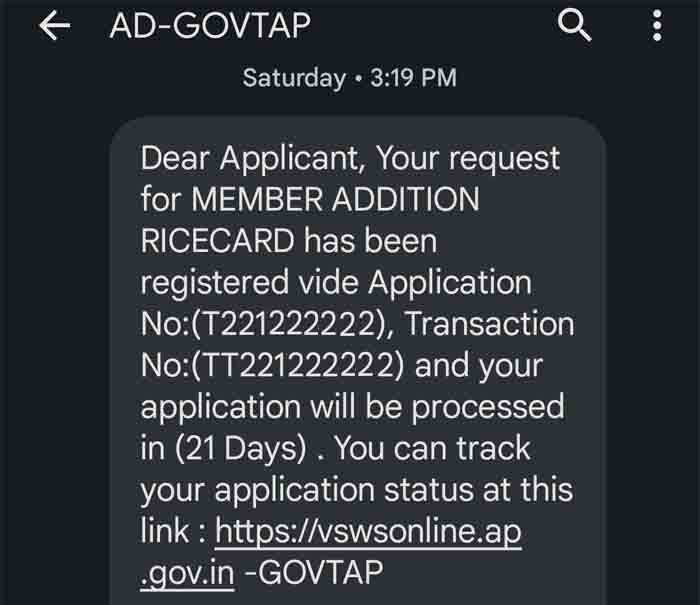
AP Seva Portal (vswsonline) Ration Card Status Find Online

AD-GOVTAP-RICE-CARD-MEMBER-ADDITION

How to apply for New Ration Card in Andhra Pradesh

Note : Currently Ration Card Print Option disabled and the Complete Ration card details are temporarily available in MRO Login.

Note : Sorry to hear, currently the printing option disabled for Downloading of Ration Card by Government of Andhra Pradesh. It will available soon, untill please wait and follow this page for any recent updates. Thank you..!

New Ration Card Application Form

Ration Card Data Corrections Application Form

Ration Card Modifications Application Form

Ration Card Transfer Application Form

AP-Ration-Card-Com-Print-Ration-Card-Online

AP Ration card Status online

People who lost Ration card, they can Search AP Ration card Status online, You need to follow below instructions for get Ration card Details online.

1. First People Can logon to AP Civil Supplies Department Website https://epdsap.ap.gov.in/

2. Then you’ll “Search Ration Card ” option,

3. Enter your “Ration Card Number” in the Ration card number section,

4. click on “Search” Button

5. Finally “Ration Card Status” will be displayed.

AP Ration Card download

People who applied New Ration Card they can Download Ration card online, AP civil supplies department has providing Print Ration Card facility through their Department Website. People who lost their Ration Card those people can download Ration card through Ration card Number, follow the below instruction for get Ration card online.

1. People Can logon to AP Civil Supplies Department Website

2. then you’ll see “Print Ration card” option,

3. Enter your Ration card Number in the Ration card Print Section,

4. Click on “Print” option

5. Finally Ration card PDF file will be downloaded,

6. finally Take Print out of your Ration card online.

AP Ration Card application Status

People who applied New Ration card those people can check their Ration card application status online, follow the below instruction for get Ration card application status online.

1. People Can logon to AP Civil Supplies Department Website,

2. Than you’ll see “Application Search” option

3. Enter your Ration Card application Number in the mentioned option,

4. Click on “Search” Button,

5. Finally “Ration Card application Status“ will be displayed.

Household Head Modifications in Ration Card Form – Telugu
CIVIL-SUPPLIES-Family-Head-Change-Telugu.pdf

Member Addition (In Case of Birth) in Ration Card Form & Telugu
CIVIL-SUPPLIES-RATION-CARD-MEMBER-ADDING-Telugu.pdf

Deletion of Member in Ration Card Form & Telugu
CIVIL-SUPPLIES-RATION-CARD-MEMBER-DELETION-Telugu.pdf

Member Migration in Ration Card Form & Telugu
CIVIL-SUPPLIES-RATION-CARD-MEMBER-MIGRATION-Telugu.pdf

Transfer of Ration Card Form & Telugu
CIVILSUPPLIES-RATION-CARD-TRANSFER-APPLICATION-Telugu.pdf

Conversion of White Card to Pink Card Form
Conversion-of-White-Card-to-Pink-Card-Application-Form.pdf

Deletion of Member in Ration Card Form & English
Deletion-of-Member-in-Ration-Card-Application-Form.pdf

Household Head Modifications in Ration Card Form & English
House-Hold-Head-Modifications-Application-Form.pdf

Issue of New Ration Card (Pink) Form & English
Issue-of-New-Ration-Card-Pink-Application-Form.pdf

Member Addition (In Case of Birth) in Ration Card Form & English
Ration-Card-Member-AdditionBirth-Application-Form.pdf

Member Migration in Ration Card Form & English
Ration-Card-Member-Migration-Application-Form.pdf

Ration Card Missing in Department Database Form
Ration-Card-Missing-Details-in-Database-Application-Form-Copy.pdf

Data Modifications in Ration Card Form
Ration-Card-Modifications-EPDS-INTEGRATION-Application-Form.pdf

Transfer of Ration Card Form & English
Ration-Card-Transafer-Application-Form.pdf

Surrender of Ration Card Form
Surrender-of-Ration-Card-Application-Form.pdf

For any queries (or) download regarding above topic, please tell us through below comment session.

Filed Under: News

How to Apply for PAN Card | Tracking PAN Card Status Online

December 23, 2018 by admin Leave a Comment

Procedure to apply for PAN Card: In this Article we will learn the process of applying for a PAN Card, Documents for proof of identity, Tracking the status of the application.

How to Apply for a PAN Card:-
The Pan card application form is called Form A. This form can be downloaded from the link given below. Once you have downloaded the form take a printout of the same. Next step is to fill the form. The form is to be filled legibly in BLOCK LETTERS in English only. It is preferable to use a pen with black ink to fill the form. In each box fill only one character i.e (alphabet /number / punctuation sign). A blank box must be left after each word. ‘Individual’ applicants need two recent colour photographs with a white background. These photos have to pasted on the form in the spaces provided. The size of the photo should be .cm x .cm. The photos should not be stapled or clipped to the form. The photo on the left should have a signature/thumb impression across it. For the right side photo the signature/thumb impression should be below it. Thumb impressions should be attested by a Notary Public or an authorized officer with official seal and stamp.

New PAN For Indian Citizens (Form 49A)

New PAN for Foreign Citizens (Form 49AA)

Changes of Correction in PAN Details

Reprint of PAN card

Transaction Status Enquiry

Status Track for PAN application

Now start filling the form through https://tin.tin.nsdl.com/pan/index.html. First of all fill the Assessing officer details. Assessing officer details can be found on these webpages. In the item section you have to fill in your personal details. Here select your title like Shri Smt etc. Write your surname first name and middle name in full form. These are to be filled without any initials.Your name should not be prefixed with any title like M/s Dr. Rani etc.

For Non Individuals what if the name is longer than the space provided? In that case it can be continued in the space provided for First and Middle Name. In case of a Company the name shouldn’t contain any abbreviations. E.g. ‘Private Limited’ should be written in full. Variations like Pvt Ltd Private Ltd P P. Ltd etc are not allowed. In case of sole proprietorship the PAN should be applied for in the proprietor’s own name. This will be printed on the PAN card. Note that the last name must be written in its full form.

The next section asks for other names that one is or was known by. It must be filled if the applicant selects “yes” following the instructions applicable for item. Item the Gender field should be filled only by Individual applicants. The item section asks for date of birth. The dates expected from different categories of applicants are specified in the form. E.g. A Company should provide its DateofIncorporation. Next Individual applicants should fill in their father’s name Instructions in item with respect to name apply here.

Note that married women should also give their father’s and not their husband’s name.

Item asks for your address. Residential address should be filled only by Individuals HUF AOP BOI or AJP. Individuals should give Office Address here if they have a source of income e.g business or profession. In case of a Firm LLP Company Local Authority or a Trust complete office address is mandatory. The address given by all the applicants should include these details Town/City/District State/Union Territory and PIN CODE Foreign addresses must contain Country Name along with its ZIP Code. For item i.e. Address for Communication Individuals/HUFs/AOP/BOI/AJP may tick on either ‘Residence’ or ‘Office’ address.

Other applicants should write their ‘Office’ addressAll communication will be sent to the address written here. Telephone Number and Email ID details are to be filled in item . Telephone details should include Country code i.e ISD code and Area/STD code E.g. Details of a Delhi telephone number should be filled as the Country code * the STD Code

The numbers and email id are necessary to contact applicants in case of any discrepancy in the application send the PAN card via email SMS the status updates

In item select the category status that is applicable. In case of Limited Liability Partnership the PAN will be given a Firm status. Item asks for the registration of companies issued by the Registrar of Companies. Other applicants may mention registration number issued by State or Central Government Authority.

Citizens of India must enter their AADHAAR number if allotted. It should be supported by a copy of the AADHAAR card. In item applicants must indicate their source of income using a business/profession code These codes are available on page of the form. E.g. Medical Profession and Business’s code is Engineering is Item asks for personal details of representative assessees. Only those specified in Section of the Incometax Act can act as representative assessees. Some of them are an agent of the non resident guardian or manager of a minor lunatic or idiot Court of Wards etc.

Representative assessees are mandatory for applicants who are minors mentally retarded deceased idiot or a lunatic. Personal details of the Representative Assessee have to be filled here. Item is about documents to be submitted for Pan Card application.

Attaching proof of identity and proof of address with a PAN application is mandatory. These documents should be in the name of applicant. Representative assessees must also attach these documents List of documents that serve as proof of identity and address are given on page of the Pan application form. Applicants must furnish any one document from the options listed in the form. E.g.Proof of identity for Individual applicants and HUF are School leaving certificate Ration Card Driver’s license etc. Documents for proof of address are Telephone Bill Passport etc.

Now we will discuss some general information regarding the application The fee for processing PAN application is Rs.. i.e Rs . + .% service tax.

Payment can be made by Demand Draft Cheque For addresses outside India the processing fee is Rs. .i.e[ (Application fee . + Dispatch Charges .) + .% service tax]. For foreign addresses payment can be made only by way of Demand Draft payable at Mumbai.
The box at the end of the form asks for the applicant’s signature or thumbprint. Representative Assessee’s signature or thumb print should be given for minors the deceased lunatics and the mentally retarded. Applications without signature or thumbprint will be rejected.

Applicants will receive an acknowledgement on acceptance of this form.This will contain the Unique Identification number. This number can be used for tracking the status of the application.

You can track its status using the Income tax Department website or these websites On this website the “Status Track ” search will perform this task. This search will need either your acknowledgement number or details like name and date of birth One can also get PAN status details via SMS. SMS NSDLPAN &lt <space> Acknowledgement No. and send to respective number.

Your Details on PAN Card:-

  1. Your Full Name along with Surname
  2. Your Father’s Full Name along with Surname
  3. DOB (Date of Birth, example: DD / MM / YEAR )
  4. 10 Digit Alphanumeric number
  5. Your Signature
  6. Your Photograph
  7. Date of Issue

PAN Card Number Explanation

The PAN Number consist of 10 characters which includes Digits and Alphabets. The Number segmented into five parts which is explained below.

  • 1st three characters of PAN will be alphabetic series (i.e. AAA to ZZZ.)
  • 4th character of PAN represents the status of the PAN holder.
  1. C for Company
  2. P for Person
  3. H for HUF(Hindu Undivided Family)
  4. F for Firm
  5. A for Association of Persons (AOP)
  6. T for AOP (Trust)
  7. B for Body of Individuals (BOI)
  8. L for Local Authority
  9. J for Artificial Juridical Person
  10. G for Government
  • 5th character represents first character of the PAN holder’s surname.
  • Next four characters are Unique number.
  • Last character in the PAN is an alphabetic check digit.

For any queries regarding above topic, please tell us through below comment session.

Filed Under: News Tagged With: PAN Card

How to apply for Voter ID Card Online in India

December 23, 2018 by admin Leave a Comment

Voter ID card Application Procedure, Documents required to apply voter id in India and state wise website to submit application for Election Card.

How to apply for Voter ID card online in India
In order to apply voter card in India, you should fulfill the eligibility and have the following documents Residence Proof (Electricity bill, Aadhaar Card, Passport etc.), Proof of Date of Birth (10th Class memo, PAN card, Date of birth certificate etc.), Scan copy of passport size photo.

How to register online for Voter ID card?

In order to submit application for Voter ID, simply following below given steps.

Step 1:-

  • Log on the Election Commission of India’s website: http://eci.nic.in/
  • Click on “Enroll now become a Voter” – See at right side
  • Enter your Phone number and Email ID in the respective fields then proceed
  • You will receive a verification code on your mobile
  • Enter Verification code then click on Proceed Button

Step 2:-

  • Now you need to fill the Online Form – Format 6 (Application for inclusion of name in Electoral Roll)
  • Select your State, District and Assembly Constituency
  • Enter your name in English and in Regional Language
  • Choose Gender and enter place of birth (if know) or Village/Town
  • Save the details

Now you will be redirected to Form 6 where need to fill the form 6 and upload your photo, cross check the details finally click on Submit button.

Document should be kept ready:
Now Keep all the documents of you ready, your BlO (Booth Level Officer) will contact you for documents and collect your documents on the scheduled date.

The following Documents required.

  • Residence Proof
  • Proof of Date of Birth
  • Scan copy of passport size photo

State Wise Website List Of Election Commission of India:-

1) Electoral Card Online Application for Tamil Nadu, register for Voter Card:- http://elections.tn.nic.in/eregistration.htm

2) Apply online Voter ID in Madhya Pradesh:- http://india.gov.in/outerwin.php?id=http%3A%2F%2Fwww.ceomadhyapradesh.nic.in%2Flogin_reg.aspx

3) Online voter registration for Kerala:- http://www.ceo.kerala.gov.in/eregistration.html

4) Andhra Pradesh Online voter registration:- http://www.ceoandhra.nic.in/ceonew/home.aspx

5) Karnataka Electoral card e-form:- http://www.voterreg.kar.nic.in/

6) How to apply for Voter Card in Maharastra:- http://ceo.maharashtra.gov.in/

7) Orissa online Voter registration :- http://ceoorissa.nic.in/

8) West Bengal Voter application:- http://ceowestbengal.nic.in/

9) Uttar Pradesh Voter Card apply:- http://ceouttarpradesh.nic.in/

10) Voter registration for Arunachal Pradesh:- http://ceoarunachal.nic.in/

11) Assam Voter Id registration form:- http://ceoassam.nic.in/

12) Voter registration for Bihar:- http://ceobihar.nic.in/

13) GOA Voter id card:- http://ceogoa.nic.in/

14) Gujarat Voter card details:- http://sec.gujarat.gov.in/voter-reg.htm

15) How to apply for Voter id in Haryana:- http://ceoharyana.nic.in/

16) Himachal Pradesh voter id registration procedure:- http://ceohimachal.nic.in/

17) Jammu and Kashmir Voter card form:- http://ceojammukashmir.nic.in/

18) Manipur Online form for Electoral Card:- http://ceomanipur.nic.in/

19) Meghalaya Voter status and apply:- http://ceomeghalaya.nic.in/ (look for E registration)

20) Voter registration for Mizoram:- http://ceomizoram.nic.in/

21) Nagaland Voter card application:- http://ceonagaland.nic.in/

22) Apply online for voter card in Punjab:- http://ceopunjab.nic.in/English/home.aspx

23) Rajasthan Voter id details:- http://ceorajasthan.nic.in/

24) Voter Id in Sikkim:- http://ceosikkim.nic.in/

25) Online Voter in Tripura:- http://ceotripura.nic.in/index.asp

26) Electoral ID in Chhattisgarh:- http://ceochhattisgarh.nic.in/

27) Jharkhand Voter application form:- http://www.jharkhand.gov.in/ceo/

28) Uttarakhand Electoral Card details:- http://ceo.uk.gov.in/

29) Andaman & Nicobar Voter id e-form:- http://ceoandaman.nic.in/

30) Chandigarh Voter id registration form:- http://ceochandigarh.nic.in/

31) Voter registration for Dadra & Nagar Haveli:- http://ceodnh.nic.in/

32) Apply for Voter id card in Daman & Diu:- http://ceodaman.nic.in/

33) Lakshadweep voter id application:- http://ceolakshadweep.gov.in/home.html;jsessionid=ECF2E252EF3F93117E0417E96914B368

34) Voter registration for Puducherry:- http://ceopondicherry.nic.in/

35) how to apply voter id in Delhi:- http://ceodelhi.gov.in/

Filed Under: News

  • « Previous Page
  • 1
  • …
  • 34
  • 35
  • 36

Search List 1

Search List 2

Search List 3

How to Search Ration Card Number by Name

District Wise Ration Card Search

 Anantapur

Chittoor

East Godavari

Guntur

Kadapa

Krishna

Kurnool

Nellore

Prakasam

Srikakulam

Visakhapatnam

Vizianagaram

West Godavari

Recent Posts

  • APRationCard Smart Card Download
  • AP Smart Ration Card Now Available
  • What is the Process for member addition in Ration Card in Andhra Pradesh state ?
  • How to check AP Employee’s / Pensioner’s Salary / Pension Bill Status Online
  • How to Check Ration Card Status Online

Recent Comments

  • BUTCHI BABU on Guntur (District’s) Ration Shop Dealer Address | Phone Number | Status Check Online | FPS
  • A Lakshmi kanth on Circle Ii Urban (Mandal), Visakhapatnam (District) – Ration Card Search | Print Online Download
  • Sreerama Mary Aruna kumari on STO, Kamalapuram
  • Nagamalli on Visakhapatnam District’s Ration Card Download Online | YAP | TAP | WAP | RAP | JAP | White Card
  • M ESWARI on Makavarapalem (Mandal), Visakhapatnam (District) – Ration Card Search | Print Online Download
  • M ESWARI on Makavarapalem (Mandal), Visakhapatnam (District) – Ration Card Search | Print Online Download
  • Yogesh Kumar on PALWAL – Dist. BHARAT GAS AGENCIES Contact Details | Address | Online Booking
  • Devaraj on KOPPAL – Dist. BHARAT GAS AGENCIES Contact Details | Address | Online Booking
  • V.MAHABOOB BASHA on Rice Card Services in Mana Mitra (WhatsApp Governance).
  • Anand on Circle Iii Urban (Mandal), Visakhapatnam (District) – Ration Card Search | Print Online Download

Pages

  • About US
  • Apply for New Ration Card Andhra Pradesh | Download Ration Card Online | Status Check
  • Buy Adspace
  • Contact us
  • Hide Ads for Premium Members
  • Privacy Policy

Copyright © 2021 · eleven40 Pro Theme on Genesis Framework · WordPress .